Testing Scope Synchronization in a Shopify App
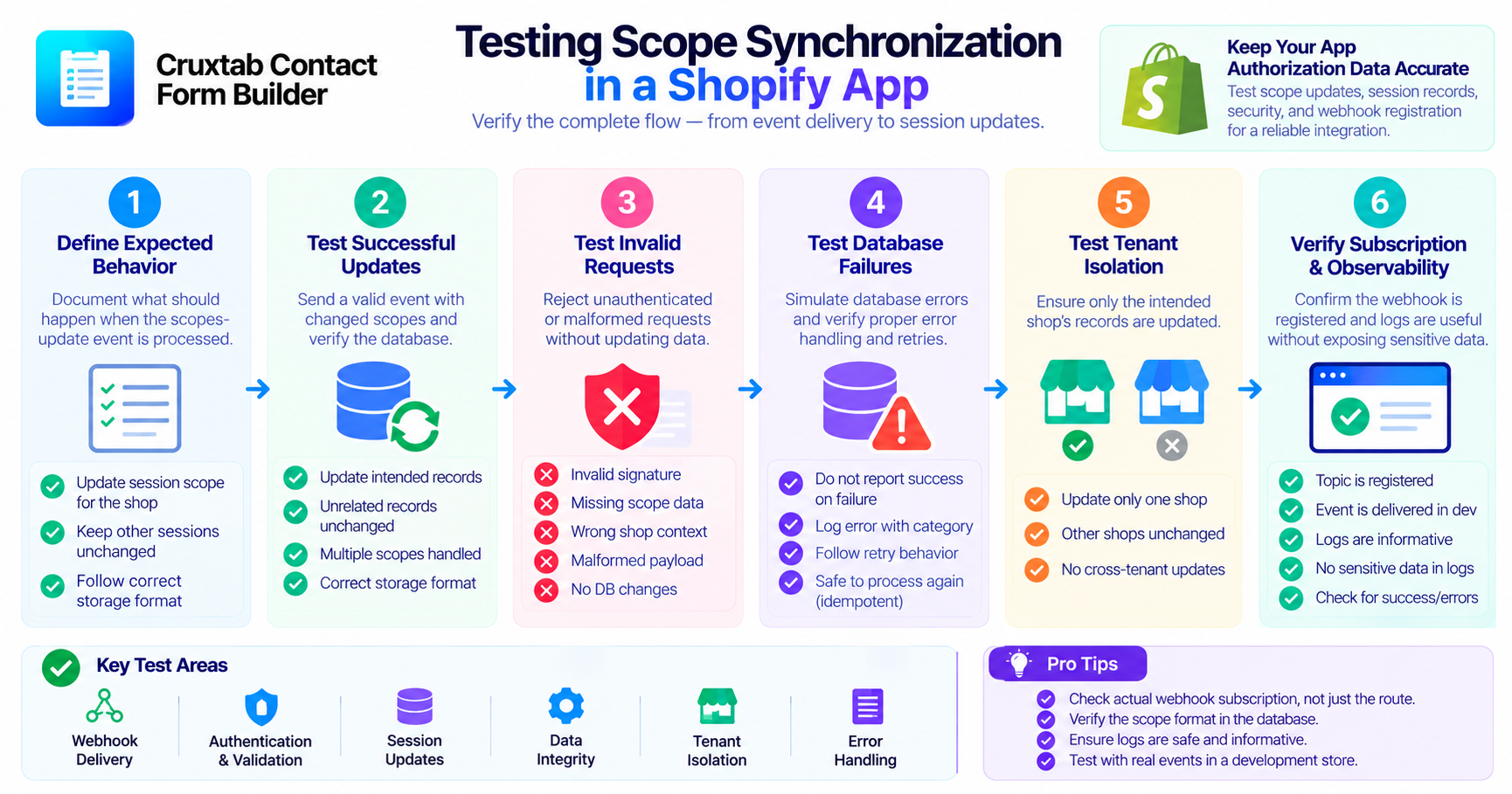
When granted API scopes change, an application may need to update its local session records to reflect the latest authorization metadata.
Testing this workflow requires more than confirming that the webhook route returns a successful response. Developers should verify the incoming event, the affected database records, error handling, and actual webhook registration.
1. Define the expected behavior
Start by documenting what should happen when the scopes-update event is processed.
For example, the application should authenticate the event and update Session.scope for the intended shop according to the session storage model.
The test specification should describe the scope representation expected in the database and how the handler behaves when no matching session exists.
2. Test successful updates
Create session records for a test shop and provide a valid event with a changed scope list.
Verify that the intended records contain the updated scopes and that unrelated session records remain unchanged.
Also test scope lists with multiple entries and ensure the stored format matches the rest of the application.
3. Test invalid requests
A secure handler must reject unauthenticated or malformed requests without updating the database.
Test invalid webhook verification, missing scope information, and missing or unexpected shop context.
Verify that no session records change when validation fails.
4. Test database failures
Simulate a database failure during the scope update.
The handler should not report that the update succeeded if the write did not complete. Test the application's error logging and response behavior using the framework's supported webhook conventions.
If the operation is retried, verify that processing the same valid scope update more than once is safe.
5. Test tenant isolation
Create session records for two different shops and deliver an event for only one.
Confirm that only the intended shop's records are updated.
This is an important regression test because an overly broad database filter could update sessions belonging to other installations.
6. Verify the subscription configuration
A mocked route test cannot confirm that Shopify has registered the webhook.
Inspect the effective deployed configuration and test actual delivery in a development environment.
If the scopes-update topic is absent from the app TOML files, verify whether another supported subscription mechanism is being used. Do not assume that the handler is active merely because the file exists.
7. Test observability
Ensure that logs provide enough information to investigate failed synchronization without exposing access tokens or full session records.
Useful details include the event type, processing outcome, error category, and a safe correlation identifier.
Conclusion
A complete test strategy covers successful scope updates, authentication failures, malformed payloads, database errors, tenant isolation, and actual webhook delivery.
This approach helps ensure that the application's stored authorization metadata remains accurate and that the event integration works beyond unit tests.
Explore Cruxtab Contact Form Builder for Shopify form-building workflows.
Comments
Join the discussionNo comments yet. Be the first to comment.