Serving Template Thumbnails from an External Image CDN
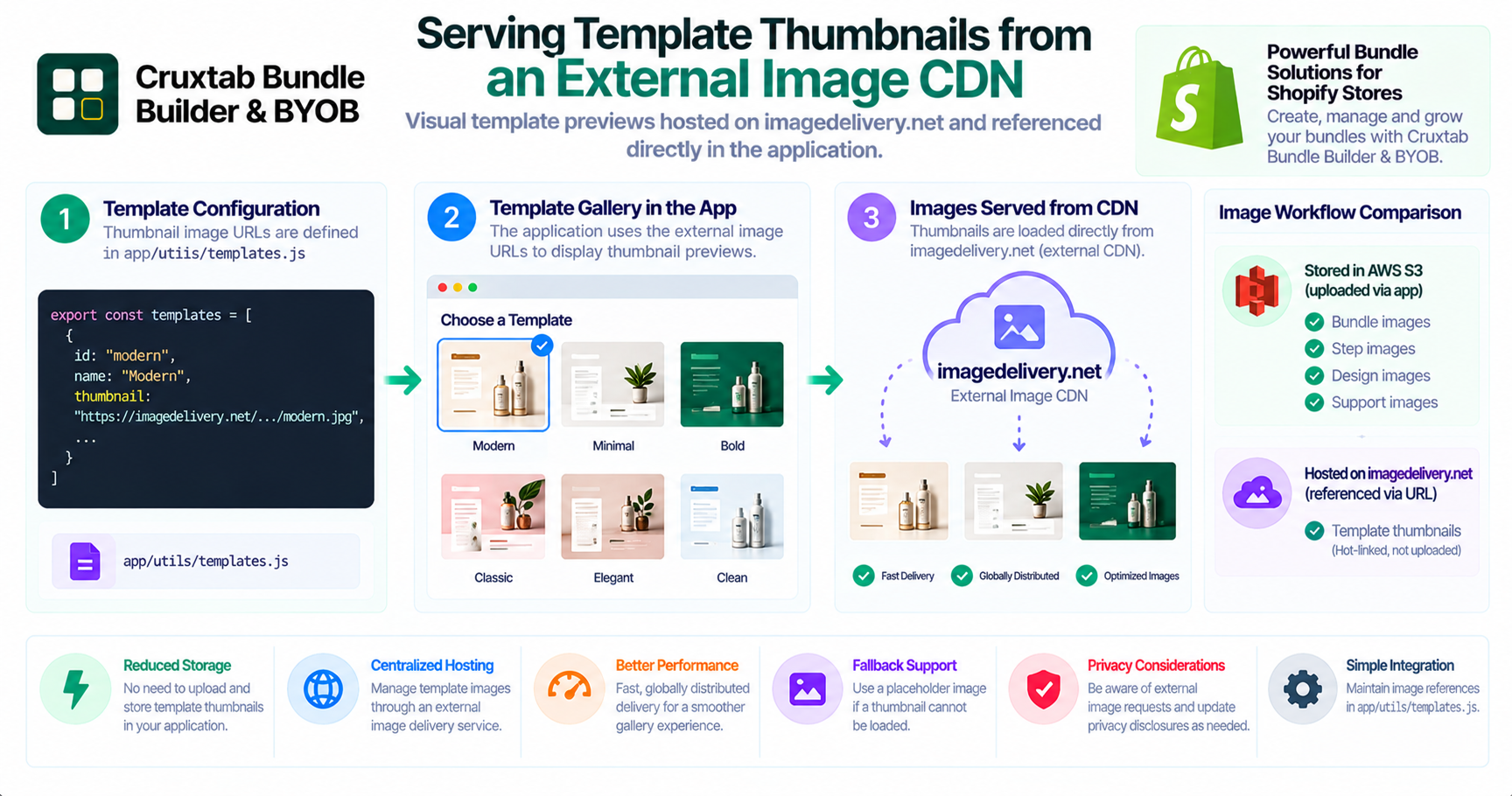
Template galleries help users understand available designs before selecting one. Visual previews make it easier to compare layouts and choose a starting point.
However, template thumbnails do not always need to be uploaded and managed by the application itself. An application can also reference images hosted by an external image delivery service.
Why use an external image host?
Template thumbnails are visual assets used to preview designs. Hosting them separately from application data can simplify how the application references and displays those images.
An external image delivery service can serve these assets without requiring the application to store a separate copy of every thumbnail.
Template thumbnail implementation
Cruxtab Bundle Builder uses imagedelivery.net for template thumbnail images.
The template image references are managed in:
app/utils/templates.js
The application hot-links these thumbnail images rather than uploading them through its own S3 image-upload utility.
This is different from merchant-uploaded bundle, step, design, and support images, which use AWS S3.
What does hot-linking mean?
Hot-linking means that the application references an image hosted on another service instead of storing and serving its own copy.
The application uses the external image reference when displaying the thumbnail.
This creates a simple separation:
- Template thumbnail assets are hosted externally.
- Application code maintains the thumbnail references.
- The browser loads the image from the external image host.
Benefits of this approach
Less duplicated storage: The application does not need to upload another copy of each template thumbnail.
Centralized asset hosting: Template images can be managed through the external image-hosting service.
Simpler application references: The template configuration can reference the image location directly.
Important considerations
External image hosting introduces dependencies that developers should consider.
Availability: If the image host is unavailable, thumbnails may not load.
Image URLs: References should be checked to ensure they remain valid.
Performance: Image dimensions, compression, and responsive delivery can affect gallery loading time.
Fallbacks: A placeholder image can improve the experience when an external thumbnail cannot be loaded.
Privacy and consent: Loading a third-party image may involve a browser request to an external domain. Applications should assess their privacy disclosures and consent requirements based on the services and jurisdictions involved.
External thumbnails versus uploaded assets
It is useful to keep these two image workflows distinct.
| Asset type | Storage approach |
|---|---|
| Bundle images | AWS S3 |
| Step images | AWS S3 |
| Design images | AWS S3 |
| Support images | AWS S3 |
| Template thumbnails | External image hosting through imagedelivery.net |
This separation makes it easier to understand which assets are managed by the application and which are referenced externally.
Conclusion
An external image host can be a practical option for static template previews.
Cruxtab Bundle Builder references template thumbnail images hosted on imagedelivery.net, with those references maintained in app/utils/templates.js.
Explore Cruxtab Bundle Builder & BYOB.
Comments
Join the discussionNo comments yet. Be the first to comment.