Keeping Shopify Session Scopes in Sync
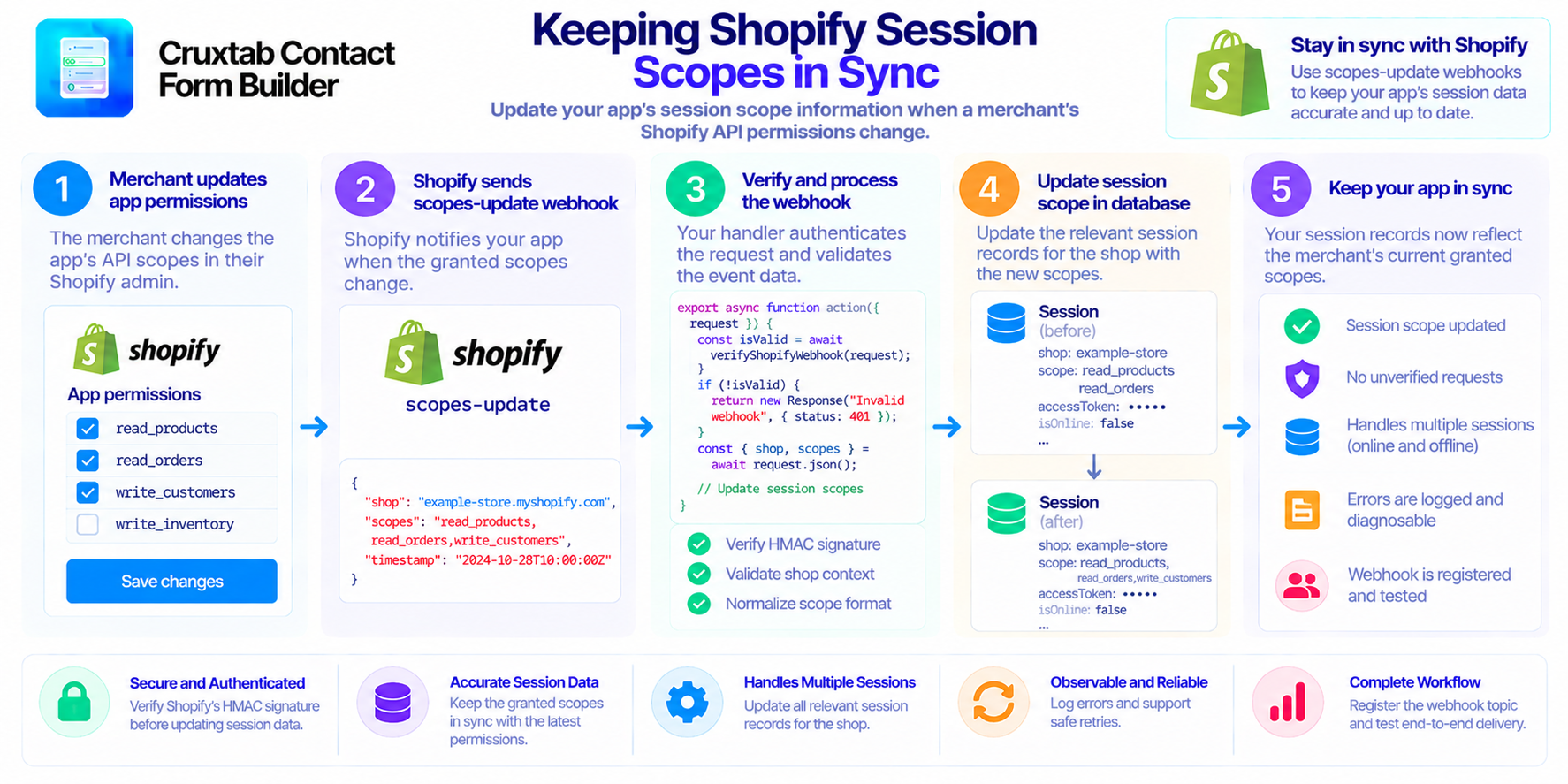
Session storage is an important part of many Shopify app architectures. Depending on the session adapter and app design, session records may contain information about the shop, access tokens, granted scopes, and other authorization-related metadata.
When the granted scopes change, the application should ensure that its stored scope information does not remain outdated.
The problem with stale scope information
Suppose an app originally receives permission to access one set of Shopify resources. Later, its authorization changes and a different set of scopes is granted.
If the local Session.scope field still contains the previous value, the database no longer accurately represents the latest authorization information received by the application.
This can make debugging and authorization-state management more difficult.
The actual permissions enforced by Shopify remain authoritative; a stale database field does not itself grant new access. However, local scope information should still be maintained correctly.
Use the scopes-update event
A scopes-update webhook provides a way to react to changes in granted permissions.
In a Shopify app, the event handler can authenticate the request, identify the relevant shop, and update Session.scope using the scope information supplied by the verified event.
Keeping this operation in a dedicated handler helps separate authorization metadata maintenance from unrelated form or storefront logic.
Update the correct records
An app may have more than one session record associated with a shop, depending on its authentication flow and session storage implementation.
The handler should follow the app's session model rather than assuming there is always exactly one record.
Consider:
- Which session records belong to the affected shop?
- How are offline and online sessions represented?
- Is the scope field stored as a string or another data structure?
- What should happen if no matching session is found?
- How should database failures be reported?
These details should be resolved from the actual session adapter and application requirements.
Avoid trusting unverified input
The webhook handler should verify the request using Shopify's supported authentication mechanism before changing session data.
A request that merely contains a shop domain and a scope list is not sufficient authorization to modify stored records.
After authentication, validate the event's expected fields and normalize the scope representation before persisting it.
Make database updates observable
If the scope update fails, the application should not silently assume the session has been synchronized.
Record an appropriate operational error and make the failure diagnosable without exposing access tokens or other sensitive session values.
Where retry behavior is appropriate, design it so that repeating the same update is safe.
Verify registration and delivery
The application may have a correctly implemented route at app/routes/webhooks.app.scopes_update.jsx, but the topic must also be subscribed to through the app's effective configuration.
If no active subscription exists, Shopify may never deliver the event to the handler.
Review the deployed webhook configuration and test an actual event in a development environment. This verifies the full workflow instead of only testing the route in isolation.
Conclusion
Keeping Session.scope synchronized helps the application maintain accurate authorization metadata. A reliable implementation authenticates the event, updates the correct records, handles storage errors, and verifies that the webhook is actually registered.
Explore Cruxtab Contact Form Builder to learn more about Shopify form-building workflows.
Comments
Join the discussionNo comments yet. Be the first to comment.