Centralizing Application Error Reporting with Slack
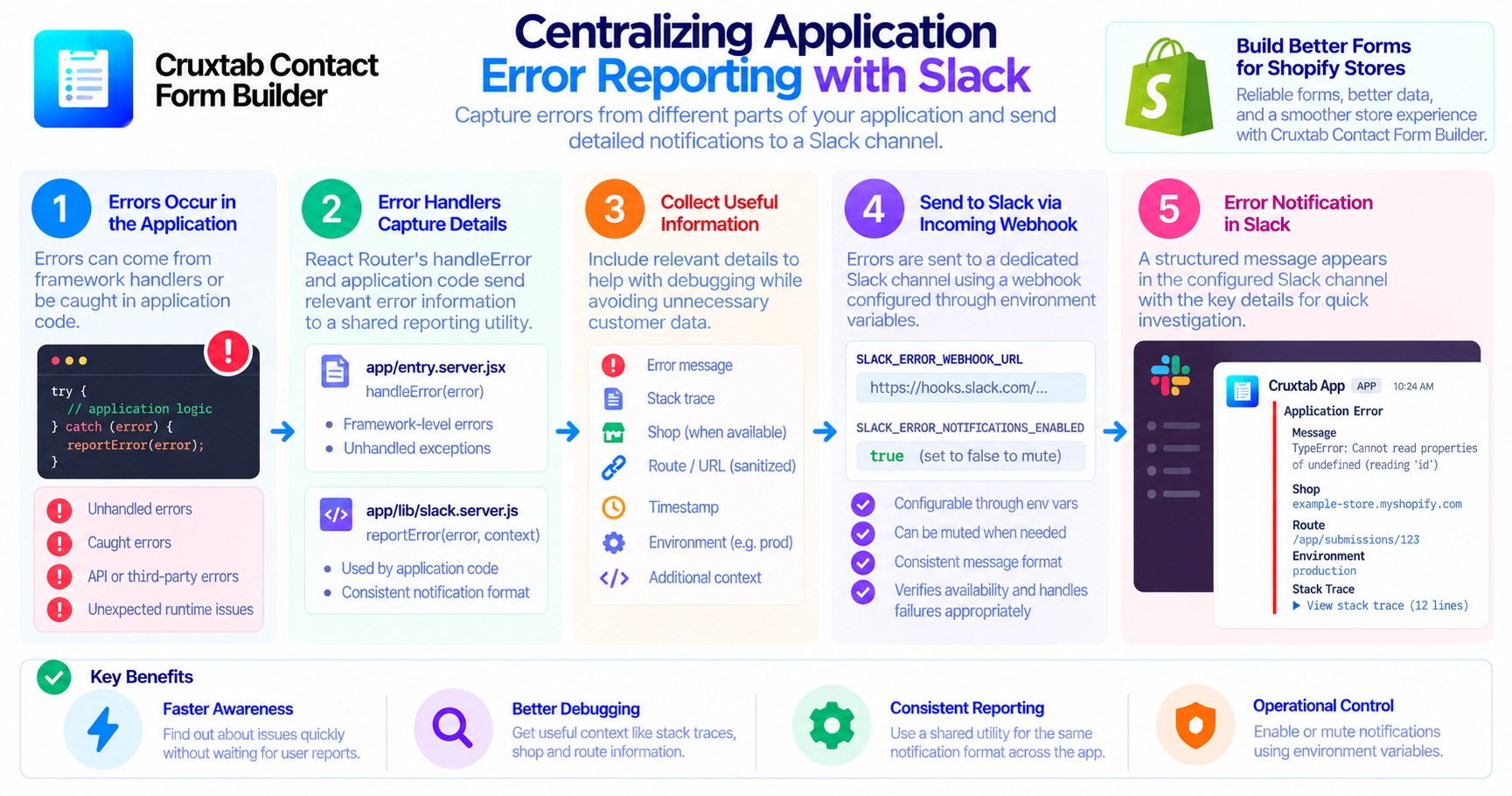
When an application encounters an unexpected error, the first challenge is often discovering that something went wrong. Without centralized reporting, developers may need to reproduce the issue locally, inspect server logs, or wait for a user to report the problem.
A practical error-reporting system can shorten that feedback loop by sending relevant error details to a dedicated Slack channel.
Why centralized error reporting matters
Errors can originate from different parts of an application. Some occur unexpectedly during request handling, while others are caught by application code and handled locally.
If these errors are reported through unrelated mechanisms, it becomes harder to recognize recurring problems or understand which parts of the application need attention.
Centralized reporting gives developers one place to review error notifications and begin investigating incidents.
Reporting errors from different entry points
In a React Router application, error handling can include both framework-level errors and errors caught inside application logic.
The Cruxtab Contact Form Builder implementation uses two relevant entry points:
app/entry.server.jsx— handles unhandled errors through React Router'shandleErrormechanism.app/lib/slack.server.js— provides shared Slack error-reporting functionality used by application code.
The shared reporting utility can help keep notifications consistent rather than requiring every route to implement its own Slack integration.
The implementation also reports many caught errors, according to the application's error-reporting flow. This distinction matters because an error can be caught and handled without reaching a framework-level error handler.
What information is useful in a report?
A useful notification may include:
- The error message
- The stack trace
- The affected shop, when available
- A sanitized URL that helps identify the relevant route
These details provide an initial starting point for investigation without requiring developers to reproduce every incident before understanding its context.
The quality of the report matters just as much as the fact that a notification was sent. Reports should be informative enough to support debugging while avoiding unnecessary customer data.
Configuring Slack notifications
The integration uses a Slack incoming webhook configured through an environment variable:
SLACK_ERROR_WEBHOOK_URL
A separate environment variable can mute error notifications:
SLACK_ERROR_NOTIFICATIONS_ENABLED=false
This provides an operational control for disabling Slack notifications when necessary, without removing the reporting code itself.
The exact behavior when configuration is missing or Slack is unavailable should be verified against the implementation.
Error reporting is not error resolution
A Slack message does not automatically fix an application error. It makes the problem easier to discover and investigate.
Developers still need to identify the root cause, determine its impact, apply a fix, and verify that the issue no longer occurs.
For production systems, error notifications work best alongside structured logs, meaningful tests, and a clear incident-response process.
Conclusion
Centralized error reporting helps developers notice application problems earlier and investigate them with useful context. By routing framework-level and caught errors through a shared Slack reporting utility, applications can create a more consistent debugging workflow.
If you're exploring form-building features for Shopify, learn more about Cruxtab Contact Form Builder.
Comments
Join the discussionNo comments yet. Be the first to comment.