Why AI-Generated Forms Need Schema Validation
An AI model can produce a convincing form configuration and still return something the application cannot safely use.
It might suggest an unsupported field type, omit a required property, produce an unexpected data structure, or generate more fields than the editor is designed to handle.
For an AI-powered form builder, validating generated output is therefore a core part of the architecture.
The model should not define the application's rules
Suppose a form builder supports text inputs, email fields, dropdowns, checkboxes, and other predefined field types.
A language model might suggest a field type that sounds reasonable but is not implemented by the application.
If the application accepts that value without validation, the editor may render the field incorrectly or fail when saving the form.
The supported field types should come from the application's own schema. The model can select from that list, but it should not be allowed to expand it arbitrarily.
Validate the structure
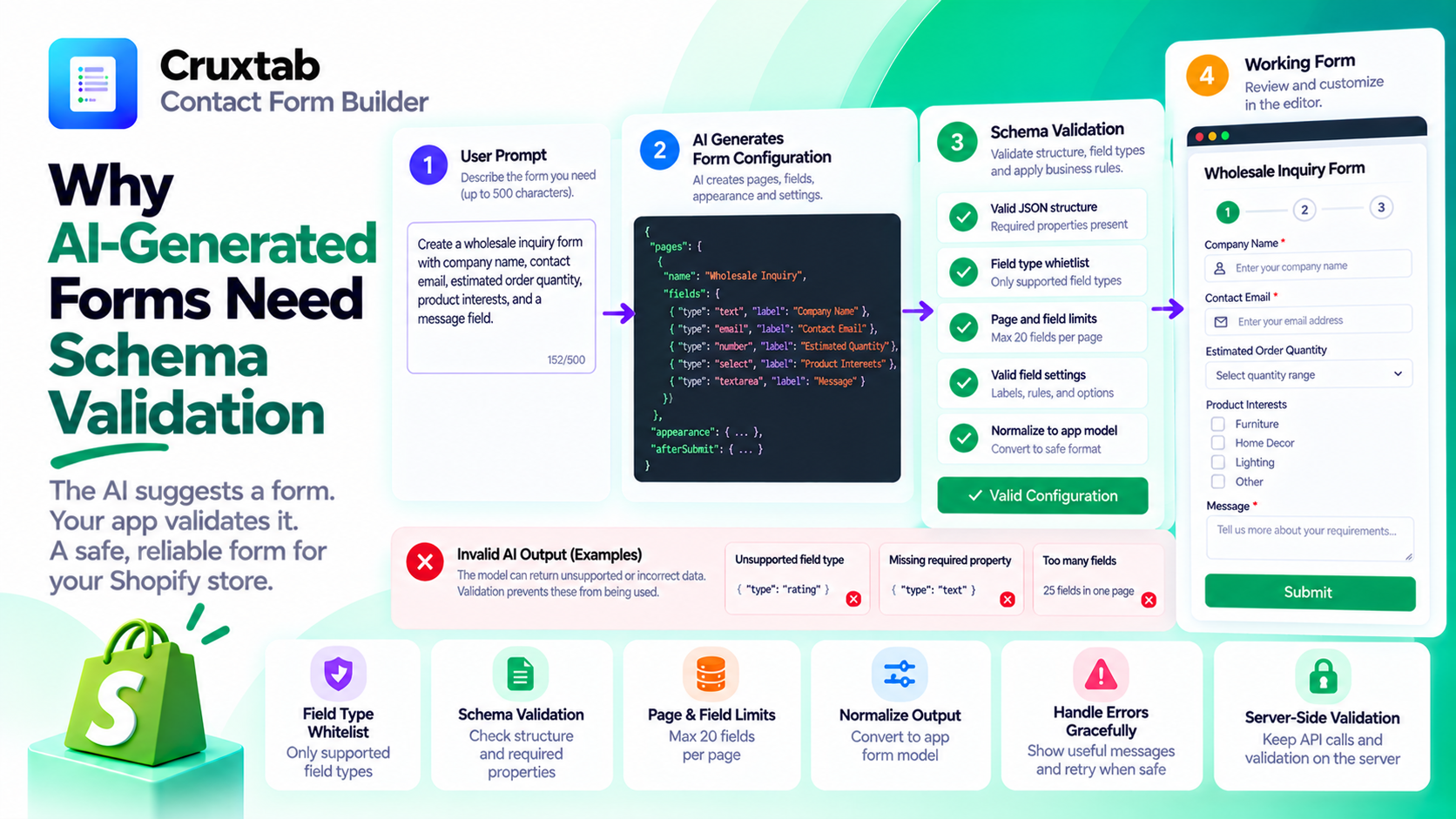
A robust generation pipeline can be organized into several stages:
- Receive the user's description.
- Send the generation request to the AI model.
- Parse the returned content.
- Validate the overall structure.
- Check every field against the supported field types.
- Enforce page and field-count limits.
- Normalize accepted values into the application's form model.
Each stage addresses a different failure mode.
Parsing checks whether the output can be read. Schema validation checks whether the expected properties exist and have appropriate types. Business-rule validation checks whether the configuration is permitted by the application.
These are related, but they are not interchangeable.
Use a field-type whitelist
A field-type whitelist is a simple and effective boundary.
Instead of accepting arbitrary strings from model output, the application checks whether each field type belongs to its supported set.
Conceptually:
const allowedFieldTypes = new Set([
  "text",
  "email",
  "textarea",
  "select"
]);

function isSupportedFieldType(type) {
  return allowedFieldTypes.has(type);
}
This is an illustrative example, not the complete Cruxtab field-type list. A production implementation should use the application's actual canonical schema.
A whitelist also helps prevent the AI integration from becoming coupled to arbitrary model-generated properties.
Enforce limits after generation
Prompt instructions can ask a model to keep a form within a particular size, but instructions alone are not enforcement.
For example, Cruxtab Contact Form Builder caps generated pages at 20 fields each.
The application should check that limit in its own validation logic, even if the prompt already tells the model about it.
The same principle applies to input length. Cruxtab accepts descriptions of up to 500 characters, which provides a clear boundary for the generation request.
Handle invalid output gracefully
Validation will occasionally reject generated content.
That should not necessarily become an unexplained error for the user.
The application can return a useful message, retry a recoverable generation failure where appropriate, or ask the user to simplify the description.
Retries should be bounded and should not bypass monthly usage limits.
If the application repairs invalid output automatically, the repaired result should go through validation again.
Keep the AI boundary on the server
The browser should not be trusted to validate generated output on behalf of the backend.
The server should validate the response before it is accepted into the application's workflow. API credentials should remain server-side, and the model's output should never be treated as executable code.
These safeguards matter even when the prompt appears harmless.
How Cruxtab handles generated forms
Cruxtab Contact Form Builder uses AI generation to create form pages, fields, appearance settings, and after-submit configuration. Its generation workflow validates field types against a whitelist and limits each page to 20 fields.
This illustrates a general principle for AI-powered developer tools: the model proposes a result, but the application decides whether that result is valid.
Explore the app: https://apps.shopify.com/cruxtab-form-builder
Conclusion
Reliable AI features require a boundary between probabilistic generation and deterministic application rules.
Validate structure, restrict supported field types, enforce limits on the server, and handle failures deliberately.
The result is a form-generation workflow that can benefit from AI flexibility without depending on the model to enforce application correctness.
Comments
Join the discussionNo comments yet. Be the first to comment.