Validating Repeatable Form Data on the Server
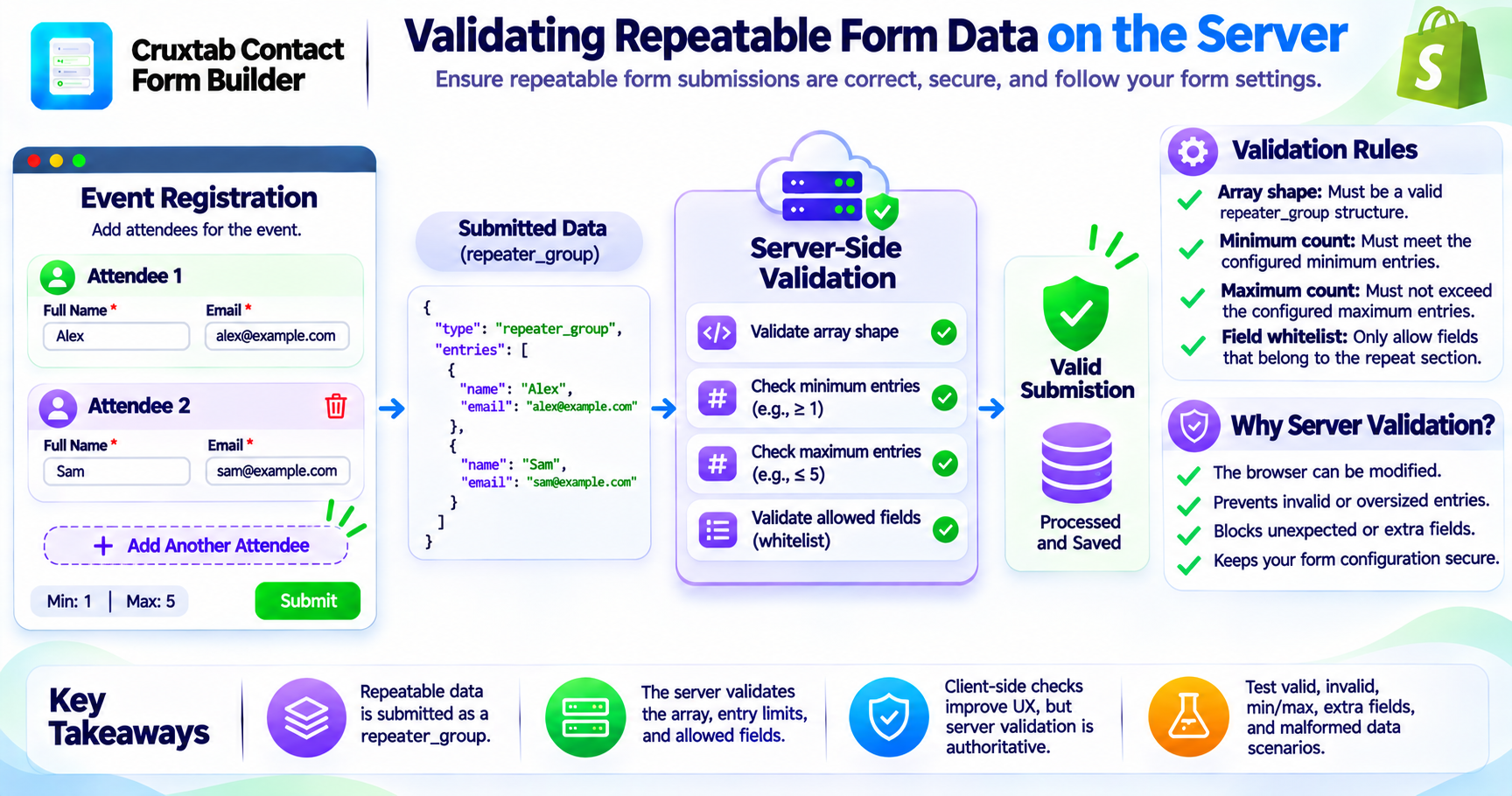
Repeatable form sections introduce a new type of submitted data.
Instead of receiving a single set of field answers, the server may receive an array containing multiple entries for the same section.
This structure requires server-side validation.
Cruxtab Contact Form Builder validates repeat-section submissions in the submit endpoint, enforcing the array shape, minimum and maximum entry counts, and a whitelist of fields belonging to the section.
Why server-side validation is important
Storefront JavaScript controls the customer-facing interaction.
However, the browser is not a trusted environment.
A customer can modify the request before sending it to the server.
For example, they might:
- Submit more entries than the interface allows.
- Submit fewer entries than required.
- Change the structure of the repeated data.
- Include fields that do not belong to the section.
- Add unexpected properties.
The server must validate the submitted data independently.
Understanding the repeater_group answer
Repeatable section data is stored as a:
repeater_group
This answer type represents the repeated entries as a grouped structure.
A simplified conceptual example might look like:
{
  "type": "repeater_group",
  "entries": [
    {
      "name": "Alex",
      "email": "alex@example.com"
    },
    {
      "name": "Sam",
      "email": "sam@example.com"
    }
  ]
}
This is an illustrative structure, not the exact submission schema used by the application.
The important concept is that the repeated data is represented as an array of entries rather than unrelated individual answers.
The server validation responsibilities
The submit endpoint enforces several important rules.
1. Validate the array shape
The submitted repeat-group data must have the expected structure.
The server should reject malformed values that do not represent valid repeated entries.
2. Enforce the minimum entry count
If a repeatable section requires a minimum number of entries, the submitted array must satisfy that requirement.
This prevents customers from bypassing the minimum configuration by modifying the request.
3. Enforce the maximum entry count
The server also validates the maximum number of entries.
This is important because client-side limits alone cannot prevent oversized submissions.
4. Validate the field whitelist
The server validates that the submitted fields belong to the section.
Unexpected fields should not be accepted simply because they appear in the request.
This helps prevent customers from injecting unrelated data into the repeat-group answer.
Client validation is not enough
The storefront may display an Add another button and enforce entry limits through JavaScript.
That provides a better user experience.
However, the server must remain the authoritative validation layer.
The two layers serve different purposes:
| Layer | Responsibility |
|---|---|
| Storefront JavaScript | Interactive controls and immediate feedback |
| Submit endpoint | Authoritative validation of submitted data |
The server should not assume that the request was generated by the app's own storefront JavaScript.
Testing validation rules
Developers should test:
- Valid repeated-entry arrays.
- Empty arrays when entries are required.
- Arrays below the minimum.
- Arrays above the maximum.
- Unexpected fields.
- Invalid entry structures.
- Invalid field values.
- Malformed repeater-group data.
Testing these cases helps ensure that the server protects the form configuration even when the customer bypasses the normal interface.
Conclusion
Repeatable form sections require structured submission data and server-side validation.
Cruxtab Contact Form Builder validates the repeater-group array shape, minimum and maximum entry counts, and the whitelist of fields belonging to the section.
This ensures that repeatable form submissions are validated independently of the storefront interaction.
Explore Cruxtab Contact Form Builder.
Comments
Join the discussionNo comments yet. Be the first to comment.