Using Slack for Internal Error Alerts in Web Applications
Application errors can occur during request processing, external API calls, or other backend operations. If developers discover these issues only after a customer reports them, diagnosing the problem can take longer.
Internal error notifications help teams become aware of failures sooner.
Why send application errors to Slack?
Slack is commonly used for team communication. A dedicated error channel can provide a convenient place to receive application alerts.
Instead of relying entirely on manual log inspection, developers can receive notifications containing useful diagnostic context.
Cruxtab's internal Slack integration
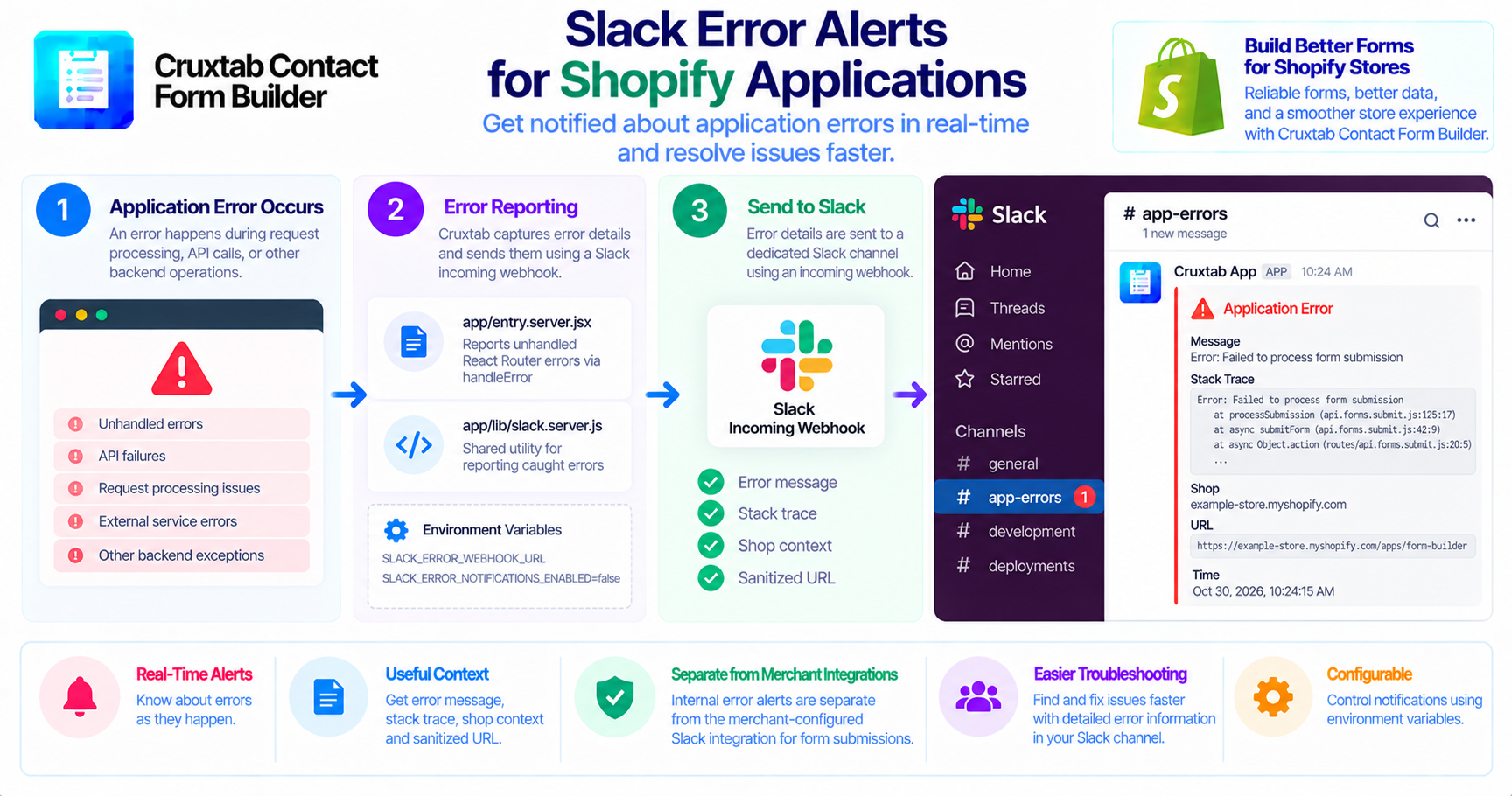
Cruxtab Contact Form Builder uses a Slack incoming webhook for internal error reporting.
The implementation includes:
app/entry.server.jsxapp/lib/slack.server.js
The server entry point reports unhandled React Router errors through handleError, while the shared Slack utility supports reporting many caught errors.
This is a platform-level service. It is separate from the merchant-configured Slack integration that sends form submissions to a merchant's own webhook.
What information can be reported?
The specified error-reporting data includes:
- Error message.
- Stack trace.
- Shop context.
- Sanitized URL.
These details can help developers identify the affected request and locate the relevant code path.
Error messages and stack traces should still be reviewed for secrets or sensitive customer information before being forwarded to Slack.
Configure the webhook
The integration uses:
SLACK_ERROR_WEBHOOK_URL
Notifications can be muted with:
SLACK_ERROR_NOTIFICATIONS_ENABLED=false
These environment variables provide configuration controls for the reporting utility.
The exact behavior when the webhook is unavailable, invalid, or not configured should be confirmed from the implementation.
Avoid noisy notifications
A large volume of repeated alerts can make it difficult to notice important problems.
Teams should consider whether repeated errors need grouping, deduplication, or rate limiting. These are possible improvements and should not be presented as implemented features without verifying the code.
Conclusion
Internal Slack error alerts provide developers with a convenient way to discover and investigate application failures. Separating internal error notifications from merchant-facing submission notifications also helps keep operational monitoring distinct from business workflows.
Explore Cruxtab Contact Form Builder to learn more about its Shopify form-building capabilities.
Comments
Join the discussionNo comments yet. Be the first to comment.