Using React Flow to Build a Visual Workflow Editor
Some configuration interfaces are easier to understand when users can see how individual rules connect.
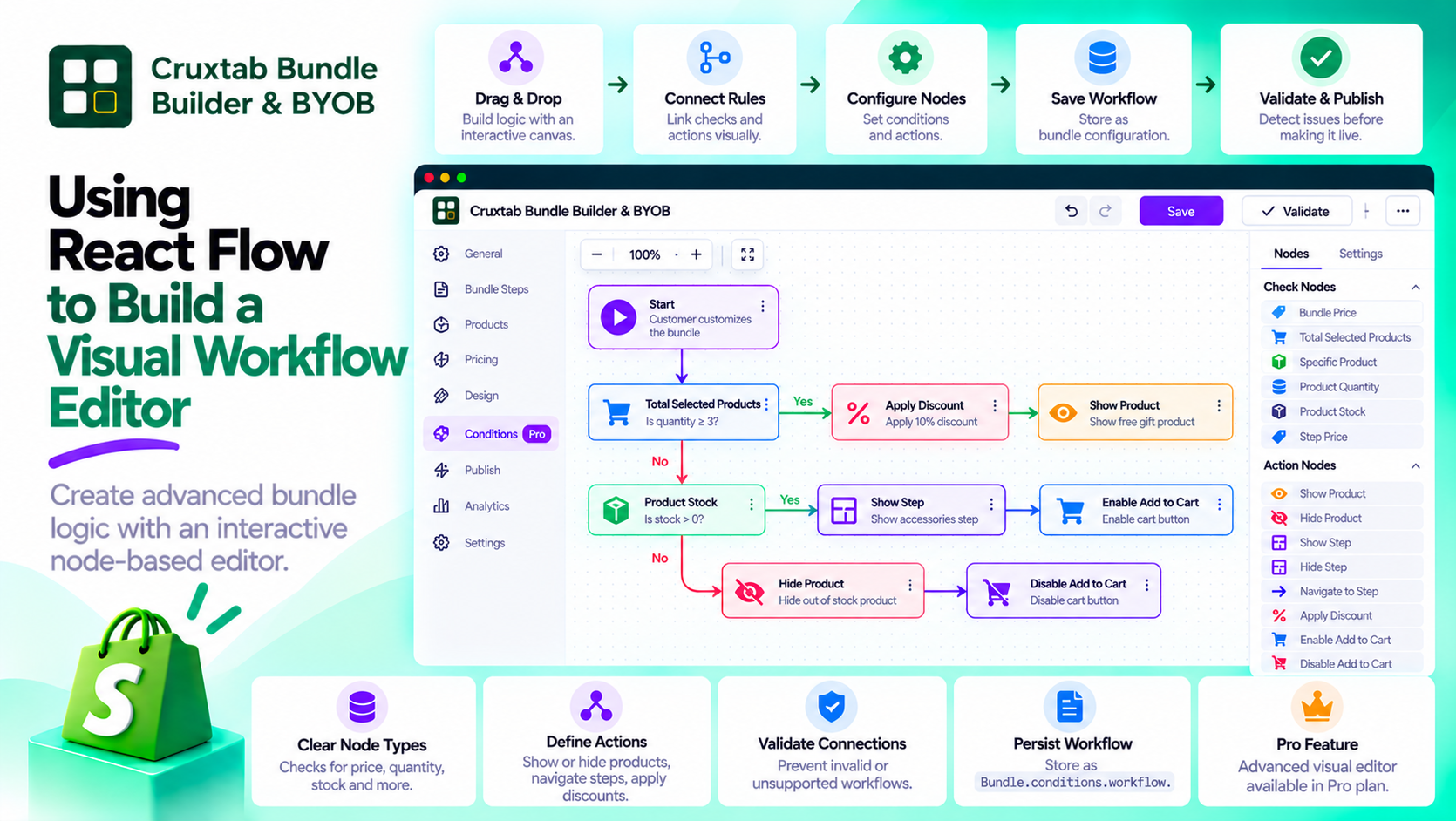
A node-based editor is one approach to this problem. It represents rules as nodes on a canvas and connections as edges between them.
React Flow, available through @xyflow/react, provides building blocks for creating this kind of interactive interface in React.
The interesting engineering work begins when the graph needs to represent real application behavior rather than just visual connections.
Model the workflow explicitly
A workflow usually consists of nodes and edges.
Nodes represent checks, actions, or other supported operations. Edges represent relationships between those nodes.
For a bundle conditions editor, a check might evaluate whether a selected product meets a particular requirement, while an action might show an additional product or apply a discount.
The graph should preserve stable node identifiers so that moving a node on the canvas does not change its meaning.
Separate graph editing from business logic
React Flow helps manage the visual editing experience, but it should not be responsible for all the business rules.
A maintainable architecture separates at least three concerns:
- Graph editor: Handles node placement, connections, and editing interactions.
- Workflow model: Represents nodes, configuration, and relationships as data.
- Workflow evaluator: Determines what conditions mean and which actions should occur.
This separation makes it easier to change the visual interface without rewriting the rule evaluation logic.
It also makes the evaluator easier to test without requiring browser interactions.
Design node types around their responsibilities
A workflow engine becomes easier to maintain when each node type has a clear contract.
A product-total check may require a comparison operator and a numeric threshold. A product-stock check may need a product reference and a stock-related condition.
An action node has different responsibilities. A show-step action needs to identify the step it controls, while a discount action needs a defined discount configuration.
Node-specific validation should ensure that required configuration is present and valid.
Persist the graph, not just the canvas
Node positions and edges are useful for restoring the editor, but they are not the entire business configuration.
The saved workflow must include the information needed to interpret each node and its relationships.
Cruxtab Bundle Builder & BYOB stores its workflow in Bundle.conditions.workflow.
When saving or loading a graph, the application should distinguish between visual editor state and the persisted rule definition. It should also validate data before allowing a saved workflow to affect the bundle.
Handle invalid connections
Not every connection should necessarily be allowed.
For example, a graph editor may need to prevent connections between incompatible node types or reject connections that create an unsupported workflow structure.
The application should define which graph structures are valid and validate them on the server as well as in the editor.
Client-side connection restrictions improve usability, but they do not replace validation of submitted workflow data.
Enforce access to advanced editing
A visual workflow editor may be an advanced feature reserved for a paid plan.
The application should enforce that entitlement before serving the editor and when processing its actions.
Hiding a navigation link is not sufficient to prevent direct access to a protected route.
How Cruxtab uses React Flow
Cruxtab Bundle Builder & BYOB uses @xyflow/react for its Pro Conditions Engine, which lets merchants configure advanced bundle checks and actions visually.
The workflow editor is available through the bundle-specific conditions route.
Explore the app: https://apps.shopify.com/cruxtab-bundle-builder
Conclusion
React Flow provides the visual foundation for a node-based editor, but the application still needs a well-defined workflow model and evaluator.
Separate the canvas from business logic, define contracts for each node type, validate connections, and persist the actual workflow configuration. That foundation makes a visual editor useful beyond its appearance.
Comments
Join the discussionNo comments yet. Be the first to comment.