Tracking Shopify Order Edits with Difference-Based Analytics
An order is not necessarily fixed after checkout. Customers and merchants may change order contents, and analytics systems need a way to reflect those changes without counting the entire order as a new purchase.
For a Shopify bundle analytics application, an effective approach is to refetch the order and record the difference caused by the edit.
The problem with treating edits as new purchases
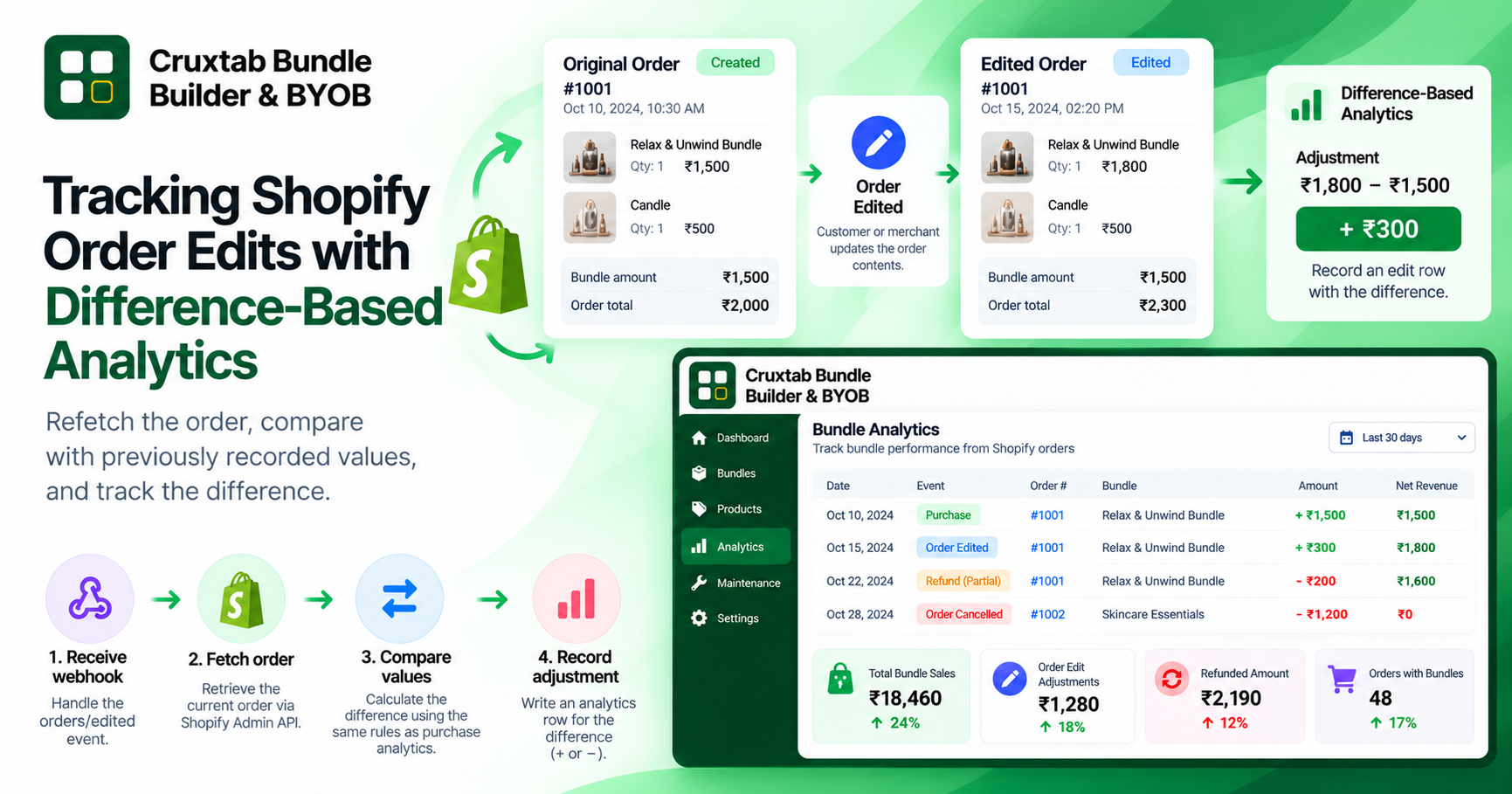
Suppose an order initially contains a bundle worth ₹1,500. The analytics system records that purchase.
Later, the order is edited and its relevant value becomes ₹1,800.
If the application records the updated total as another full purchase, the report could show ₹3,300 instead of the intended ₹1,800, depending on how totals are calculated.
Ignoring the edit creates the opposite problem: the analytics system continues reporting the old value.
The solution is to define how an edit changes the previously recorded state.
Refetch the current order
An orders/edited webhook can trigger a follow-up query to retrieve the order's current state. This is useful because the webhook notification itself may not contain every field required for the application's calculations.
The workflow can be described in four stages:
- Receive the
orders/editedwebhook. - Fetch the order through the Shopify Admin API.
- Compare the relevant current values with the values previously recorded.
- Write an analytics row representing the difference.
For example:
[ \text{Adjustment} = \text{Current tracked value} - \text{Previously tracked value} ]
If the previously tracked value is ₹1,500 and the current tracked value is ₹1,800, the adjustment is +₹300.
This formula is only appropriate when both values use the same definition, currency, and attribution rules.
Decide which fields matter
The comparison should use the same financial and bundle-identification rules as the original purchase handler.
Depending on the application's reporting requirements, relevant information may include:
- Recognized bundle line items.
- Quantities and line-item values.
- Discounts included in the chosen revenue metric.
- The order's current state.
- The previous values used for analytics.
The implementation should not assume that every order edit changes bundle revenue. An edit to an unrelated product, for example, should not automatically become a bundle revenue adjustment.
Preserve an audit trail
Writing an edit row to BundleAnalytics gives the application a record of the adjustment rather than silently replacing the original purchase row.
An adjustment-oriented model can make it easier to answer questions such as:
- Why did the reported revenue change?
- Which order edit produced the adjustment?
- Was the change positive or negative?
- Did the application process the same edit more than once?
This depends on the fields stored with each analytics row. Keeping event identifiers and relevant order references can improve traceability.
Protect against repeated processing
Webhook deliveries can be retried. If the same edit is processed twice and both runs calculate the same adjustment, the analytics total may be wrong.
Deduplication should therefore be part of the design. Depending on the available event identifiers and data model, this may involve recording processed webhook events or using a stable key for the logical adjustment.
There is also a distinction between processing an event twice and processing two legitimate edits that happen to produce similar values. A reliable implementation must preserve the latter.
Test meaningful order transitions
Useful scenarios include:
- Increasing a bundle's tracked value.
- Decreasing a bundle's tracked value.
- Editing only non-bundle items.
- Changing quantities.
- Processing the same event more than once.
- Failing to refetch the order and retrying later.
These cases help verify that analytics follows the order's changes without creating duplicate purchases or unrelated adjustments.
Conclusion
Order-edit analytics is fundamentally a reconciliation problem. Refetching the current order, comparing it with previously tracked values, and recording a difference provides a clear basis for updating reports.
The key is consistency: the original purchase and subsequent adjustment must use the same definitions and attribution rules.
Cruxtab Bundle Builder & BYOB uses the orders/edited webhook to refetch an order and record the difference in bundle analytics: https://apps.shopify.com/cruxtab-bundle-builder
Comments
Join the discussionNo comments yet. Be the first to comment.