Tracking Bundle Builder Analytics Without Overcomplicating the Frontend
Once I had the storefront APIs for loading bundle configuration and listing live bundles, I ran into the next question:
How do I know what customers are actually doing with the bundle builder?
It's easy to build a bundle configurator that works technically. It's much harder to understand whether customers are actually using it.
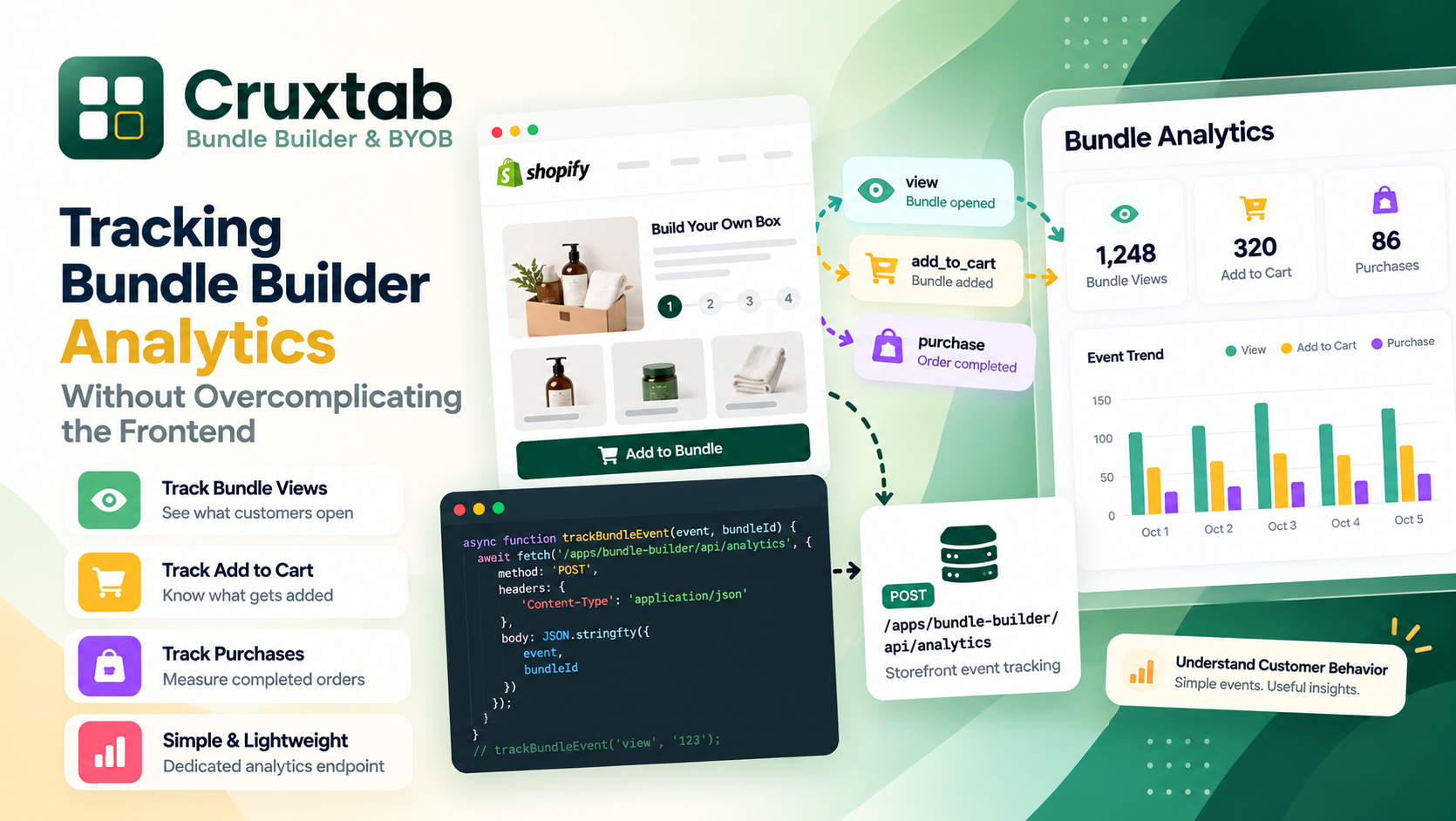
For my Shopify Bundle Builder & BYOB app, I wanted to track a few basic events:
Bundle views
Add to cart
Purchases
I didn't want to build a huge analytics system around it.
I mainly needed a lightweight way to answer questions like:
Are customers opening this bundle?
Are they adding bundles to the cart?
Are completed purchases happening?
So I created a dedicated endpoint:
POST /apps/bundle-builder/api/analytics
This endpoint receives events from the storefront JavaScript and writes them to BundleAnalytics.
Here's how I approached it.
Why I created a separate analytics endpoint
I could have mixed analytics logic into the bundle configuration endpoint.
For example:
GET /bundle-config
    ↓
Return bundle
    ↓
Also record a view
But that creates unnecessary coupling.
A configuration request should retrieve configuration.
An analytics request should record analytics.
So I separated the responsibilities:
api.bundle-config.jsx
    ↓
Read bundle configuration

api.bundles-list.jsx
    ↓
Read live bundles

api.analytics.jsx
    ↓
Write analytics events
That makes each endpoint easier to understand.
The three events I wanted to track
The first version of the analytics system only needed three event types:
view
add_to_cart
purchase
View
A view event means a customer interacted with or opened a bundle.
For example:
Customer opens bundle
        ↓
Storefront sends "view"
        ↓
Analytics endpoint
        ↓
BundleAnalytics
This gives me a basic indication of bundle interest.
Add to cart
The second event is:
add_to_cart
This is more meaningful because the customer has actually configured a bundle and attempted to add it to their cart.
The flow becomes:
Customer configures bundle
        ↓
Clicks Add to Cart
        ↓
Storefront sends analytics event
        ↓
Bundle is added
Purchase
The final event is:
purchase
This represents a completed purchase event being recorded by the storefront integration.
Having all three events gives me a very basic funnel:
View
 ↓
Add to Cart
 ↓
Purchase
Even this small amount of information can be useful.
The endpoint
The endpoint is:
POST /apps/bundle-builder/api/analytics
Unlike the configuration endpoints, this endpoint expects data in the request body.
The storefront can send something conceptually similar to:
{
  "event": "view",
  "bundleId": "123"
}
For an add-to-cart event:
{
  "event": "add_to_cart",
  "bundleId": "123"
}
And similarly for a purchase:
{
  "event": "purchase",
  "bundleId": "123"
}
The exact payload can be extended as the analytics requirements grow.
The important part is keeping the event type explicit.
Sending the event from JavaScript
On the storefront, I can create a small helper rather than repeating fetch() calls throughout the bundle builder.
Something like:
async function trackBundleEvent(event, bundleId) {
  await fetch('/apps/bundle-builder/api/analytics', {
    method: 'POST',
    headers: {
      'Content-Type': 'application/json'
    },
    body: JSON.stringify({
      event,
      bundleId
    })
  });
}
Then the rest of the application can simply call:
trackBundleEvent('view', bundleId);
or:
trackBundleEvent('add_to_cart', bundleId);
This is much cleaner than embedding analytics logic into every UI component.
Why I kept analytics separate from the main bundle logic
One thing I wanted to avoid was code like this:
function addBundleToCart(bundle) {
  // 100 lines of bundle logic...

  // Analytics
  // Another 30 lines...
}
The bundle builder already has enough responsibilities.
It needs to:
Handle product selections
Validate steps
Calculate quantities
Calculate pricing
Apply bundle rules
Update the UI
Add products to cart
Analytics should not make that code harder to understand.
Instead:
function addBundleToCart(bundle) {
  // bundle logic

  trackBundleEvent('add_to_cart', bundle.id);
}
That's much easier to maintain.
Validating the event type
The backend shouldn't accept arbitrary event names.
If someone sends:
{
  "event": "hello_world"
}
there's no reason for the analytics table to accept it.
So I treat the supported events as a defined set:
const allowedEvents = [
  'view',
  'add_to_cart',
  'purchase'
];
Then validate the incoming value:
if (!allowedEvents.includes(event)) {
  return Response.json(
    {
      error: 'Invalid analytics event'
    },
    {
      status: 400
    }
  );
}
This keeps the data cleaner.
It's a small validation step, but it becomes important once analytics data starts being used for reporting.
Checking the bundle
The event should also be associated with a real bundle.
I don't want to blindly create an analytics record just because the request contains:
bundleId = 123
The backend can resolve the bundle in the context of the requesting shop before writing the analytics record.
Conceptually:
Request
  ↓
Resolve shop
  ↓
Read bundleId
  ↓
Find bundle for that shop
  ↓
Validate event
  ↓
Create BundleAnalytics record
This also keeps the analytics data connected to the correct store.
Shop-scoped analytics
This is especially important for a Shopify app.
The application can be installed on many different stores.
So I don't want analytics records from different stores mixed together.
The request comes through the Shopify App Proxy, which gives the backend the shop context.
The architecture is roughly:
Store A
   ↓
App Proxy
   ↓
Analytics endpoint
   ↓
Store A analytics


Store B
   ↓
App Proxy
   ↓
Analytics endpoint
   ↓
Store B analytics
The same API endpoint can serve both stores while keeping their data separated.
Writing to BundleAnalytics
Once the request has passed validation, the endpoint writes the event to BundleAnalytics.
Conceptually:
await db.bundleAnalytics.create({
  data: {
    bundleId,
    event
  }
});
The actual data model can contain additional information depending on what the app needs.
For the initial implementation, I wanted to keep the event model focused rather than trying to capture every possible browser detail.
Why I didn't collect everything
Analytics can become a rabbit hole very quickly.
You start with:
bundleId
event
Then you think:
IP?
User agent?
Browser?
Device?
Country?
Session?
Referrer?
UTM parameters?
Screen size?
Before long, a simple bundle analytics endpoint has become a miniature analytics platform.
That wasn't the goal.
For the first version, I wanted to answer the most important product questions.
So I kept the event model intentionally small.
Adding rate limiting
There was another problem I needed to consider.
Analytics endpoints are write endpoints exposed to the storefront.
That means they shouldn't be treated as completely unlimited.
A badly behaved client could send a large number of requests:
POST
POST
POST
POST
POST
...
So I added an in-memory rate limit.
The current limit is:
60 requests per minute per IP
This gives the endpoint a basic protection layer.
Why rate limiting matters here
Imagine a storefront JavaScript bug accidentally calling the analytics endpoint inside a loop.
Instead of:
1 view event
the browser might send:
500 view events
That would create noisy analytics data and unnecessary backend work.
A rate limit doesn't fix the JavaScript bug, but it gives the backend a safety boundary.
The basic rate-limit idea
The in-memory implementation can be thought of as a small map:
IP address
    ↓
Request count
    ↓
Window start
Conceptually:
const rateLimits = new Map();
For each request:
1. Get IP
2. Check current time
3. Find existing counter
4. Reset if the minute expired
5. Increment counter
6. Reject if over 60
The logic is roughly:
const MAX_REQUESTS = 60;
const WINDOW_MS = 60 * 1000;
Then track requests within that window.
If an IP goes beyond the limit:
429 Too Many Requests
is an appropriate response.
Why I used an in-memory limit
For the current implementation, I didn't want to introduce Redis or another external rate-limiting service just for this endpoint.
The requirement was fairly small:
60 requests/minute/IP
An in-memory approach keeps the implementation lightweight.
There is an important caveat, though.
In-memory rate limiting is not the same as a distributed rate limiter.
If the application runs across multiple instances, each instance may have its own memory.
So this approach is suitable for a lightweight first layer, but I would reconsider it if the application needed stronger distributed protection.
Handling analytics failures
Another decision I made was not to make the entire bundle builder depend on analytics succeeding.
For example, suppose this happens:
Customer clicks Add to Cart
        ↓
Bundle added successfully
        ↓
Analytics request fails
I don't want the customer to see:
"Your bundle could not be added"
just because an analytics request failed.
Analytics is secondary to the actual storefront operation.
So the frontend can treat analytics as a best-effort operation.
For example:
trackBundleEvent('add_to_cart', bundleId)
  .catch(error => {
    console.warn('Analytics request failed', error);
  });
The bundle functionality should continue working.
A simple event flow
The complete flow now looks like this:
Customer
   ↓
Bundle Builder UI
   ↓
User performs action
   ↓
Storefront JavaScript
   ↓
POST /apps/bundle-builder/api/analytics
   ↓
App Proxy
   ↓
Resolve requesting shop
   ↓
Validate event
   ↓
Check rate limit
   ↓
Write BundleAnalytics
It's a relatively small pipeline.
That's exactly what I wanted.
What the analytics data gives me
With the three events, I can start thinking about a basic conversion funnel.
For example:
1,000 views
   ↓
300 add_to_cart
   ↓
80 purchases
From there, I can calculate useful metrics such as:
View → Add to Cart
Add to Cart → Purchase
View → Purchase
I don't need a massive analytics platform to start learning from the feature.
Even simple event data can reveal whether customers are actually using the bundle builder.
Keeping analytics extensible
Although the first version only supports three events, the API is structured so additional events can be added later.
For example:
step_view
bundle_started
bundle_completed
discount_applied
could eventually be supported.
But I don't want to add events just because I can.
Each event should answer a useful product question.
Otherwise, the database ends up full of events that nobody actually uses.
The endpoint file
The analytics endpoint lives separately:
api.analytics.jsx
So the three storefront API files currently have distinct responsibilities:
api.bundle-config.jsx
    ↓
Retrieve one bundle configuration

api.bundles-list.jsx
    ↓
Retrieve live bundles

api.analytics.jsx
    ↓
Record storefront events
I find this structure easier to navigate than putting everything into a single API route.
When something goes wrong with analytics, I know exactly where to look.
What I learned
The biggest thing I learned while building this was that analytics doesn't need to be complicated to be useful.
I initially thought about collecting a lot more information.
But the first useful version only needed:
Event
Bundle
Shop
Timestamp
From that foundation, I can build more reporting later if the product actually needs it.
I also found it important to treat analytics as a secondary system.
The customer shouldn't have a broken bundle-building experience because an analytics request failed.
And because the endpoint is publicly reachable through the storefront, having a basic rate limit is worth adding from the beginning.
The bigger API picture
At this point, the storefront API layer has three clear responsibilities:
┌─────────────────────────────────────┐
│         Shopify Storefront          │
└──────────────────┬──────────────────┘
                   │
                   ▼
            Shopify App Proxy
                   │
       ┌───────────┼────────────┐
       │           │            │
       ▼           ▼            ▼
 bundle-config  bundles-list  analytics
       │           │            │
       ▼           ▼            ▼
 Configuration   Discovery     Events
The configuration endpoint reads.
The list endpoint reads.
The analytics endpoint writes.
That separation has made the overall architecture much easier to reason about.
What's next
There was still one architectural question I wanted to understand better:
How should the storefront communicate with these backend endpoints securely through Shopify?
That's where Shopify App Proxy becomes particularly interesting.
In the next article, I'll walk through how I use the App Proxy to connect storefront JavaScript with these backend APIs while keeping requests scoped to the requesting Shopify store.
That part is especially important when building a multi-tenant Shopify app, because the backend needs to know which store is making the request.