Testing Plan-Based Branding and Metafield Synchronization
A branding setting can appear simple: determine whether the merchant is allowed to hide branding, then store the result in a metafield.
But the final behavior depends on several components working together—billing state, plan rules, shop-level overrides, Shopify GraphQL operations, and the storefront's interpretation of the stored value.
Testing only the metafield mutation leaves many important failure cases uncovered.
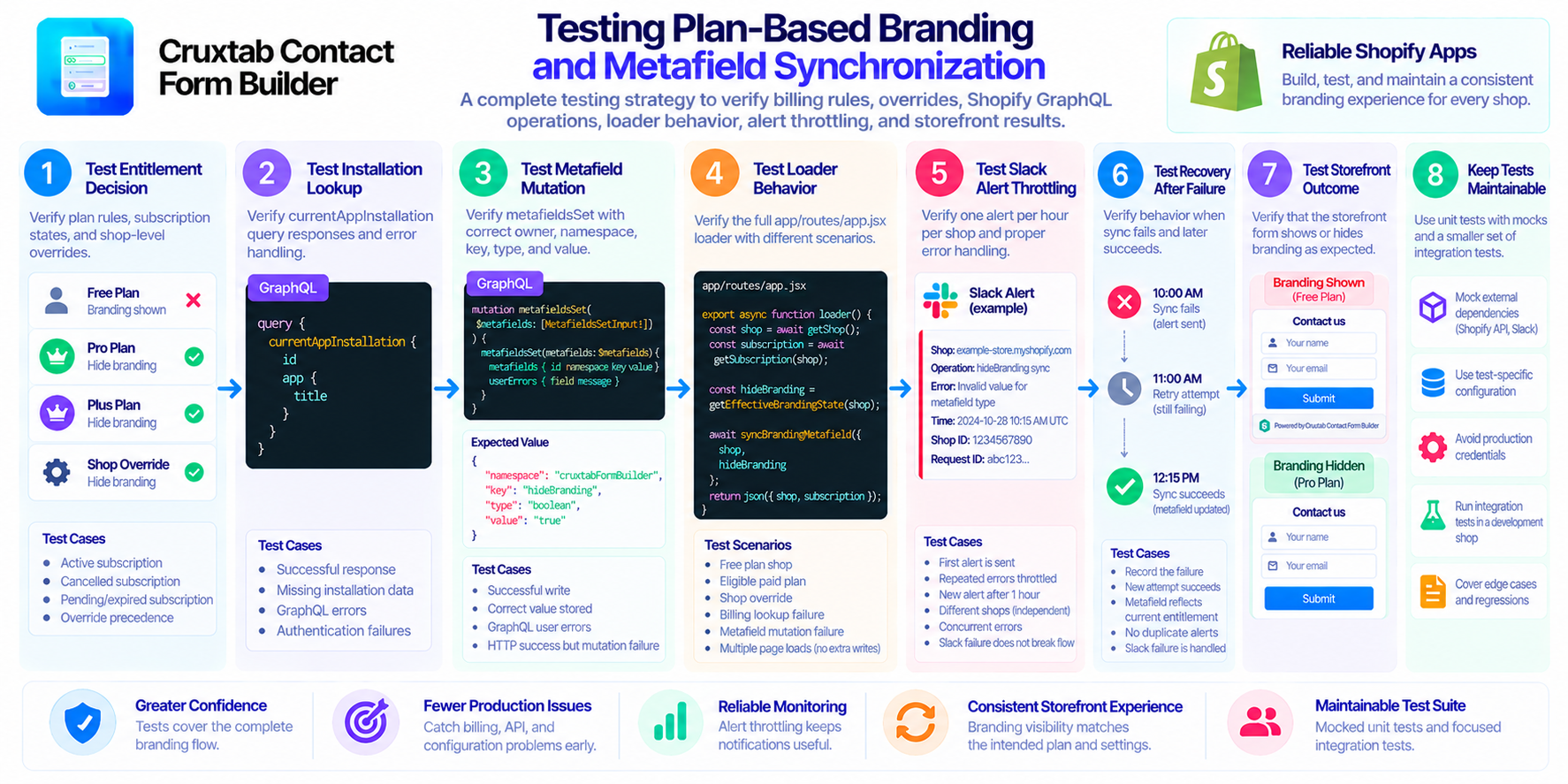
1. Test the entitlement decision independently
First, test the function that determines whether branding should be hidden.
Use explicit cases for the app's plan rules, including the free plan, eligible paid plans, and any relevant subscription states.
If the application supports an override such as BRANDING_HIDDEN_SHOPS, test the precedence rule independently.
The expected outcome should be clear for every combination. For example, the team should be able to explain whether an override takes precedence over billing eligibility or is restricted by it.
2. Test the Shopify installation lookup
The synchronization flow may use currentAppInstallation to identify the installation that owns the metafield.
Test successful responses, missing installation data, GraphQL errors, and authentication failures.
The test should confirm that the application does not attempt to write to an invalid owner when the installation lookup fails.
3. Test the metafield mutation
For metafieldsSet, verify that the correct owner, namespace, key, type, and value are sent.
Check that the stored hideBranding value matches the expected state and that the storefront consumer interprets it correctly.
Also test GraphQL user errors and cases where the request succeeds at the HTTP level but the mutation does not complete as expected.
4. Test the actual loader behavior
If synchronization occurs in the app/routes/app.jsx loader, test the loader's full behavior.
Useful scenarios include:
- An admin page loads with a free-plan shop.
- An admin page loads with a plan that permits hiding branding.
- The shop has an explicit override.
- Billing data cannot be retrieved.
- The metafield mutation fails.
- The merchant loads multiple admin pages in succession.
Verify that repeated loads do not cause unexpected API traffic or repeated notifications.
5. Test Slack alert throttling
The application uses Slack alerts throttled to one per hour per shop.
Test the first alert, repeated errors within the throttle window, and a new alert after the window expires.
Also verify that two shops can trigger independent alerts and that concurrent errors for one shop do not accidentally bypass the throttle.
If the application runs multiple instances, test the shared coordination mechanism rather than assuming a local in-memory timestamp is sufficient.
6. Test recovery after failure
Consider a shop whose branding metafield cannot be updated because of a temporary Shopify API error.
The app should record or expose the failure through an appropriate operational mechanism. When the next synchronization attempt succeeds, the metafield should reflect the current entitlement.
Test the transition from failure to success, not just the individual API calls.
Also verify that a Slack notification failure does not prevent the synchronization workflow from handling its original error appropriately.
7. Test the storefront outcome
The final test should inspect what a customer actually sees.
After synchronizing the metafield, load the storefront form and verify whether the app's branding appears or is hidden as intended.
This catches cases where the backend writes the correct value but the storefront code interprets the value incorrectly, reads the wrong metafield, or uses stale configuration.
8. Keep tests maintainable
Avoid coupling every test to a live Shopify API or Slack workspace. Unit tests can mock these external dependencies, while a smaller set of integration tests can validate the real behavior in a development shop.
Use test-specific configuration and avoid exposing production credentials.
Conclusion
Plan-based branding synchronization needs tests for billing rules, overrides, Shopify GraphQL operations, loader execution, alert throttling, failure recovery, and the final storefront result.
Testing the entire path gives greater confidence than verifying a successful metafield write in isolation.
For Shopify merchants interested in configurable storefront forms, explore Cruxtab Contact Form Builder.
SEO title: Testing Shopify Branding Entitlements and Metafield Sync
Meta description: Learn how to test plan-based branding, billing rules, Shopify metafield writes, loader execution, Slack alert throttling, and storefront behavior.
Tags: Testing, Shopify, GraphQL, SaaS, Quality Assurance
Cover image idea: A testing pipeline showing billing scenarios, shop overrides, GraphQL metafield updates, Slack alert throttling, and storefront verification.
Comments
Join the discussionNo comments yet. Be the first to comment.