Syncing Shopify App Data with Form Configuration
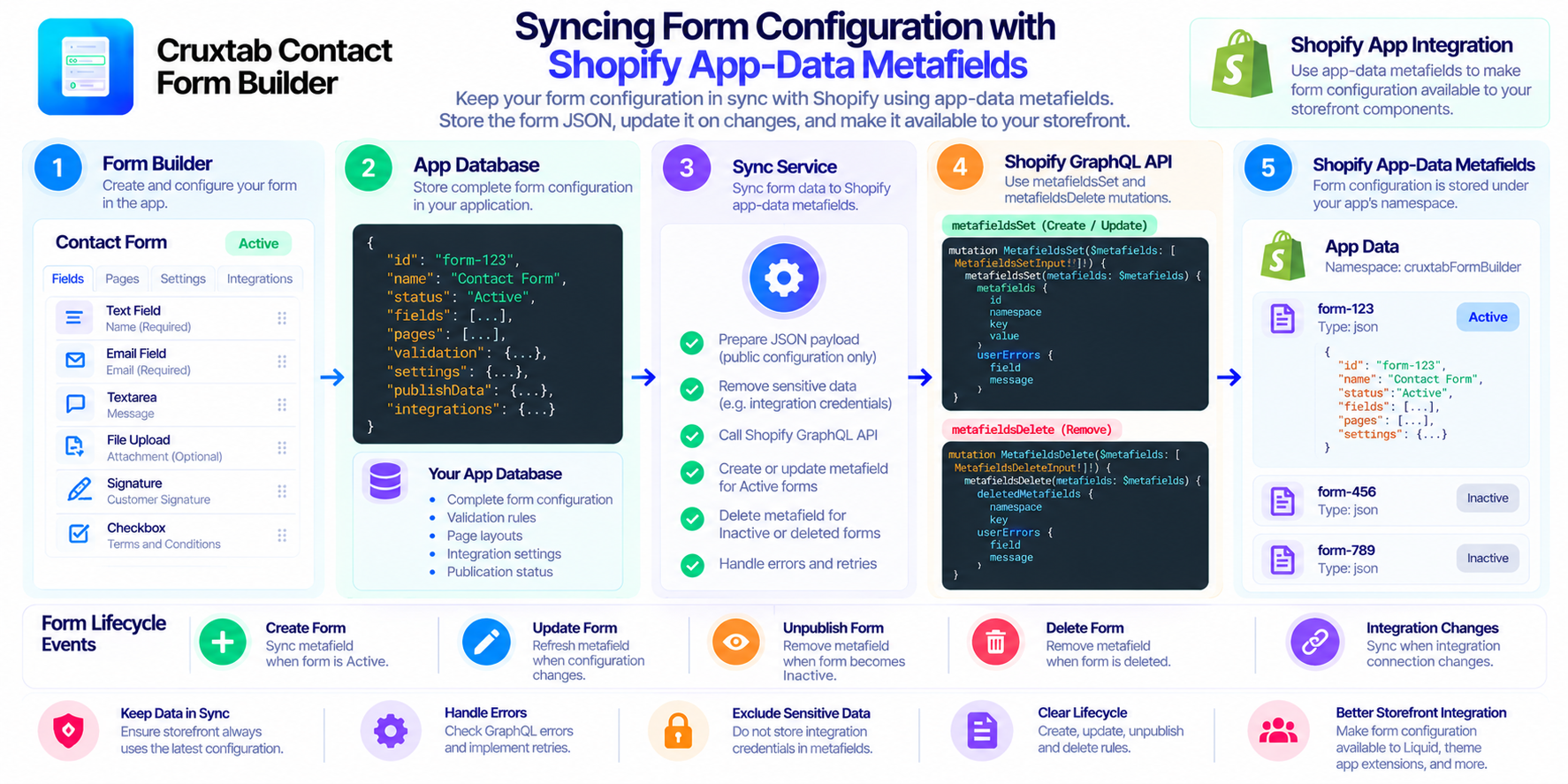
A form builder often stores more than the fields a customer sees. A form configuration can include page layouts, validation rules, publication settings, integrations, and other options that determine how the form behaves.
When a Shopify app needs to make this configuration available to other parts of its storefront workflow, syncing the configuration to Shopify app-data metafields can provide a useful integration point.
In this article, we'll explore the design considerations behind synchronizing form configuration with Shopify metafields.
Why synchronize form configuration?
An application may maintain its own records for forms, while storefront components need a predictable way to retrieve the configuration associated with a published form.
A synchronization layer helps keep those two representations aligned.
For example, a form configuration might contain:
- Form fields and their settings
- Page layout and navigation information
- Validation rules
- Publication status
- Integration configuration
- Other metadata required by the storefront renderer
Instead of manually updating several storefront components whenever a form changes, the application can synchronize a JSON representation of the form.
Using app-data metafields
Shopify app-data metafields are associated with an app installation and are useful for storing app-specific data.
A form synchronization implementation can use the current app installation as the owner of the metafields. Each form can then be represented by a metafield under a dedicated namespace.
For example, a form with an identifier such as form-123 could be represented conceptually as:
- Namespace:
cruxtabFormBuilder - Key:
form-123 - Type:
json
The metafield value contains the form configuration in JSON format.
This structure makes it possible to associate each form with a distinct key while keeping the data grouped under an app-specific namespace.
Choosing a synchronization lifecycle
Synchronization should be tied to meaningful form lifecycle events rather than performed only during initial creation.
A typical lifecycle includes:
- Create: Save the form and synchronize its configuration when it is Active.
- Update: Refresh the metafield when the form configuration changes.
- Unpublish: Remove the metafield when the form becomes Inactive.
- Delete: Remove the associated metafield when the form is deleted.
- Integration connection: Synchronize the form when an integration connection changes and the synchronization workflow is invoked.
The exact sequence matters. If the application updates the database but fails to synchronize the metafield, the two representations can temporarily differ.
Working with Shopify GraphQL
The relevant GraphQL operations include:
currentAppInstallationto identify the app installation.metafieldsSetto create or update metafield values.metafieldsDeleteto remove metafields.
A robust implementation should validate the form identifier, construct the intended JSON payload, handle GraphQL errors, and verify the outcome of mutations.
Do not assume that receiving an HTTP success response means the GraphQL operation succeeded. GraphQL responses can contain errors even when the HTTP request itself completed successfully.
Keeping the metafield synchronized
The synchronization service should have a clear contract: given a form's current state, determine whether the corresponding metafield should exist and what value it should contain.
For an Active form, the service can write the current JSON representation. For an Inactive or deleted form, it can remove the corresponding metafield.
This state-driven approach is easier to reason about than scattering metafield updates across unrelated code paths.
It is also worth considering retry behavior. A temporary Shopify API failure should be visible and recoverable rather than silently leaving stale storefront configuration.
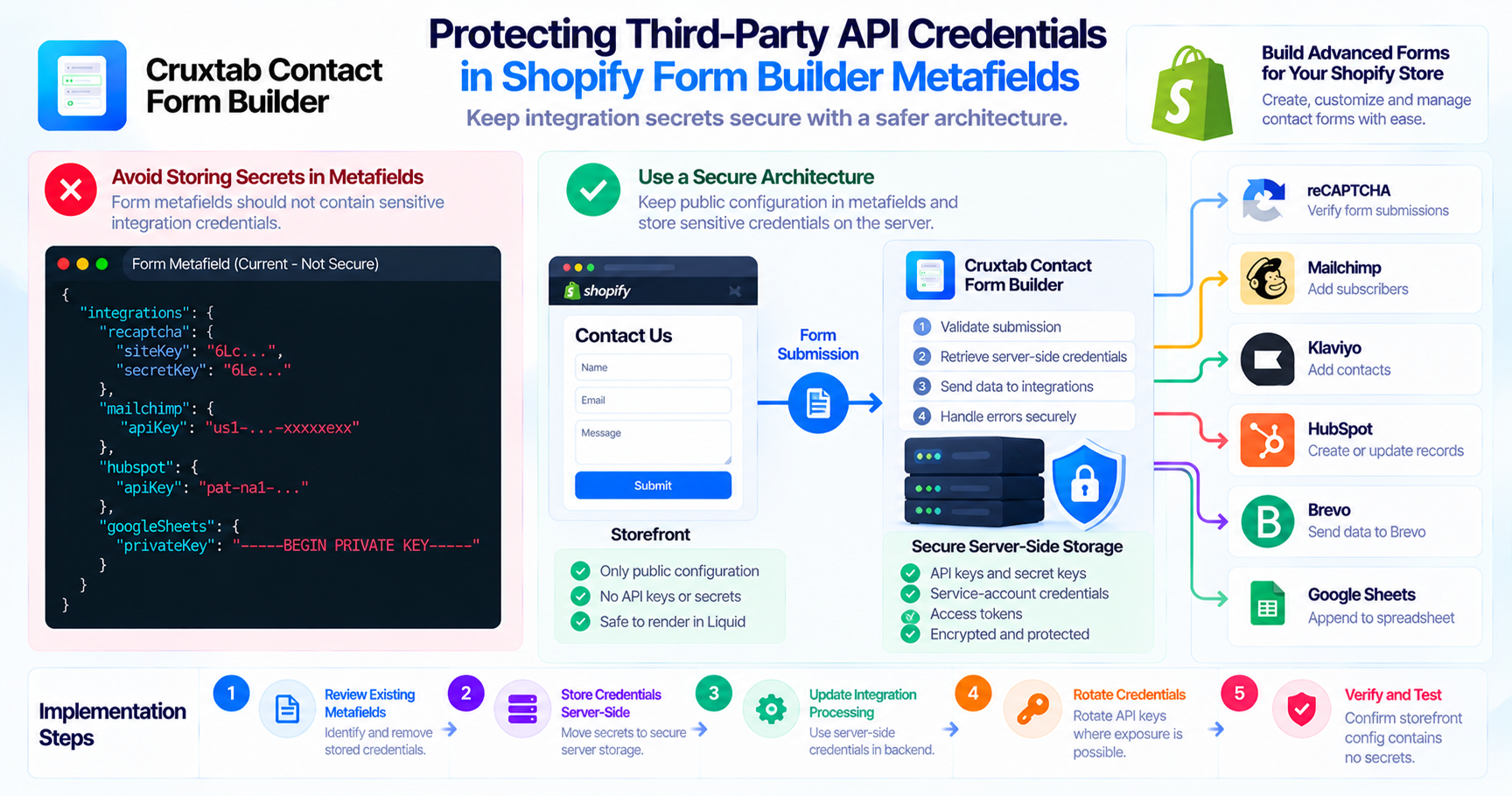
Be careful with sensitive integration data
One important design consideration is the content of the JSON payload.
If the complete integrations object is copied into the metafield, that object may contain credentials or other secrets. Storing those values in app data does not automatically make them safe to expose to storefront code.
Before implementing this pattern, determine which parts of the configuration actually need to be available to the storefront. Public configuration and private credentials should have different storage and access rules.
This is especially important when the JSON is consumed by Liquid snippets, theme app extensions, or other storefront-facing code.
Conclusion
Form-to-metafield synchronization provides a structured way to keep Shopify app data aligned with form configuration. A clear lifecycle, consistent identifiers, careful GraphQL error handling, and explicit rules for sensitive fields make the system more reliable.
If you're building forms for a Shopify store, explore Cruxtab Contact Form Builder to learn more about its form-building capabilities.
Explore Cruxtab Contact Form Builder on the Shopify App Store
Comments
Join the discussionNo comments yet. Be the first to comment.