Modernizing Shopify Webhook Configuration with App TOML Subscriptions
Webhooks allow Shopify applications to respond to events without continuously polling the Admin API.
For example, an application can receive an app/uninstalled event when a merchant uninstalls it.
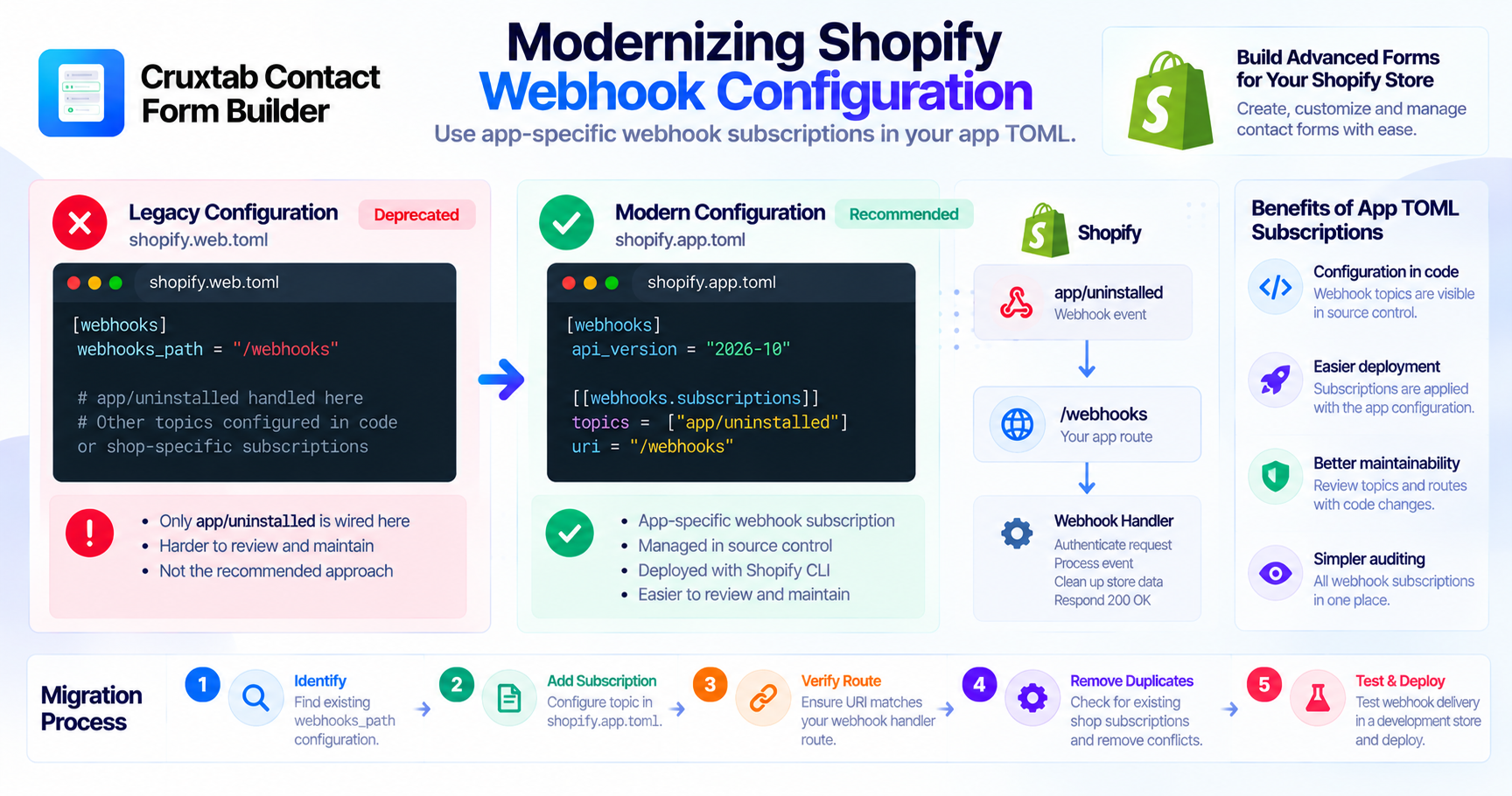
However, webhook configuration has evolved. Shopify now recommends managing app-specific webhook subscriptions through the application's TOML configuration.
The existing configuration
Cruxtab Bundle Builder uses:
webhooks_path
in:
shopify.web.toml
The audit identifies this as the only place where the app/uninstalled webhook is wired.
This configuration should be reviewed and migrated to the current app-specific webhook subscription approach.
The recommended configuration
Shopify supports webhook subscriptions in:
shopify.app.toml
A subscription can be declared using:
[[webhooks.subscriptions]]
For example:
[webhooks]
api_version = "2026-10"

[[webhooks.subscriptions]]
topics = ["app/uninstalled"]
uri = "/webhooks"
This is an illustrative configuration. The delivery URI must match an actual route in the application.
Official reference: Manage webhook subscriptions.
Why app-specific subscriptions are useful
App-specific webhook subscriptions are defined once in the application configuration and applied across shops that install the app.
This provides several advantages:
- Webhook topics are visible in source control.
- Delivery routes are part of the deployment configuration.
- Configuration can be reviewed with code changes.
- The subscription setup is easier to audit.
- The CLI can deploy the configuration.
Understanding the webhook API version
The api_version setting in the TOML webhook configuration controls the GraphQL Admin API version used to serialize app-specific webhook payloads.
This setting is separate from the Admin API version configured for normal application requests.
Cruxtab Bundle Builder currently uses 2026-01 for webhook serialization.
As of October 31, 2026, that version remains supported, but developers should plan an upgrade before its January 16, 2027 access end date.
Migrating without duplicate subscriptions
A migration should account for existing subscriptions.
If an application has an existing shop-specific subscription for the same topic, creating a new app-specific subscription without reviewing the old one can result in duplicate notifications.
Shopify recommends removing conflicting existing subscriptions when migrating to app-specific subscriptions.
A practical migration checklist
- Identify the existing
webhooks_pathconfiguration. - Find the current
app/uninstalledhandler route. - Add the topic to
shopify.app.toml. - Set the intended webhook API version.
- Verify the route matches the configured URI.
- Review existing subscriptions for conflicts.
- Test webhook delivery in a development store.
- Deploy the updated application configuration.
Webhook handler responsibilities
Changing the subscription configuration does not replace the webhook handler itself.
The application still needs to:
- Authenticate incoming webhook requests.
- Identify the webhook topic.
- Execute the appropriate business logic.
- Respond with the expected HTTP status.
- Handle retries safely.
Conclusion
Webhook configuration should be managed in a way that is easy to review, deploy, and maintain.
Cruxtab Bundle Builder's legacy webhooks_path configuration should be reviewed and migrated to app-specific subscriptions in shopify.app.toml.
Explore Cruxtab Bundle Builder & BYOB.
Comments
Join the discussionNo comments yet. Be the first to comment.