Migrating Shopify Cart Transform Creation from functionId to functionHandle
Shopify Functions allow applications to customize parts of Shopify's commerce behavior.
For bundle applications, Cart Transform functions are particularly useful because they support changes to how cart items are grouped and presented.
However, Shopify's GraphQL Admin API evolves, and applications need to update deprecated mutation arguments.
Understanding Cart Transform
Cart Transform allows an application to modify the presentation of cart lines.
For example, a bundle application can use cart transformation functionality to represent related products together in the cart.
Shopify provides the cartTransformCreate mutation to create a Cart Transform associated with a Shopify Function.
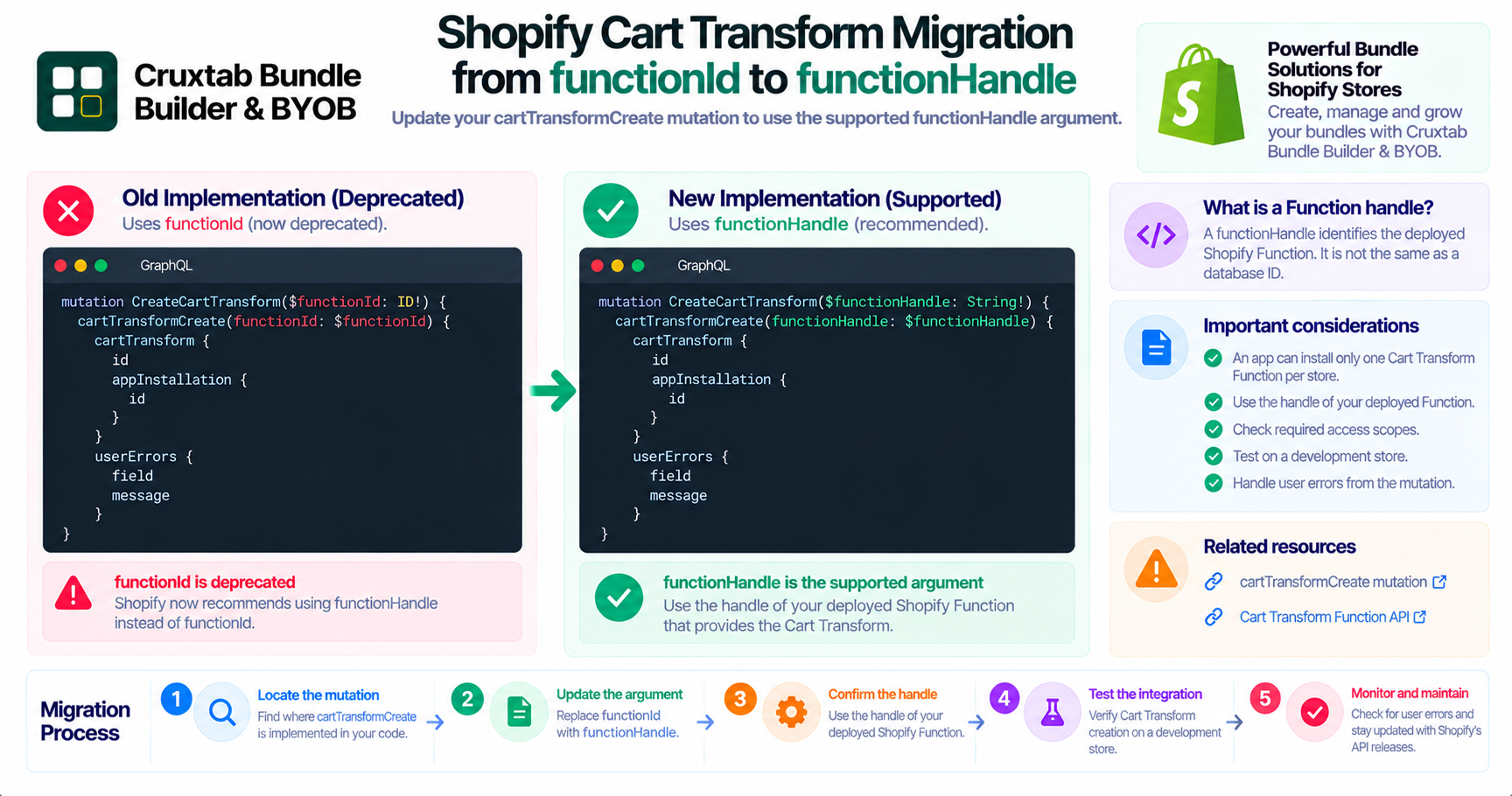
The older functionId argument
The cartTransformCreate mutation previously accepted:
functionId
Applications using this argument should review the current mutation reference.
Shopify now marks functionId as deprecated.
The supported functionHandle argument
Shopify provides a replacement argument:
functionHandle
The handle identifies the Function providing the Cart Transform.
The current mutation reference lists both arguments, with functionId marked deprecated and functionHandle available as the replacement.
Official reference: cartTransformCreate mutation.
Example of the updated mutation
The following is an illustrative example of using the newer argument:
mutation CreateCartTransform($functionHandle: String!) {
  cartTransformCreate(functionHandle: $functionHandle) {
    cartTransform {
      id
    }
    userErrors {
      field
      message
    }
  }
}
The application must provide a valid Function handle that corresponds to the Function deployed for the app.
What needs to change in the application?
For an existing implementation, developers should:
- Locate the
cartTransformCreatemutation. - Identify where
functionIdis supplied. - Confirm the deployed Shopify Function's handle.
- Update the mutation to use
functionHandle. - Update variable definitions and request payloads.
- Check returned user errors.
- Test Cart Transform creation on a development store.
Do not confuse the Function handle with a database ID
A Function handle is not interchangeable with an arbitrary database identifier.
The application must use the handle expected by Shopify's mutation and ensure that it refers to the intended deployed Function.
Additional Cart Transform considerations
Shopify's Cart Transform API also has operational requirements.
For example, Shopify documents that an app can install a maximum of one Cart Transform Function per store.
Developers should review the current Function API requirements, access scopes, and store eligibility before implementing or migrating this functionality.
Reference: Shopify Cart Transform Function API.
Conclusion
Deprecated mutation arguments should be migrated before they become a compatibility problem.
Cruxtab Bundle Builder's Cart Transform creation logic should be reviewed to replace functionId with Shopify's supported functionHandle argument.
Explore Cruxtab Bundle Builder & BYOB.
Comments
Join the discussionNo comments yet. Be the first to comment.