Managing Third-Party Scripts in Shopify Form Builders
Third-party scripts can add valuable functionality to an online store. Analytics, advertising pixels, chat widgets, and other integrations allow merchants to connect their storefronts to external services.
However, every additional script can affect page loading and runtime behavior.
Why script management matters
A storefront may load scripts for several purposes:
- Analytics measurement.
- Advertising conversion tracking.
- Customer support chat.
- External fonts.
- Form functionality.
If scripts are loaded unnecessarily or repeatedly, they may add network requests and increase the work performed by the browser.
Script-based integrations in Cruxtab
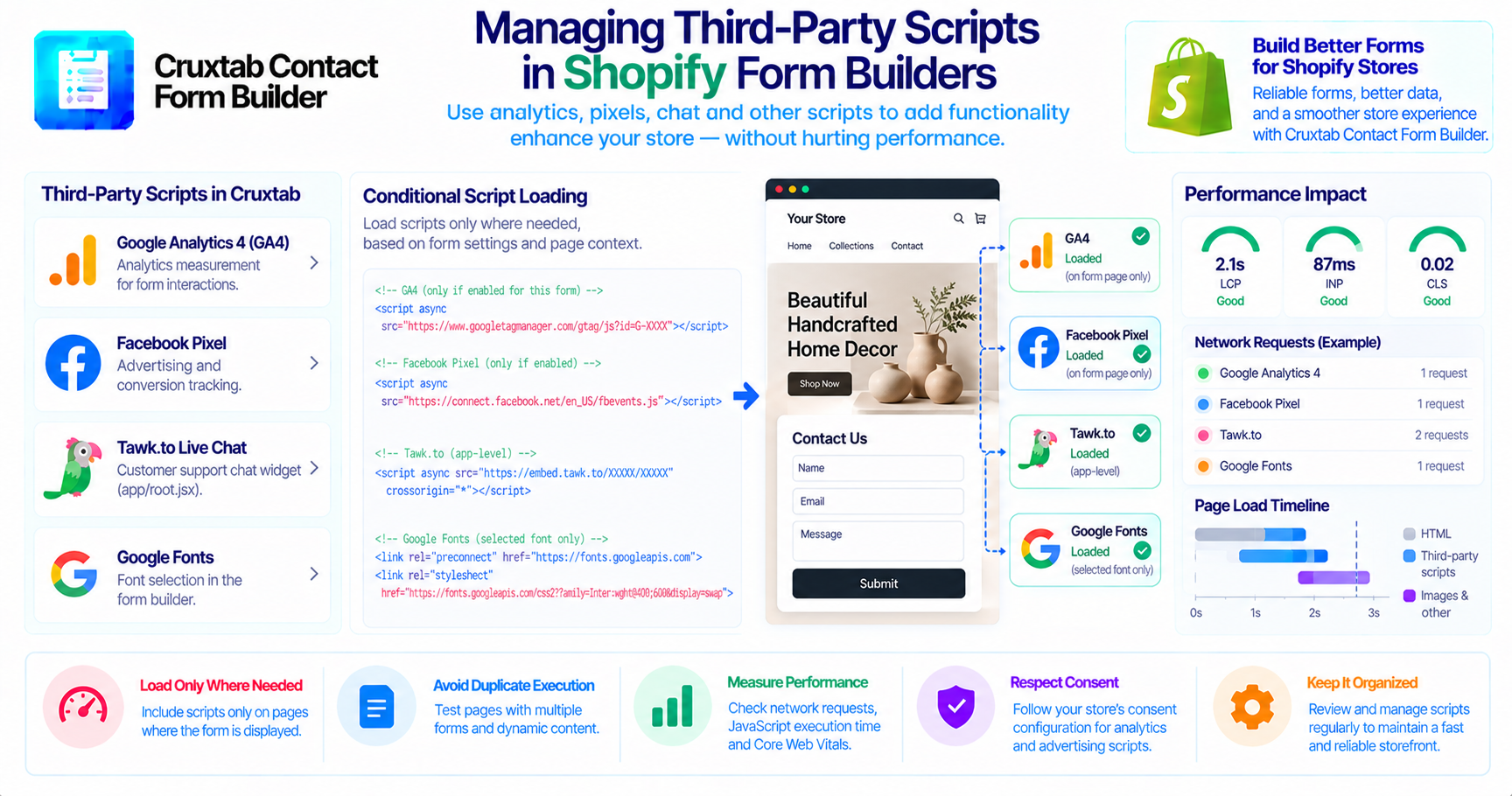
Cruxtab Contact Form Builder supports GA4 and Facebook Pixel through storefront script injection.
The application also loads Tawk.to live chat through:
app/root.jsx
The Google Fonts API is used to provide font choices within the form builder.
These services have different purposes, so they should not all be treated as identical storefront dependencies.
Load scripts only where needed
For per-form analytics integrations, consider whether the relevant scripts need to be loaded on every storefront page or only where the associated form is displayed.
The exact behavior should be confirmed from the current theme integration and script-injection implementation.
Avoid assuming that a script is loaded only once or only on a particular page without testing the actual rendered storefront.
Consider duplicate execution
Theme sections, app blocks, and dynamic storefront rendering can introduce situations where scripts or event listeners are initialized more than once.
Test pages containing multiple forms and pages where content changes without a full browser reload.
The goal is to avoid duplicate tracking and unnecessary script execution.
Measure performance impact
Use browser performance tools and Core Web Vitals measurements to evaluate the effect of third-party scripts.
Useful checks include:
- Network request count.
- JavaScript execution time.
- Main-thread activity.
- Layout shifts.
- Loading behavior on mobile connections.
Do not assume that a script is harmless simply because it is asynchronous.
Respect consent requirements
Analytics and advertising scripts may process visitor data. Their loading behavior should be consistent with the store's consent configuration and applicable privacy requirements.
Conclusion
Third-party integrations can improve a storefront experience, but they should be implemented with performance and privacy in mind. Testing script loading, duplicate execution, and mobile performance helps keep the storefront responsive.
Explore Cruxtab Contact Form Builder for Shopify form-building and analytics integration features.
Comments
Join the discussionNo comments yet. Be the first to comment.