Managing Reusable Template Definitions in JavaScript
As a configurable application grows, template information can easily become scattered across components.
One component may contain template names, another may determine which options to display, and a third may interpret the selected template. Over time, these separate definitions can become difficult to keep consistent.
A dedicated template module offers a cleaner approach.
Keep template definitions in one place
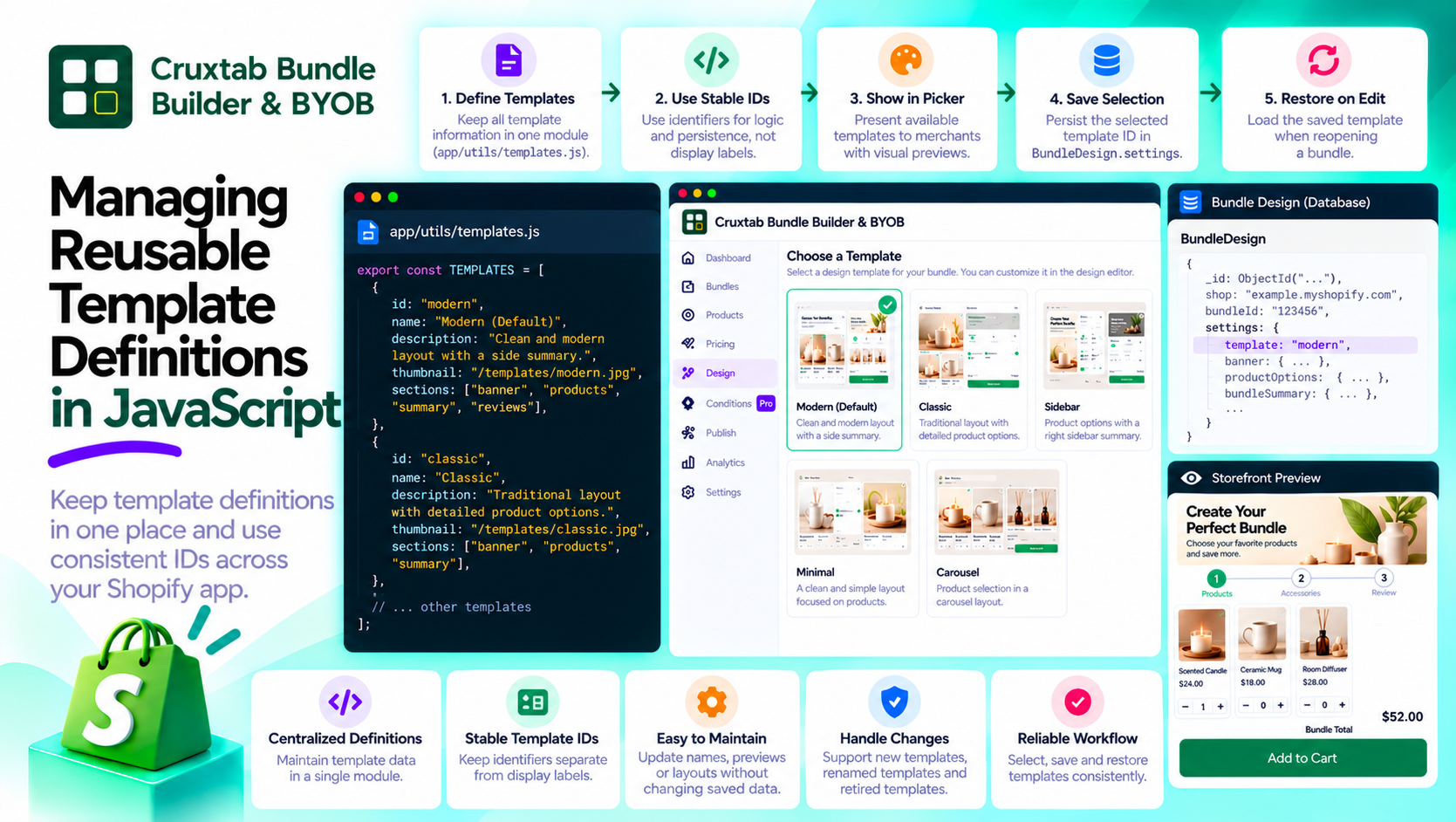
Cruxtab Bundle Builder & BYOB uses app/utils/templates.js for its template-related functionality.
A dedicated module provides a natural place to maintain the information needed to identify and present available templates.
Rather than duplicating template definitions throughout the application, the selection interface can use a shared source.
The exact structure depends on the implementation, but a conceptual definition might include an ID and a display name:
const templates = [
  { id: "layout-a", name: "Layout A" },
  { id: "layout-b", name: "Layout B" },
];
This is an illustrative example, not the application's actual template list or identifiers.
Use identifiers instead of display labels
A template's display name is intended for people. Its ID is intended for application logic and persistence.
Keeping those roles separate gives developers more flexibility to improve labels without unnecessarily changing stored design data.
For example, a display label could be rewritten for clarity while the underlying template ID remains stable.
Keep selection logic understandable
The template picker is responsible for presenting the available choices and allowing a merchant to select one.
The bundle's design configuration records the selected template ID.
This separation makes it easier to reason about the workflow: the utility module defines the available template information, the picker supports selection, and the saved configuration records the merchant's choice.
Plan for template changes
Templates evolve. Developers may rename a template, change its layout, add a new option, or stop offering an older design.
A maintainable implementation should consider:
- Whether existing saved IDs remain valid.
- How the application handles an unknown template ID.
- Whether a default template is needed.
- How the picker and design editor remain consistent.
- How template changes affect existing bundles.
These considerations become increasingly important as more merchants rely on saved configurations.
Test the module and the workflow
Unit tests can verify that template definitions contain unique IDs and the expected metadata.
Integration tests can check that a merchant's selection is saved and restored correctly.
Together, these tests help prevent a small change in template definitions from breaking the broader bundle-editing experience.
Conclusion
Reusable template definitions reduce duplication and give a configurable application a more consistent foundation.
Cruxtab Bundle Builder & BYOB provides a dedicated template picker and a template utility module, with the selected template ID persisted as part of the bundle design.
Explore the app: https://apps.shopify.com/cruxtab-bundle-builder
The general lesson is to centralize reusable configuration and keep human-readable labels separate from the identifiers your application depends on.
Comments
Join the discussionNo comments yet. Be the first to comment.