Making Application Error Reporting Resilient
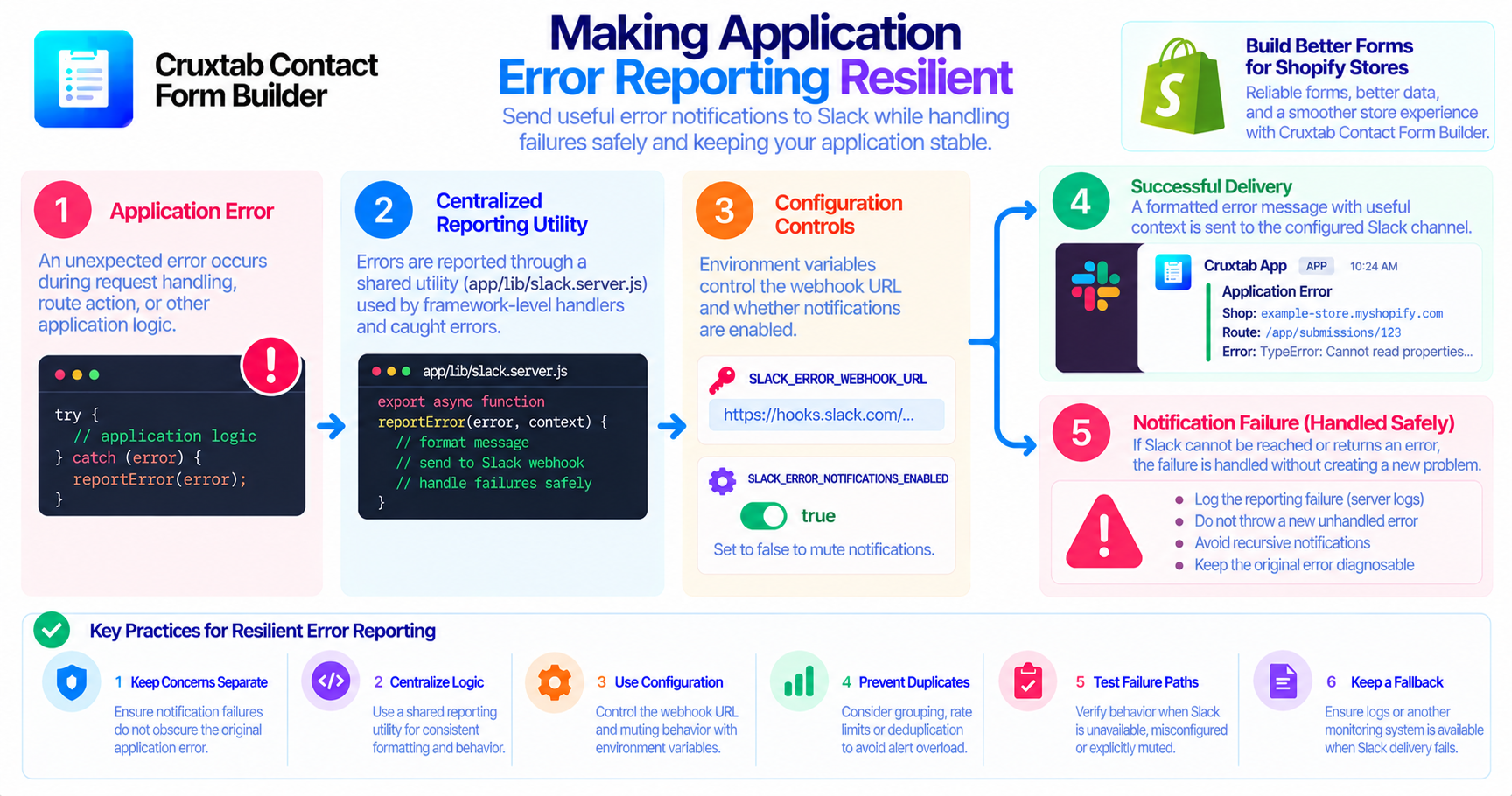
Error reporting is intended to help developers understand application failures. But what happens when the reporting system itself fails?
A Slack webhook may be misconfigured, the remote service may be unavailable, or a notification request may encounter a network problem. If error reporting is not designed carefully, the attempt to report one failure can create another.
Keep reporting separate from the original failure
The original application error and the notification delivery attempt are two different concerns.
For example, an application may encounter an unexpected error during request handling. Its error-reporting utility then tries to send a message to Slack. If that request fails, the application now has a second problem to handle.
A resilient design should avoid allowing notification failure to obscure the original exception or cause uncontrolled recursive reporting.
The exact behavior depends on the implementation, so this is an important area to inspect and test rather than assume.
Centralize reporting logic
The Cruxtab Contact Form Builder implementation uses app/lib/slack.server.js as a shared error-reporting utility. Unhandled React Router errors are also reported through the server entry point app/entry.server.jsx.
Centralizing the notification logic provides a natural place to define consistent message formatting and configuration behavior.
It also makes it easier to review how errors are sent, which fields are included, and what happens if Slack cannot receive a notification.
Use configuration as an operational control
The reporting integration uses SLACK_ERROR_WEBHOOK_URL for the Slack incoming webhook and supports muting notifications with:
SLACK_ERROR_NOTIFICATIONS_ENABLED=false
This gives operators a way to disable Slack notifications through environment configuration.
However, muting should not be confused with repairing an underlying error or guaranteeing that another logging system captures it. Those behaviors need to be verified separately.
Avoid uncontrolled duplicate alerts
If a single failure causes multiple layers to report the same exception, the Slack channel may receive redundant notifications.
Duplicate alerts can make it harder to recognize new incidents, especially during a high-volume failure.
Potential strategies to evaluate include:
- Reporting at one clearly defined layer where possible.
- Including enough context to correlate related failures.
- Grouping repeated messages when the volume justifies it.
- Adding rate limits or deduplication if needed.
These are possible resilience improvements, not claims that the current implementation already includes them.
Test the failure paths
A useful test plan should include more than a successful Slack request.
Test the reporting behavior when:
- The Slack webhook is configured correctly.
- Notifications are explicitly muted.
- The webhook URL is missing or invalid.
- Slack cannot be reached or responds with an error.
- An error occurs inside the reporting utility itself.
- The same underlying exception could be observed by multiple handlers.
The desired result is straightforward: the original application failure should remain diagnosable, while notification failures should be handled in a controlled way.
Keep a fallback for investigation
Slack is a notification destination, not necessarily the complete record of every failure. Teams should consider what other diagnostic information is available when Slack delivery is unsuccessful.
Depending on the deployment, that may include server logs, platform logs, or a dedicated monitoring system. Avoid assuming that these alternatives exist without verifying the actual environment.
Conclusion
A reliable reporting system must handle failure without making the original problem harder to understand. Shared reporting logic, explicit configuration, controlled notification behavior, and tests for delivery failures help make Slack alerts more dependable.
Explore Cruxtab Contact Form Builder to learn more about form-building capabilities for Shopify merchants.
- #reliability-engineering
- #site-reliability-engineering
- #site-reliability-engineering-certification
- #site-reliability-engineering-certification-online
- #site-reliability-engineering-sre-foundation
- #reliabilityengineering
- #ai-reliability-engineering
- #modern-reliability-engineering
- #site-reliability-engineering-legacy
- #site-reliability-engineering-sre
- #error-handling
- #error-handling-in-go
- #error-handling-in-solidity
- #error-handling-in-js
- #error-handling-in-javascript-try-catch-finally
Comments
Join the discussionNo comments yet. Be the first to comment.