Keeping Shopify Form Publication State Consistent
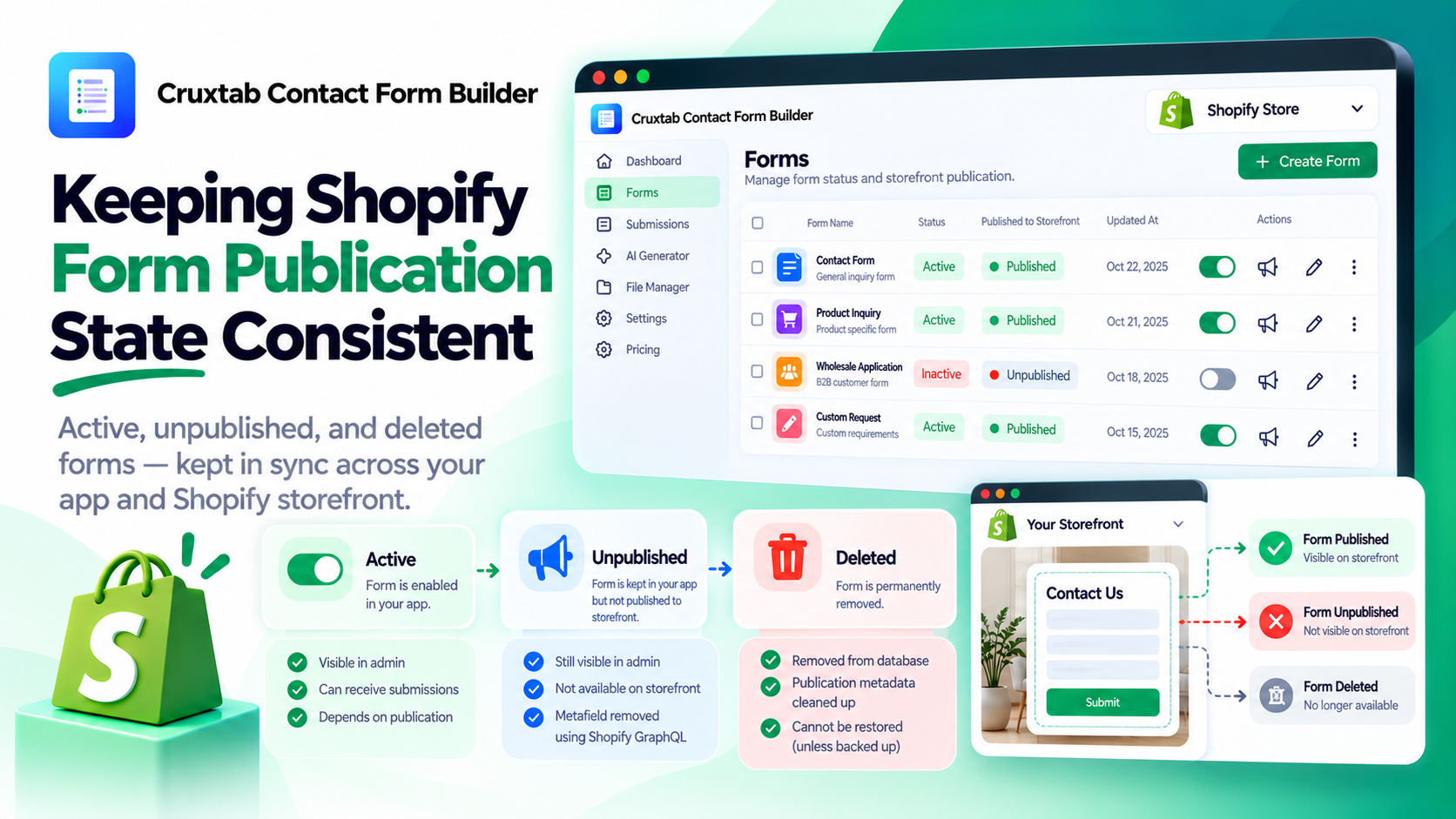
In a Shopify app, changing a setting in the admin interface does not always mean the storefront immediately reflects that change.
This is especially important for form builders, where a merchant may want to disable a form, unpublish it, or remove it completely.
If the application maintains form records in its own database and publication metadata in Shopify metafields, those two systems must be coordinated carefully.
Understand the different kinds of state
A form can have several related but distinct properties:
- Whether the form exists in the application's database
- Whether the form is active according to the app's business rules
- Whether the form is published for storefront use
- Whether the storefront integration can still discover the form's configuration
These properties should not be compressed into a single status value unless the application has explicitly defined that behavior.
A merchant needs to know whether a form is disabled, unpublished, or deleted because each action can have different consequences.
Define the state transitions
Before implementing buttons, document the allowed transitions.
For example:
| Operation | Primary intention |
|---|---|
| Toggle status | Change whether the form is active |
| Unpublish | Remove its storefront publication |
| Delete | Remove the form record and handle dependent resources |
The exact effects should follow the app's business rules.
For example, deleting a form might also require deleting its publication metadata. Unpublishing might preserve the form record so the merchant can edit or publish it again later.
The important part is that these behaviors are deliberate and documented.
Remember that API calls can fail independently
Suppose a merchant clicks Unpublish.
The app may need to update its database and call Shopify's metafieldsDelete mutation. If one operation succeeds and the other fails, the systems may temporarily disagree.
A database transaction can help coordinate database changes, but it cannot automatically roll back a separate Shopify API request.
For operations that cross these boundaries, consider:
- Recording the intended state transition
- Tracking the synchronization result
- Retrying failed operations safely
- Rechecking the actual metafield state
- Providing an administrative recovery path
Not every application needs a sophisticated distributed workflow. The implementation should match the cost of inconsistency and the expected volume of changes.
Make retries safe
Retries are important when an external request times out or returns an ambiguous result.
The application should be able to determine whether the requested outcome has already been achieved before attempting additional changes.
For example, an unpublish operation may be considered complete when the relevant publication metadata is confirmed absent, provided that absence is the intended final state.
Careful retry behavior prevents transient API errors from turning into persistent inconsistencies.
Test the storefront, not just the admin button
A successful response from an admin action is not sufficient proof that the storefront behaves correctly.
Useful integration tests include:
- Publish a form and verify that the intended storefront integration can discover it.
- Disable the form and verify the expected active-state behavior.
- Unpublish the form and verify that it is no longer available through the publication mechanism.
- Delete the form and verify that its dependent metadata is handled correctly.
- Simulate a failed Shopify mutation and verify that the application reports or recovers from the inconsistency.
These tests should reflect the actual storefront rendering logic and publication contract.
Applying these ideas to Cruxtab Contact Form Builder
Cruxtab Contact Form Builder provides form status management, unpublishing, and deletion through its Forms page.
Its implementation uses Shopify GraphQL operations such as metafieldsSet and metafieldsDelete, supported by dedicated form model and metafield utility modules.
This is a useful example of why admin actions and storefront state need to be considered together.
Explore the app: https://apps.shopify.com/cruxtab-form-builder
Conclusion
Reliable form publishing is not just about adding or removing a metafield. It is about defining the form lifecycle and keeping every relevant system consistent with that lifecycle.
Make the differences between active, unpublished, and deleted states explicit. Design recovery for failed API calls, make retries safe, and test the storefront behavior that merchants actually care about.
Comments
Join the discussionNo comments yet. Be the first to comment.