Improving Shopify Storefront Performance When Rendering Dynamic Forms
Storefront performance matters because every page load involves downloading, parsing, and rendering HTML, CSS, and JavaScript.
When an application adds dynamic content to a Shopify storefront, the implementation should consider how much content is generated and how much work the browser must perform.
A form shortcode feature provides a useful example of this challenge.
The shortcode rendering approach
Crux Form Shortcode allows merchants to place a form using:
<div class="cruxtab-formbuilder" data-id="FORM_ID"></div>
The implementation is located in:
extensions/form-builder/blocks/shortcode-embed.liquid
It uses Liquid app metafields to render available forms and loads:
assets/form-builder.js
The JavaScript locates the matching form and moves it into the shortcode element.
The performance limitation
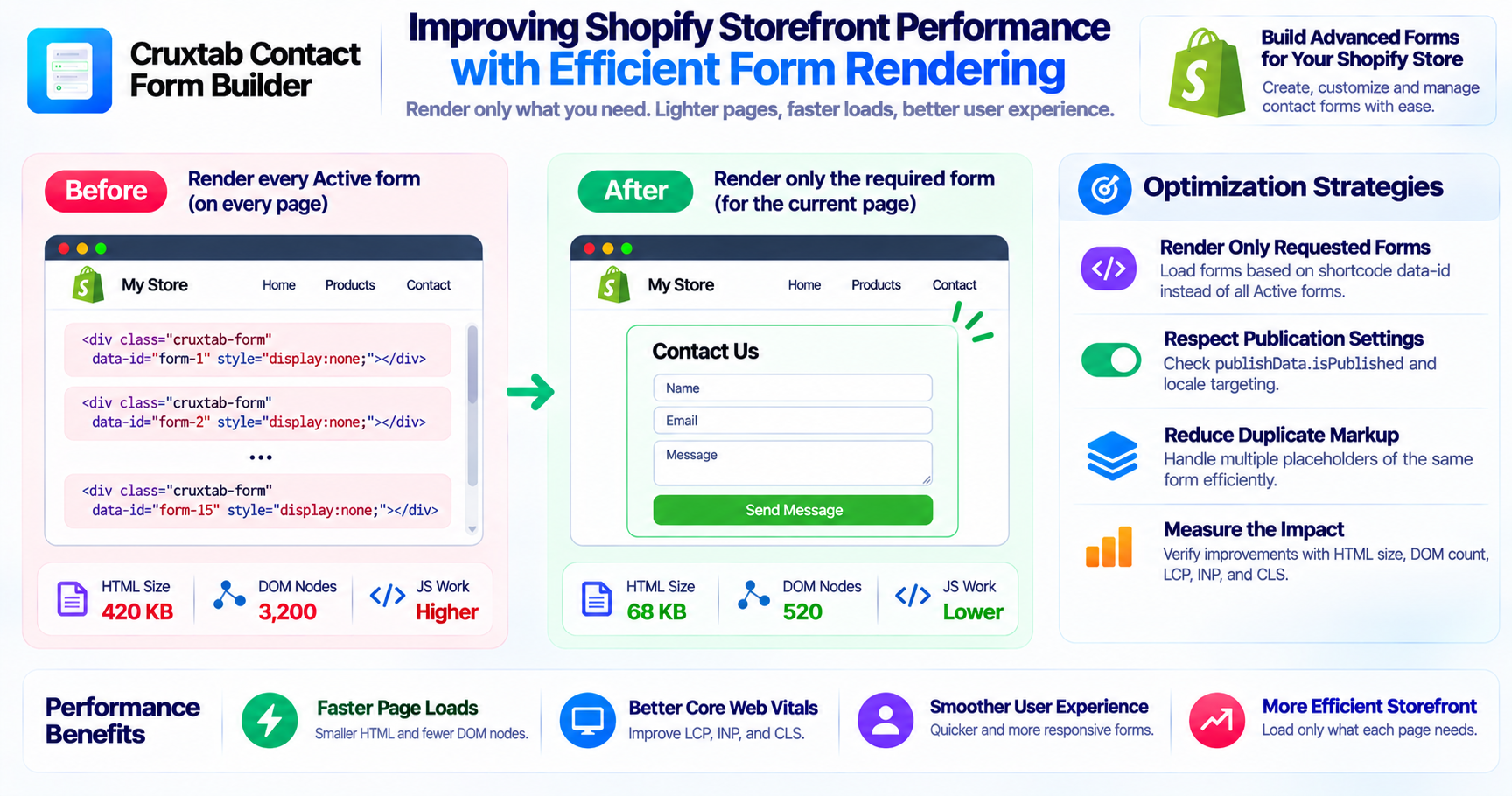
The current implementation renders every Active form into every page's HTML, even when a page contains only one shortcode.
For example, imagine a store with 15 Active forms.
A page that needs only one contact form may still receive hidden markup for all 15 forms.
This creates unnecessary page content.
Why pre-rendering every form can be expensive
Rendering unused forms can increase several types of browser workload.
HTML size
Every additional form contributes markup to the initial page response.
DOM size
The browser needs to parse and maintain the rendered elements, even when they are hidden.
JavaScript processing
The storefront script needs to locate the matching form among the rendered elements.
Page complexity
Additional markup can make debugging and performance analysis more difficult.
The actual performance impact depends on form complexity, page structure, and the number of Active forms.
Potential optimization strategies
The current behavior suggests several possible improvements.
1. Render only requested forms
Instead of rendering every Active form, the application could investigate a more targeted selection mechanism based on shortcode identifiers.
This would reduce unnecessary markup when a page needs only a small subset of available forms.
2. Respect publication settings
The current implementation checks only status == 'Active'.
It ignores:
publishData.isPublished- Locale targeting
Applying these conditions could prevent irrelevant forms from being rendered.
3. Reduce duplicate markup
If a page contains multiple shortcode placeholders for the same form, the implementation could consider whether one rendered form can be reused safely or whether separate instances are required.
The correct behavior depends on how the form JavaScript handles multiple instances.
4. Measure before and after
Performance improvements should be validated rather than assumed.
Useful measurements include:
- Initial HTML response size
- DOM node count
- JavaScript execution time
- Largest Contentful Paint
- Interaction to Next Paint
- Cumulative Layout Shift
Testing should use pages with different numbers of Active forms and shortcode placeholders.
Why hidden elements still matter
Hiding an element does not eliminate the cost of generating its HTML or adding it to the DOM.
This is an important distinction when building storefront applications.
A large number of hidden forms can still contribute to page weight even if visitors never see them.
Conclusion
Dynamic storefront features should render only the content that is needed.
Crux Form Shortcode currently pre-renders every Active form into every page's HTML before placing the matching form. Reducing unnecessary form markup is an important opportunity for improving storefront efficiency.
Explore Cruxtab Contact Form Builder.
Comments
Join the discussionNo comments yet. Be the first to comment.