Handling Shopify Form Submissions Securely
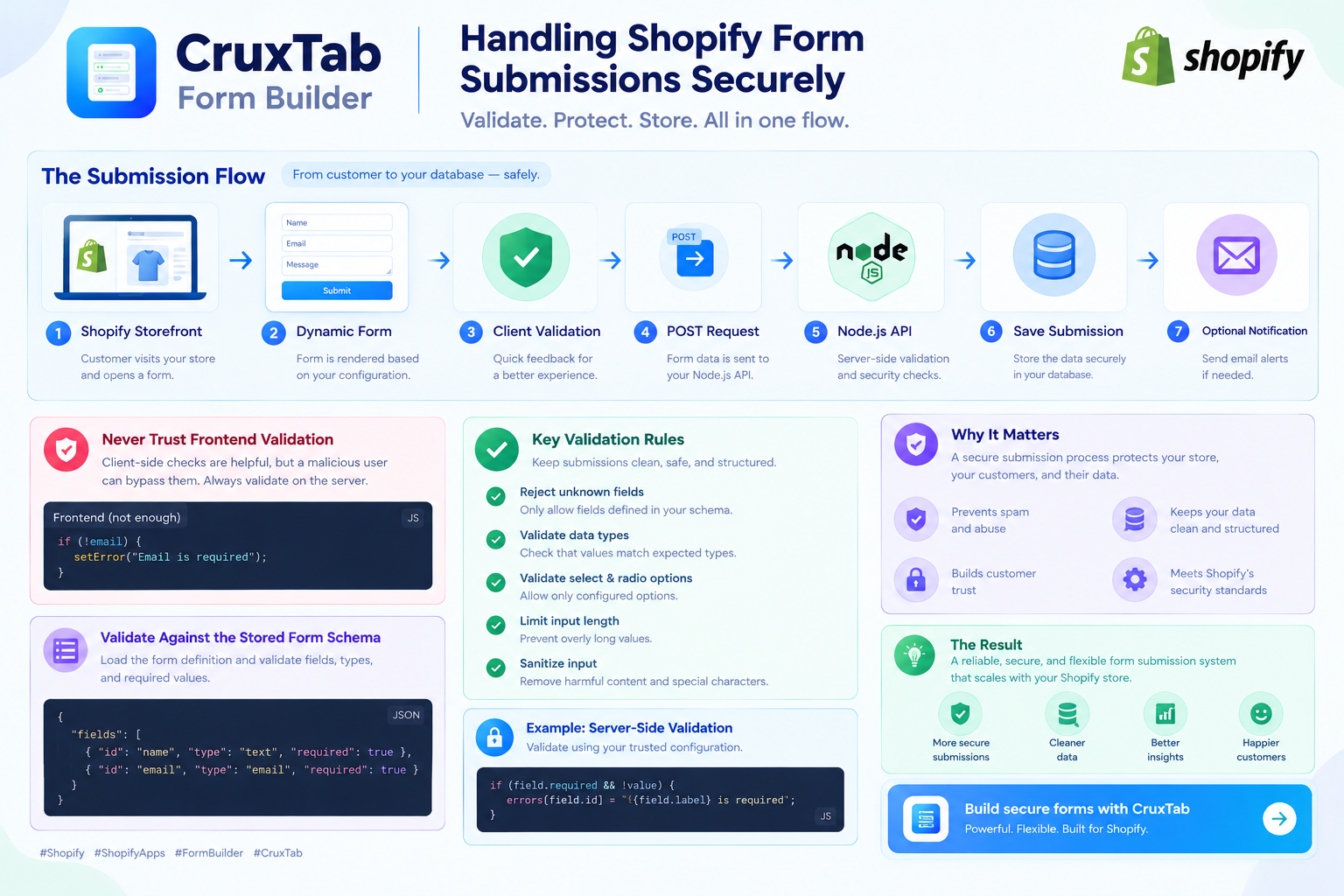
A form builder is not finished when the form appears on a Shopify storefront.
The more important part is what happens after a customer clicks Submit.
A form submission can contain names, email addresses, phone numbers, product questions, wholesale information, custom requirements, and other customer-provided data.
That means a Shopify form app needs a submission architecture that is reliable, validated, and designed with security in mind.
In this article, we'll build a practical model for handling form submissions with a React frontend and a Node.js backend.
The Basic Submission Flow
A typical architecture looks like this:
Shopify Storefront
        ↓
Dynamic Form
        ↓
Client Validation
        ↓
POST Request
        ↓
Node.js API
        ↓
Server Validation
        ↓
Rate Limiting / Security Checks
        ↓
Save Submission
        ↓
Optional Notification
Each layer has a different responsibility.
The frontend provides a good user experience.
The backend provides the security boundary.
Never Trust Frontend Validation
Suppose the frontend checks whether an email address is valid:
if (!email) {
  setError("Email is required");
}
This is useful for customers.
But it should never be your only validation.
A malicious client can send a request directly to your API without using your React application.
For example:
POST /api/forms/product-inquiry/submit
with completely different data.
The server must validate every submission independently.
Validate Against the Stored Form Schema
If your app uses a dynamic form schema, the backend can load the stored form definition before processing a submission.
For example:
{
  "fields": [
    {
      "id": "name",
      "type": "text",
      "required": true
    },
    {
      "id": "email",
      "type": "email",
      "required": true
    }
  ]
}
The submitted values might be:
{
  "name": "Alex",
  "email": "alex@example.com"
}
The server can compare the submitted values with the stored schema.
This lets you verify:
Which fields exist
Which fields are required
Which field types are expected
Which values are allowed
Whether unexpected fields were submitted
Example Validation Flow
A Node.js service could follow this pattern:
async function validateSubmission(form, values) {
  const errors = {};

  for (const field of form.fields) {
    const value = values[field.id];

    if (field.required && !value) {
      errors[field.id] = `${field.label} is required`;
      continue;
    }

    if (field.type === "email" && value) {
      if (!isValidEmail(value)) {
        errors[field.id] = "Enter a valid email address";
      }
    }
  }

  return errors;
}
The exact implementation will depend on your application, but the principle is important:
The backend should validate using trusted server-side configuration.
Reject Unknown Fields
Suppose the form only contains:
name
email
message
but the request contains:
{
  "name": "Alex",
  "email": "alex@example.com",
  "message": "Hello",
  "admin": true
}
The backend should not blindly store everything it receives.
One approach is to build an allowlist from the form schema:
const allowedFields = new Set(
  form.fields.map((field) => field.id)
);
Then filter or reject values that aren't part of the form definition.
This makes the submission format predictable.
Validate Data Types
Required fields aren't enough.
The backend should also validate expected types.
For example:
text      → string
email     → string with email validation
checkbox  → boolean
select    → allowed option
number    → numeric value
A value should not be considered valid simply because it exists.
Validate Select and Radio Options
Suppose the form contains:
{
  "id": "contact_reason",
  "type": "select",
  "options": [
    "Product Question",
    "Wholesale",
    "Custom Order"
  ]
}
A client should only be able to submit one of those configured options.
The server can check:
const validOptions = new Set(field.options);

if (!validOptions.has(value)) {
  errors[field.id] = "Invalid option";
}
This prevents arbitrary values from being accepted where the schema expects a controlled list.
Limit Input Length
Never assume customers will submit short values.
A message field could contain thousands or millions of characters if the server doesn't impose limits.
For example:
const MAX_MESSAGE_LENGTH = 5000;

if (message.length > MAX_MESSAGE_LENGTH) {
  errors.message = "Message is too long";
}
Reasonable limits should be defined for each field where appropriate.
Limits help protect:
Database storage
API resources
Email systems
Admin interfaces
Logging systems
Protect the Submission Endpoint
A public form submission endpoint can attract automated traffic.
Consider adding:
Rate limiting
Request size limits
Origin/session checks where appropriate
Bot protection
Abuse monitoring
For example, an API might limit repeated requests from the same source within a short period.
The exact limits should depend on the application's expected traffic.
Rate Limiting Example
With an Express application, rate limiting can be applied to submission routes.
Conceptually:
app.use(
  "/api/forms",
  submissionRateLimiter
);
The limiter can restrict excessive requests while allowing normal customers to submit forms.
Don't make the limit so aggressive that legitimate customers are blocked.
Avoid Trusting Hidden Form Fields
A common mistake is assuming hidden fields are trustworthy.
For example:
<input type="hidden" name="productId" value="123">
A customer can modify that value before sending the request.
If a product identifier affects business logic, the server should verify it rather than trusting the browser.
The same principle applies to:
Form IDs
Store IDs
Product IDs
Prices
Permissions
User roles
Internal flags
Anything security-sensitive should be determined or verified server-side.
Prevent Cross-Site Request Forgery Where Applicable
If your authentication model uses cookies, CSRF protections may be necessary for state-changing requests.
Depending on the architecture, this can include:
CSRF tokens
SameSite cookie settings
Origin validation
Framework-specific protections
The exact approach depends on how the Shopify app authenticates requests and how the API is exposed.
The important point is to understand the browser authentication model rather than assuming every request is safe.
Escape or Sanitize Output
A submission is user-generated data.
Do not assume that stored text is safe to render as HTML.
For example, a customer could submit text containing markup or script-like content.
When displaying submission data in an admin dashboard, render it as text unless HTML is explicitly required and safely sanitized.
For example:
<div>{submission.message}</div>
is preferable to injecting arbitrary HTML.
Avoid using mechanisms such as dangerouslySetInnerHTML for untrusted submission content unless the content has been properly sanitized.
Store Only What You Need
A form builder can potentially collect a lot of information.
That doesn't mean you should store everything.
Before adding a field to your database, ask:
Do we need this data?
How long do we need it?
Who can access it?
Why are we collecting it?
Reducing unnecessary data also reduces the impact of a potential data exposure.
Protect Access to Submissions
The submission API and admin dashboard should enforce authorization.
For example:
Store A
  ↓
Only Store A's submissions

Store B
  ↓
Only Store B's submissions
Never rely only on a frontend filter such as:
submissions.filter(...)
The server must enforce tenant/store ownership.
A request should be authorized against the authenticated shop or account before returning data.
Multi-Tenant Data Isolation
This is particularly important for Shopify apps.
Imagine the database contains:
shop_id | submission_id
--------|-------------
shop-a  | 101
shop-a  | 102
shop-b  | 103
When Shop A requests submissions, the database query should include its shop identifier.
For example:
const submissions = await Submission.find({
  shopId: authenticatedShopId
});
The authenticated shop should come from trusted authentication context, not from a value supplied by the browser.
Store Submission Metadata Carefully
Useful metadata might include:
Form ID
Shop ID
Created timestamp
Page URL
Product ID
Submission status
But metadata can also contain sensitive information.
Only collect what has a legitimate purpose.
If storing URLs, referrers, IP addresses, or user-agent information, consider your privacy requirements and applicable policies.
Email Notifications
Many form builders send an email after a submission.
A simple flow might be:
Customer submits form
        ↓
Validate submission
        ↓
Save submission
        ↓
Send notification
It's usually safer to save the submission before attempting notification delivery.
That way, a temporary email provider failure doesn't necessarily mean the customer's submission disappears.
You can then retry notification delivery separately.
Don't Block the Entire Request on Email
For larger applications, email delivery can be treated as an asynchronous task.
For example:
API Request
    ↓
Validate
    ↓
Save
    ↓
Queue notification
    ↓
Return success
A background worker can then process the notification.
This can make the customer-facing submission request faster and more reliable.
Handle Duplicate Submissions
Customers can accidentally click Submit multiple times.
A useful frontend pattern is to disable the submit button while a request is in progress:
const [submitting, setSubmitting] = useState(false);
But frontend protection isn't enough.
If duplicate submissions are a serious concern, consider server-side idempotency or duplicate detection.
For example, an idempotency key can help the server recognize repeated attempts.
Return Safe API Responses
The API should return enough information for the frontend to display a useful result.
For example:
{
  "success": true,
  "message": "Your form was submitted successfully."
}
For validation errors:
{
  "success": false,
  "errors": {
    "email": "Enter a valid email address."
  }
}
Avoid returning internal implementation details such as database errors, stack traces, or secrets.
Logging
Logs are useful when troubleshooting failed submissions.
But don't log sensitive customer data unnecessarily.
Instead of:
console.log(req.body);
consider logging structured information such as:
console.log({
  event: "form_submission_failed",
  formId,
  shopId,
  reason: "validation_error"
});
This provides useful debugging information without automatically dumping customer-submitted content into logs.
A Practical Secure Architecture
Putting the pieces together:
             Shopify Storefront
                    │
                    ▼
             Dynamic Form UI
                    │
                    ▼
            Client Validation
                    │
                    ▼
              HTTPS Request
                    │
                    ▼
             Node.js API
                    │
          ┌─────────┴─────────┐
          ▼                   ▼
   Authentication        Rate Limiting
          │                   │
          └─────────┬─────────┘
                    ▼
             Load Form Schema
                    │
                    ▼
          Server-Side Validation
                    │
                    ▼
           Store Submission
                    │
             ┌──────┴──────┐
             ▼             ▼
        Admin View     Notification
Each layer provides a separate protection or responsibility.
Testing the Submission System
Before releasing a form builder, test more than the happy path.
Valid submission
Name: Alex
Email: alex@example.com
Message: Hello
Expected result:
Submission accepted
Missing required field
Name: Alex
Email: ""
Expected result:
Email is required
Invalid email
Email: hello
Expected result:
Invalid email
Unknown field
{
  "name": "Alex",
  "unexpected": "value"
}
Expected result:
Rejected or ignored
Invalid select option
Reason: InvalidValue
Expected result:
Invalid option
Oversized message
Expected result:
Message exceeds allowed length
Excessive requests
Expected result:
Rate limit response
Testing these cases helps identify weaknesses before customers encounter them.
How Cruxtab Contact Form Builder Handles the Bigger Picture
Cruxtab Contact Form Builder is designed around reusable forms that can be shown in different Shopify contexts.
A store can create forms for:
Homepage visitors
Specific pages
Specific products
Product inquiries
Wholesale requests
Custom requirements
That means the submission system needs to work with dynamically configured forms rather than one hard-coded contact form.
The architecture can be thought of as:
Form Configuration
       ↓
Target Matching
       ↓
Dynamic Renderer
       ↓
Client Validation
       ↓
Secure API
       ↓
Server Validation
       ↓
Submission Storage
The important part is that security doesn't depend on the form being displayed in a particular location.
The same server-side validation principles apply whether the form appears on a homepage, product page, or custom page.
Try Cruxtab Contact Form Builder
If you want to create customizable forms for your Shopify store and display different forms on your homepage, pages, or products, you can check out Cruxtab Contact Form Builder:
https://apps.shopify.com/cruxtab-form-builder
Final Thoughts
A form submission system should be treated as an API that accepts untrusted input.
A strong implementation should:
Validate on the server
Validate against the stored form schema
Reject unexpected or invalid values
Limit input sizes
Protect public endpoints from abuse
Enforce store-level authorization
Keep customer data isolated
Avoid exposing sensitive information in logs
Handle notification failures separately
Return safe API responses
Test invalid and abusive input
The frontend makes the form easy to use.
The backend makes the submission trustworthy.
For a Shopify form builder, keeping those responsibilities separate creates a system that is easier to maintain and safer to operate as the app grows.