Handling Shopify App Scope Changes with Webhooks
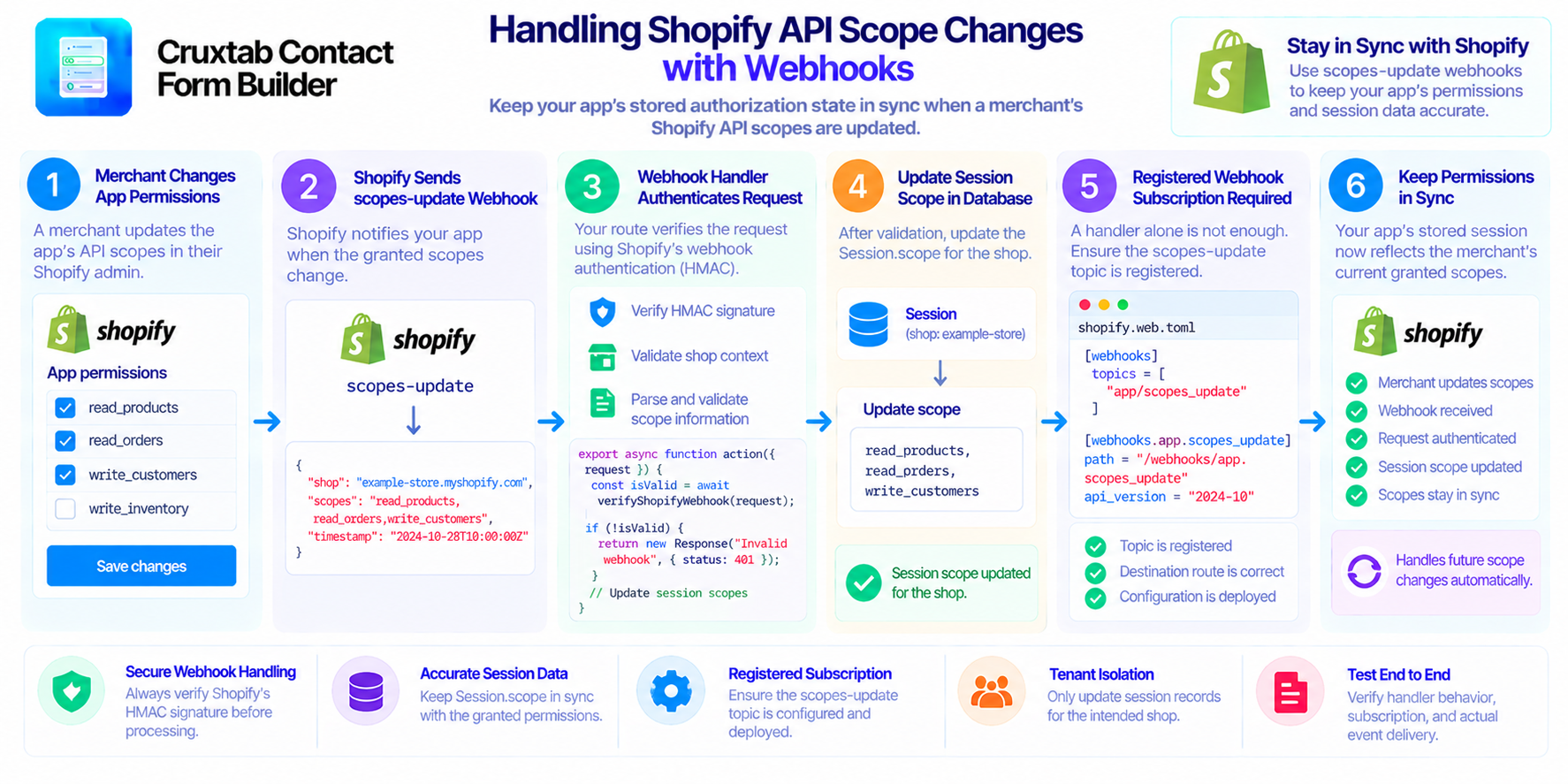
Shopify apps rely on API scopes to determine which resources and operations they can access. As an app evolves, its requested permissions may change, and a merchant may grant a different set of scopes.
When those permissions change, the application needs a reliable way to keep its stored authorization information up to date.
A scopes-update webhook can help synchronize the granted permissions with the app's local session records.
Why API scopes matter
API scopes define the permissions an app requests from Shopify. Depending on the app's functionality, these permissions may allow access to products, orders, customers, inventory, or other resources.
The exact permissions depend on the app's integration requirements and the authorization granted by the merchant.
Keeping track of the granted scopes is useful because the application's local records may otherwise contain an outdated representation of its current authorization.
What is a scopes-update webhook?
A scopes-update webhook notifies an app when the granted API scopes change.
The handler can process the event and update the corresponding session information so the application's stored authorization state reflects the new scope list.
In a Shopify app, the handler might live at:
app/routes/webhooks.app.scopes_update.jsx
The route should use the framework's supported webhook authentication mechanism before making changes to stored session data.
Update the session scope
If the application stores granted scopes in Session.scope, the handler can use the verified webhook payload to update that field for the appropriate shop session records.
A reliable implementation should:
- Authenticate the incoming webhook.
- Identify the shop associated with the event.
- Validate the received scope information.
- Update the appropriate session records.
- Handle database errors explicitly.
The application should not accept arbitrary scope values from an unauthenticated request.
It is also important to understand how the session storage adapter represents scopes. Some applications store them as a comma-separated string, while others use a different representation. The update must match the format expected by the rest of the application.
A handler is not enough
Creating a webhook route does not automatically mean Shopify will send events to it.
The app must also register a subscription for the relevant topic through its effective webhook configuration.
If the handler exists but no active subscription is registered, the session scope update may never run in response to a real Shopify event.
This can leave the local session data stale even though the handler itself is implemented correctly.
Test the complete workflow
A useful test should verify more than whether the route returns a successful response.
Test that a valid event updates the intended session records, an invalid event is rejected, and unrelated shops remain unchanged.
Also verify the deployed webhook registration and actual event delivery. A direct route test cannot prove that Shopify has subscribed the app to the topic.
Conclusion
A scopes-update webhook helps keep local authorization metadata aligned with Shopify's granted permissions. Reliable handling requires authenticated requests, correct shop identification, consistent session updates, and a registered webhook subscription.
For developers building Shopify storefront forms and related workflows, explore Cruxtab Contact Form Builder.
Comments
Join the discussionThe point that a handler alone doesn't mean Shopify will ever call it is the one that bites people most. A small tip: after each deploy, log the active webhook subscriptions (or query them via the Admin API) and compare against what the app expects, so a missing scopes_update topic fails loudly instead of leaving sessions stale. Do you also guard against out-of-order deliveries when updating the session scope?