Handling Dynamic Shopify Theme Content with MutationObserver
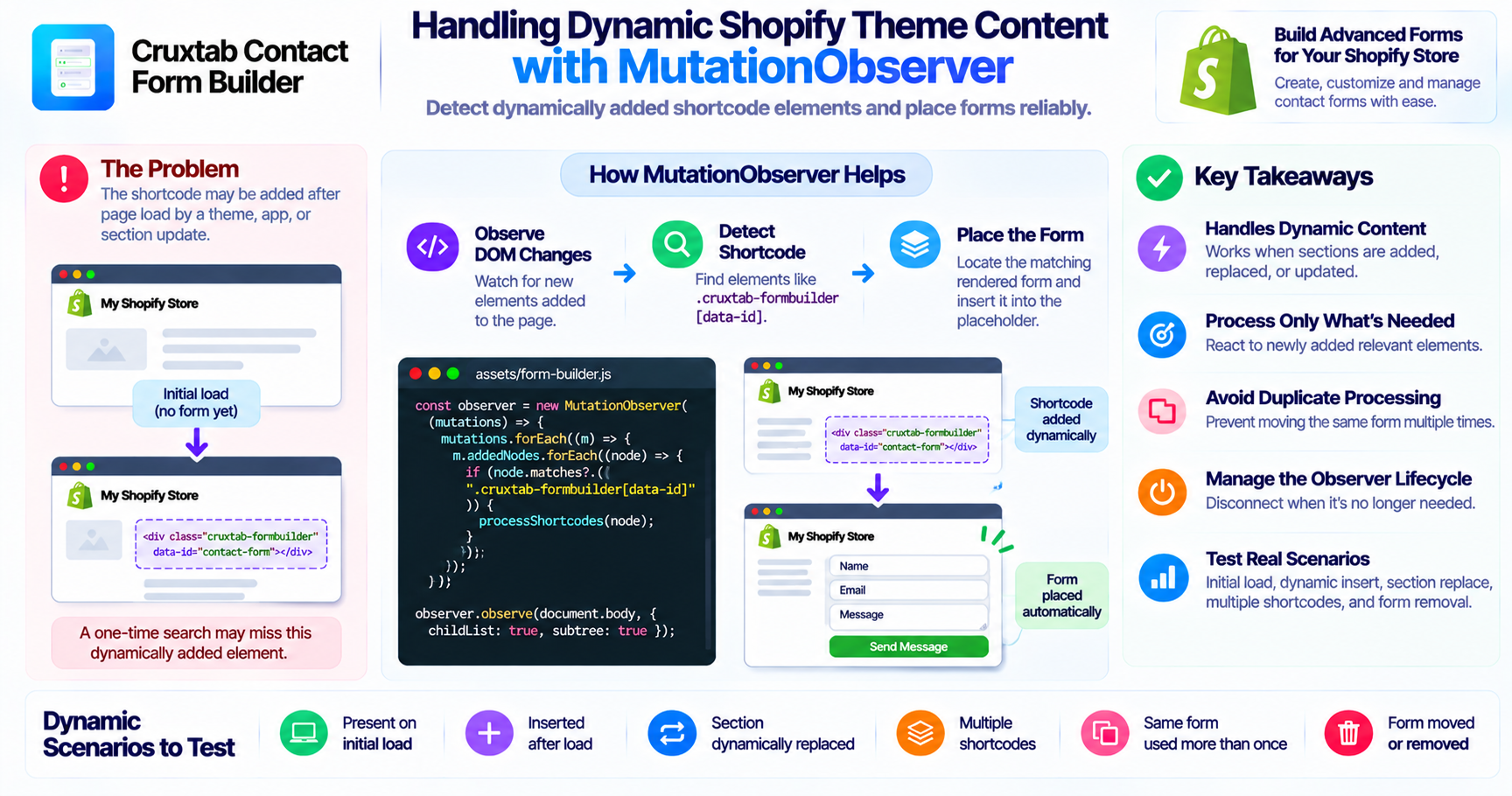
Shopify storefront pages are not always static.
Theme scripts, app embeds, navigation changes, and dynamically rendered sections can modify the DOM after the initial page load.
JavaScript that searches for an element only once may fail to handle elements that appear later.
This is where the browser's MutationObserver API can be useful.
Understanding the problem
Crux Form Shortcode uses this HTML structure:
<div class="cruxtab-formbuilder" data-id="FORM_ID"></div>
The storefront script in:
assets/form-builder.js
searches for shortcode placeholders and moves the matching form into the requested location.
The current implementation relies on the shortcode placement being available when its JavaScript processing runs.
However, storefront themes can update their DOM dynamically.
For example, a section may be added or replaced after the initial page render.
What is MutationObserver?
MutationObserver is a browser API that allows JavaScript to observe changes to the DOM.
It can detect changes such as:
- New elements being added
- Existing elements being removed
- Attributes being modified
- Changes within a selected subtree
This can help scripts respond when relevant elements appear after the initial page load.
Official reference: MDN MutationObserver.
The missing fallback in Crux Form Shortcode
The shortcode implementation contains a comment mentioning a MutationObserver fallback.
However, the audit confirms that the fallback has not been implemented.
This means the documented intention should not be confused with an existing runtime capability.
A future implementation could use MutationObserver to detect shortcode placeholders added after the initial processing pass.
An illustrative implementation
A simplified example:
function processShortcodes(root = document) {
  const placeholders = root.querySelectorAll(
    ".cruxtab-formbuilder[data-id]"
  );

  placeholders.forEach((placeholder) => {
    const formId = placeholder.dataset.id;

    if (!formId) return;

    // Locate and place the matching rendered form.
    // The actual matching and movement logic
    // must use the application's existing implementation.
  });
}

const observer = new MutationObserver((mutations) => {
  for (const mutation of mutations) {
    mutation.addedNodes.forEach((node) => {
      if (node.nodeType !== Node.ELEMENT_NODE) return;

      processShortcodes(node);

      if (node.matches?.(".cruxtab-formbuilder[data-id]")) {
        processShortcodes(node.parentElement ?? document);
      }
    });
  }
});

observer.observe(document.body, {
  childList: true,
  subtree: true,
});
This is an illustrative pattern, not a drop-in replacement for the existing shortcode implementation. The actual integration needs to handle matching forms, repeated processing, and the lifecycle of moved elements.
Avoid observing more than necessary
MutationObserver can create unnecessary work if every DOM change triggers a full-page search.
A better implementation should:
- Process only newly added relevant elements
- Avoid repeatedly moving the same form
- Prevent duplicate processing
- Disconnect the observer when it is no longer needed
- Avoid reacting to mutations caused by its own processing logic
The observer should be designed around the specific changes the shortcode feature needs to detect.
Test dynamic storefront scenarios
A fallback should be tested against several situations:
- Shortcode exists during the initial page load.
- Shortcode is inserted after the page loads.
- A theme section is dynamically replaced.
- Multiple shortcode elements are inserted.
- The same form identifier appears more than once.
- A form is moved or removed during theme updates.
The application should also confirm that observing DOM changes does not introduce excessive JavaScript work.
Conclusion
MutationObserver can help storefront applications handle DOM elements that appear after the initial page load.
Crux Form Shortcode includes a comment describing a MutationObserver fallback, but the audit found that it has not yet been implemented.
Adding a carefully scoped observer is a possible future improvement for handling dynamically inserted shortcode elements.
Explore Cruxtab Contact Form Builder.
Comments
Join the discussionNo comments yet. Be the first to comment.