From Visual Nodes to Persistent Workflow Data
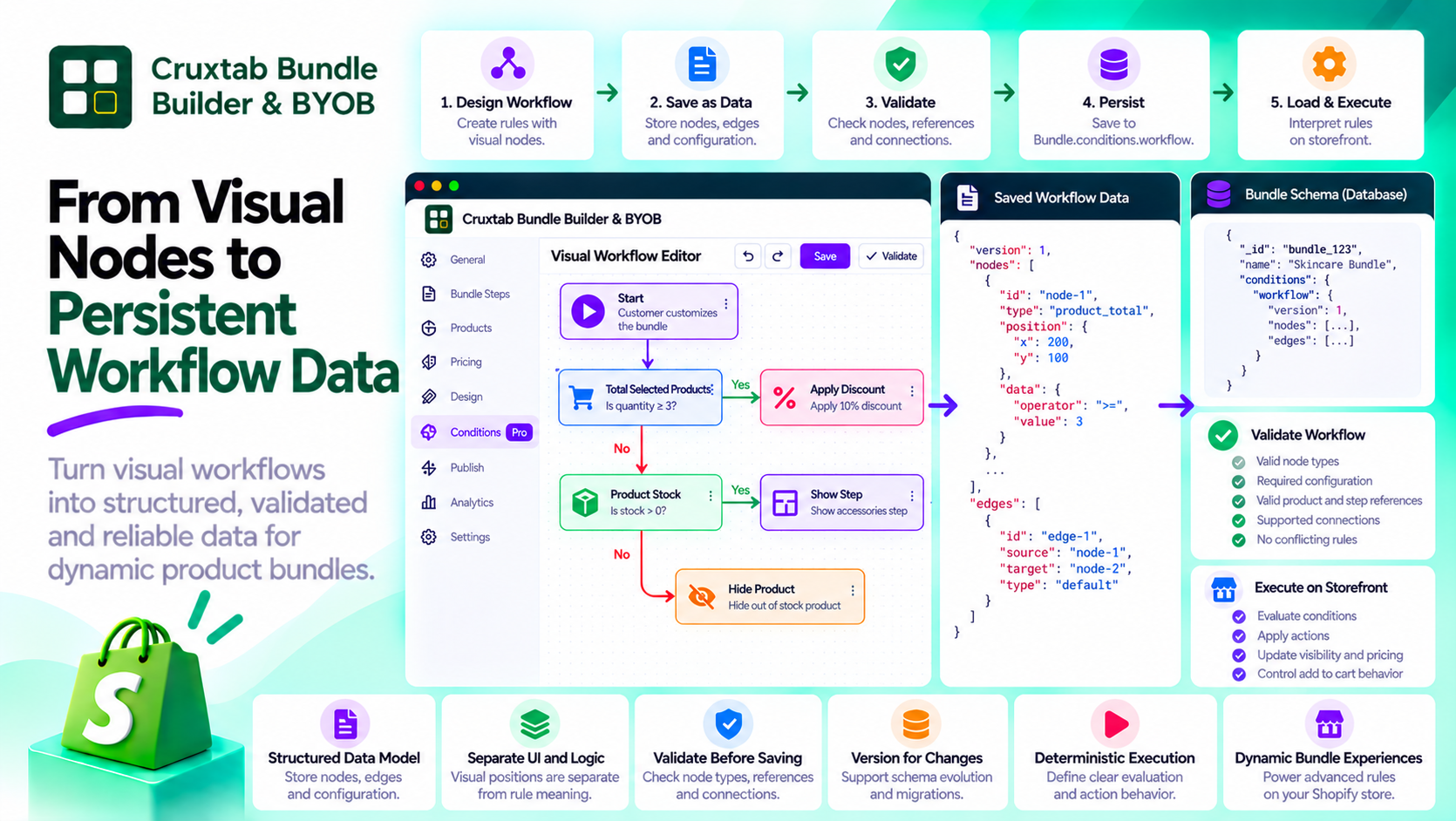
A visual workflow editor allows users to create rules by arranging nodes and connecting them on a canvas.
But the graph displayed in the browser is only one representation of the workflow. The application also needs to store that workflow, load it later, validate it, and interpret its meaning.
This is where workflow data modeling becomes important.
Treat the workflow as a structured document
A workflow typically contains nodes and connections.
Each node needs a stable identifier, a supported type, and the configuration required for its operation.
Connections identify relationships between nodes and help the evaluator determine how the workflow should proceed.
The stored representation should preserve the information needed to reconstruct both the editor and the rule definition.
Separate presentation from meaning
A node's position on the canvas is presentation data. Its type, configuration, and relationships determine its meaning.
For example, moving a product-stock check to another location on the canvas should not change which product it evaluates.
This distinction makes it possible to reorganize the editor without accidentally changing business behavior.
It also helps keep the workflow evaluator independent of the UI library.
Validate the saved workflow
Even if the editor prevents invalid connections, the server should not blindly trust submitted graph data.
Validation should check:
- Whether node types are supported
- Whether required configuration exists
- Whether referenced products or steps are valid
- Whether connections follow the permitted structure
- Whether the workflow contains unsupported or contradictory rules
The application should also define how malformed or older workflow configurations are handled.
Define execution semantics
A stored graph does not automatically specify how it should be executed.
The application must define how checks are evaluated, how connections are traversed, and how multiple actions interact.
For example, if one rule hides a product while another action attempts to reveal it, the engine needs a deterministic way to resolve the result.
Likewise, if two actions request different navigation targets, the application should define whether the workflow permits both, prioritizes one, or rejects the configuration.
These rules are part of the engine's contract and should not be left to incidental node order.
Plan for changes to the schema
Workflow engines evolve. New node types may be introduced, and existing node configurations may need additional properties.
Versioning the saved representation can help the application identify older workflows and migrate them deliberately.
A migration strategy is particularly useful when merchants have existing bundles that must remain editable after the conditions engine changes.
Workflow persistence in Cruxtab
Cruxtab Bundle Builder & BYOB stores its Conditions Engine configuration in Bundle.conditions.workflow.
The workflow is edited through a React Flow interface, while the saved configuration belongs to the bundle's application data.
This separation illustrates why visual editing and workflow execution should be treated as related but distinct responsibilities.
Explore the app: https://apps.shopify.com/cruxtab-bundle-builder
Conclusion
A workflow editor becomes reliable when the graph is treated as a structured, validated, and versionable data model.
Keep visual presentation separate from rule semantics, validate saved configuration on the server, and define deterministic execution behavior. These foundations make it easier to maintain advanced rules as the application grows.
Comments
Join the discussionNo comments yet. Be the first to comment.