Designing Template-Aware Configuration Interfaces
Configuration interfaces become difficult to use when they expose every possible setting, regardless of whether those settings apply to the user's current design.
This is especially relevant to Shopify bundle builders. Different templates may support different visual sections, and merchants should not have to navigate irrelevant controls to customize their bundle page.
A template-aware design editor can make this experience considerably clearer.
The problem with one-size-fits-all editors
Imagine an editor that always displays settings for a banner, sidebar, reviews, social sharing, product options, and footer—even when the selected template does not support some of those sections.
The result is unnecessary complexity. Merchants must determine which controls matter, and the editor becomes harder to navigate as new features are added.
A better approach is to make the available controls reflect the active template.
Model the editor around sections
A bundle design may contain several configurable areas:
- Content: banner, instructions, notes, and requirements
- Shopping experience: product options, bundle summary, and buttons
- Page structure: header, footer, sidebar, and overall layout
- Supporting content: reviews and social sharing
These categories are a useful way to think about the interface. They help organize settings around the merchant's task rather than exposing a long, undifferentiated list.
The actual sections shown should depend on the selected template.
Separate capabilities from configuration values
A useful design principle is to distinguish two questions:
- Does this template support a section?
- What settings has the merchant configured for that section?
The first concerns template capabilities. The second concerns design state.
Keeping these concepts separate can make the editor easier to extend. Adding a new template does not necessarily require duplicating every existing configuration control.
Make changes understandable
Each section should have a clear purpose. Merchants should be able to identify what they are editing and see the effect in the preview.
For example, changing product-option presentation should be easy to distinguish from changing the bundle summary or page layout.
A well-organized interface also helps developers test individual areas instead of treating the entire design editor as one large component.
Persist settings consistently
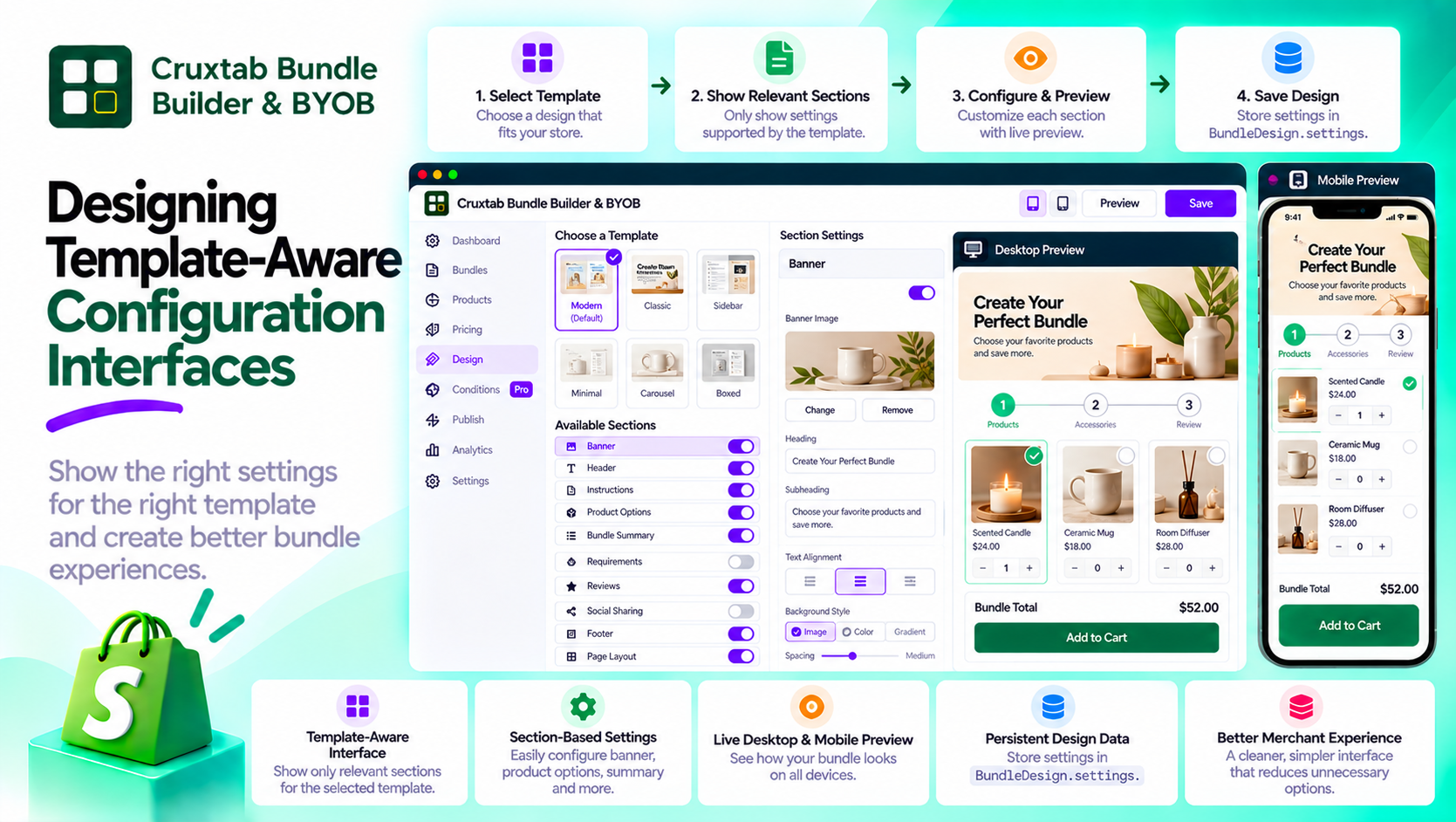
The editor's configuration belongs to the bundle design. In Cruxtab Bundle Builder & BYOB, design settings are stored in BundleDesign.settings.
Keeping the settings associated with the bundle design provides a defined place for configuration to live independently of the editor's visual controls.
Conclusion
Template-aware interfaces reduce unnecessary complexity by showing relevant configuration options at the right time.
Cruxtab Bundle Builder & BYOB includes a full-screen design editor with template-dependent sections and live desktop and mobile previews.
Explore the app: https://apps.shopify.com/cruxtab-bundle-builder
The broader lesson is simple: a configurable interface should expose flexibility without making every user manage every possible option.
Comments
Join the discussionNo comments yet. Be the first to comment.