Designing Safe Multi-Tenant Data Deletion
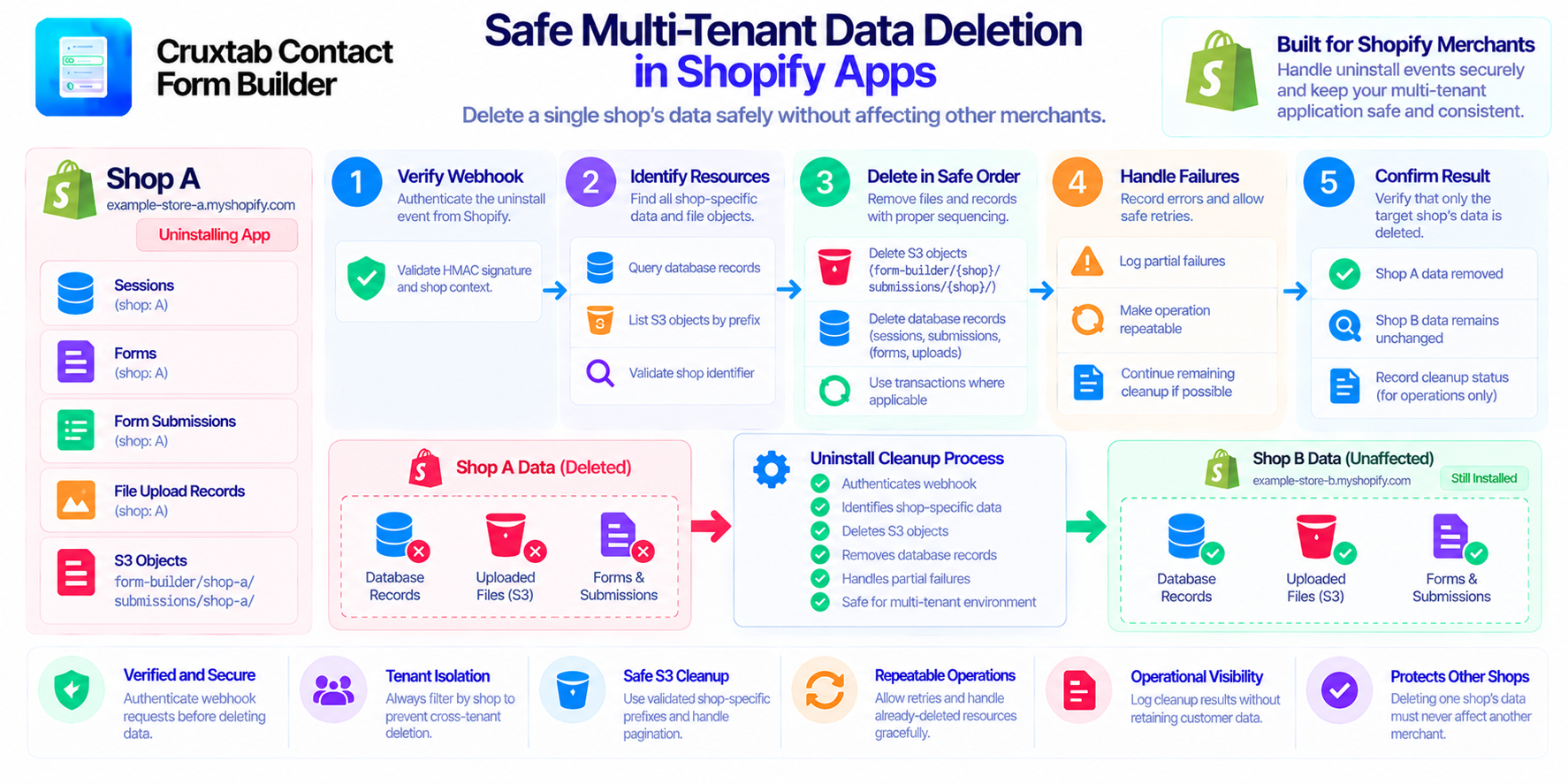
Multi-tenant applications store data for many customers in the same system. This makes resource cleanup particularly important: deleting one shop's data must never remove another shop's records or files.
Shopify apps face this challenge when a merchant uninstalls an app. Sessions, forms, submissions, upload records, and object-storage files may all need to be removed.
Let's examine how to design that deletion process safely.
1. Establish a reliable tenant boundary
Every resource selected for deletion should be associated with the correct shop.
For database records, this usually means applying a shop-specific filter rather than deleting records based on a generic status or resource type alone.
For S3 objects, it means using a validated shop-specific key prefix.
For example, an application may organize uploaded objects under:
form-builder/{shop}/
submissions/{shop}/
These prefixes can make shop-specific cleanup easier, but they are not a replacement for validation. The handler must construct the expected prefixes from a trusted, verified shop context.
2. Authenticate before deleting anything
An uninstall request is destructive because it can trigger permanent deletion.
Before starting cleanup, verify that the webhook came from Shopify using the framework's supported verification process.
Do not trust a shop identifier supplied by an unverified request body or URL parameter.
A verified event establishes the context for the cleanup operation. If verification fails, the application should reject the request without deleting data.
3. Identify every related resource
Deleting only the main form record is rarely enough.
A form application may store several related resource types:
- Sessions used to maintain authenticated app state
- Forms and their configurations
- Form submissions
- File upload metadata
- Actual files in S3
Create an explicit inventory of these resources and their relationships.
This makes it easier to find data that might otherwise be overlooked, such as an upload object that is no longer referenced by a form or a submission attachment whose metadata has become stale.
4. Choose a deliberate deletion order
The deletion order should account for relationships between resources.
For example, the application may first identify the shop's uploads and object keys, then delete external files and associated records according to its recovery strategy.
The exact order depends on whether the system needs database metadata to retry failed S3 deletions.
Avoid deleting the only record of an object key before confirming that the object was removed or that another reliable mechanism exists to locate it later.
5. Make cleanup repeatable
Webhook delivery and application retries can lead to repeated processing attempts.
A cleanup operation should tolerate resources that have already been removed. If a session or form no longer exists, that should not automatically prevent the remaining cleanup from proceeding.
However, distinguish expected "already absent" conditions from real failures such as access-denied responses or incorrectly scoped deletion requests.
Repeatable operations are easier to recover and safer to run during maintenance.
6. Protect against cross-tenant deletion
Add tests that deliberately create data for two shops.
When the uninstall workflow runs for the first shop, verify that its records and objects are removed while the second shop's resources remain unchanged.
Include similar tests for malformed shop identifiers, unexpected S3 keys, and database queries that accidentally omit the tenant filter.
These tests are particularly valuable because cross-tenant deletion can be difficult to detect after the data has been permanently removed.
7. Keep an operational record
Even when the goal is to delete application data, minimal operational records can help diagnose failures.
Where permitted by the app's retention policy, keep non-sensitive job status and error information without retaining the customer data that the cleanup was meant to remove.
Define what operational information can remain after uninstall and make sure it does not contradict the app's deletion commitments.
Conclusion
Safe multi-tenant deletion depends on verified shop context, explicit resource inventories, narrow deletion filters, careful S3 prefix handling, repeatable operations, and cross-tenant tests.
These principles apply to Shopify apps and any SaaS platform that manages customer-owned resources.
For Shopify form-building workflows, explore Cruxtab Contact Form Builder.
Comments
Join the discussionNo comments yet. Be the first to comment.