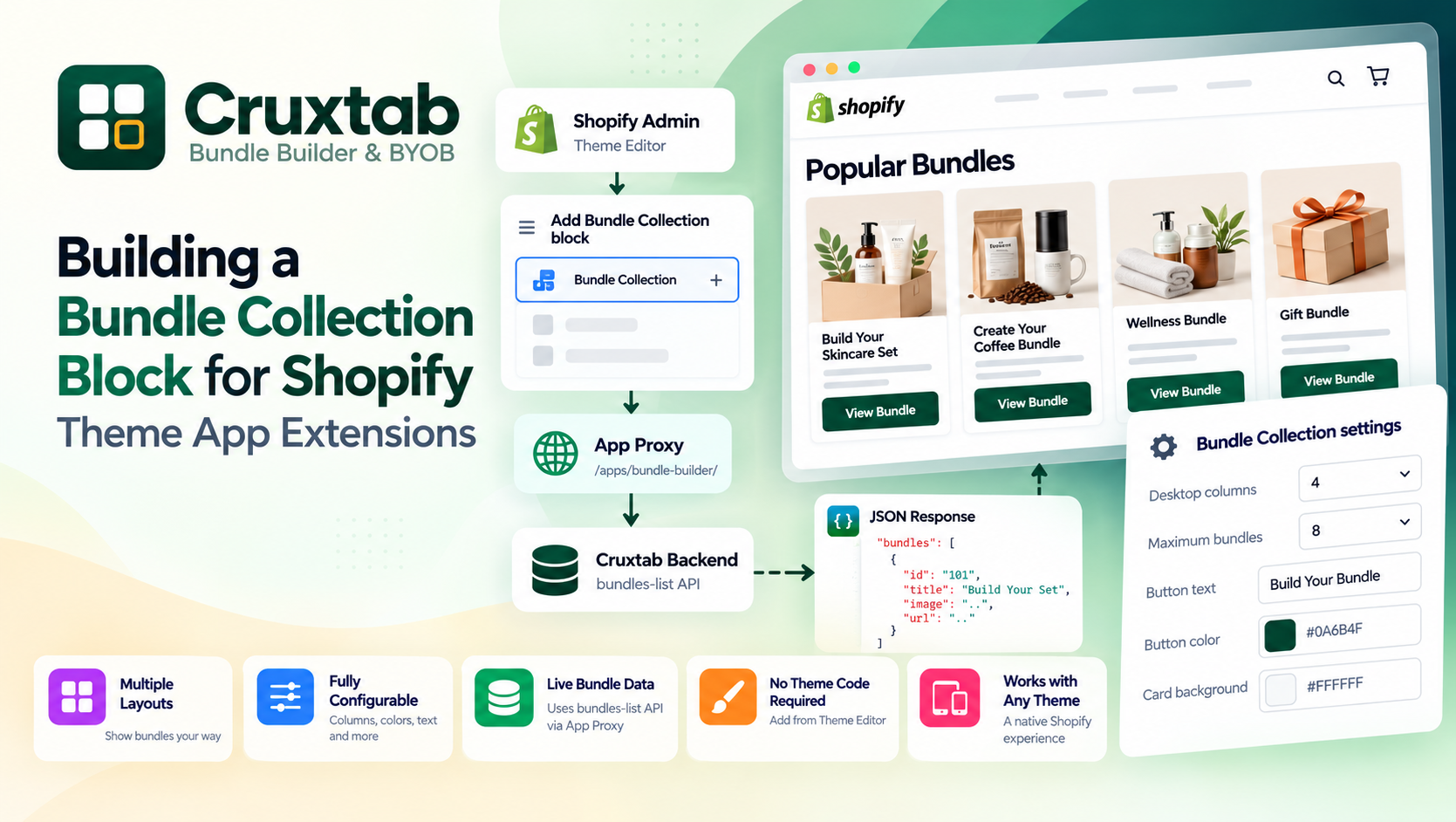
Designing a Storefront API Layer for a Shopify Bundle Builder
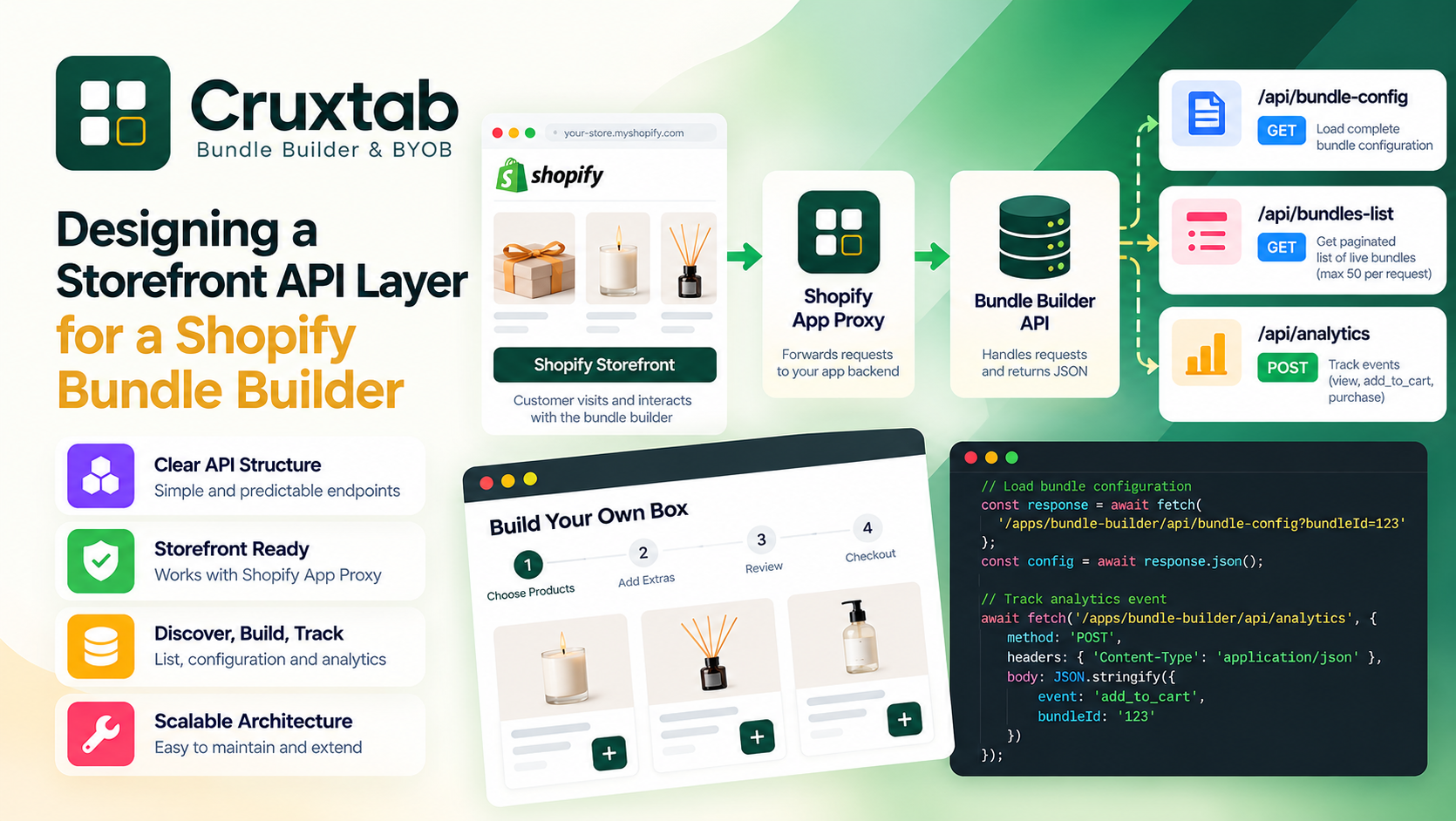
After building the individual APIs for my Shopify Bundle Builder & BYOB app, I started looking at the bigger picture.
At first, the endpoints looked like separate pieces:
/bundle-config
/bundles-list
/analytics
But they are actually solving three parts of the same problem.
The storefront needs to:
Discover available bundles.
Load the configuration for a specific bundle.
Tell the backend what customers are doing.
Once I looked at it that way, the API architecture became much easier to reason about.
In this final article of the series, I want to walk through how I structured the storefront API layer, why I separated the endpoints, and what I would consider improving as the application grows.
The problem I was trying to solve
A bundle builder isn't just a product page with a different Add to Cart button.
The customer can potentially:
Choose products
Choose variants
Move through steps
Apply bundle rules
Change quantities
See pricing
Build a final bundle
Add it to cart
The storefront therefore needs application data, not just Liquid-rendered product information.
I wanted the frontend to communicate with the backend through a small, predictable API layer.
The architecture I ended up with is:
Shopify Storefront
       ↓
App Proxy
       ↓
Bundle Builder API
       ↓
Database
The API layer sits between the storefront and the application's data.
The three core endpoints
The storefront API currently has three main responsibilities.
1. Bundle configuration
GET /apps/bundle-builder/api/bundle-config?bundleId=
This endpoint loads the full configuration for one live bundle.
The response can contain:
Bundle
Steps
Rules
Design
This is the endpoint the bundle builder needs when initializing a specific bundle.
2. Bundle listing
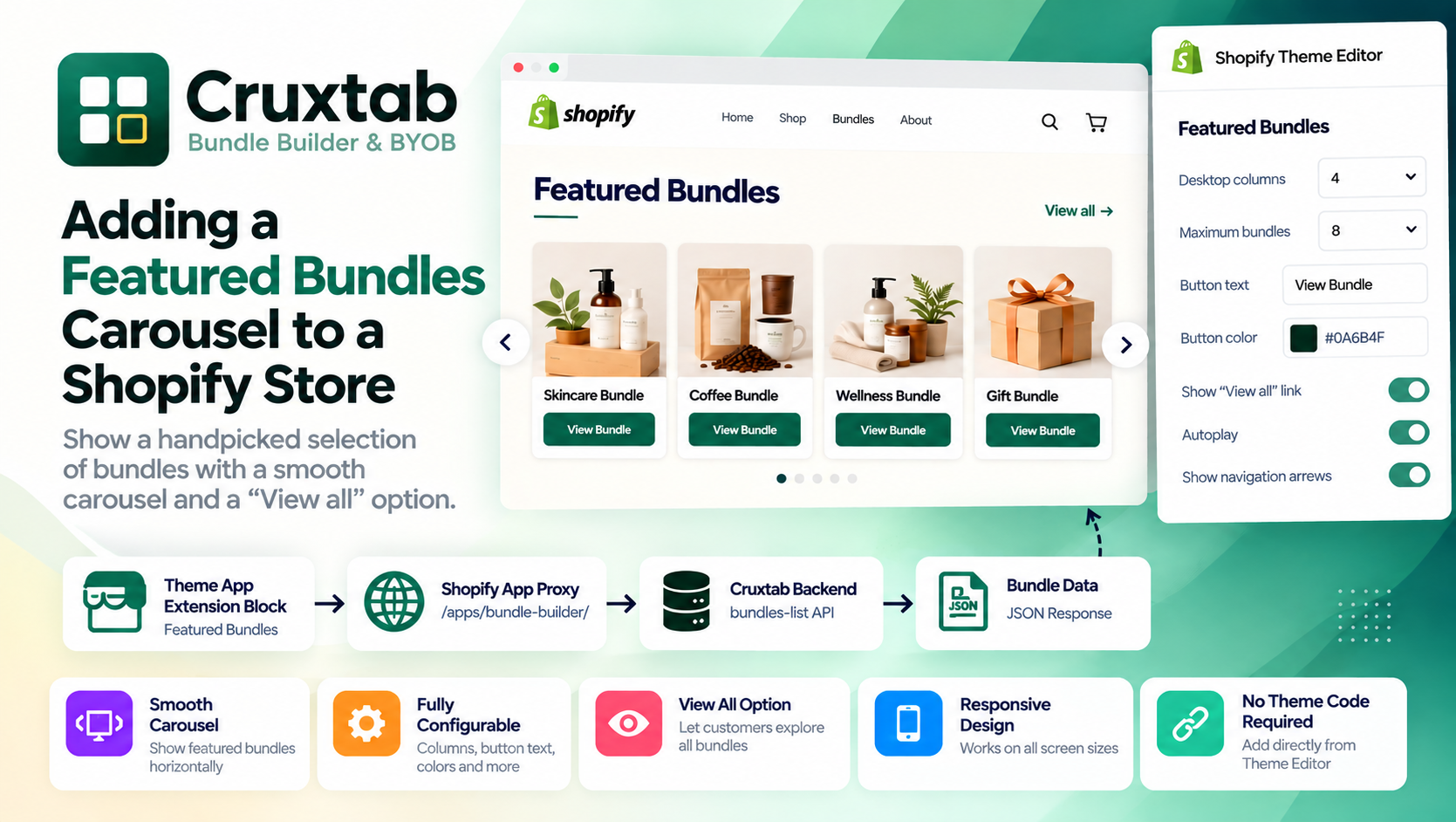
GET /apps/bundle-builder/api/bundles-list?limit=&offset=
This endpoint returns a paginated list of live bundles.
I added pagination because I didn't want the storefront to request every bundle in a single response.
There is also a maximum of 50 bundles per request.
3. Analytics
POST /apps/bundle-builder/api/analytics
This endpoint records storefront events.
The initial events are:
view
add_to_cart
purchase
The data is written to BundleAnalytics.
Together, these three endpoints form the basic storefront API layer.
Why I separated the endpoints
It would have been possible to create one endpoint:
/apps/bundle-builder/api
and make it handle everything.
But I don't think that would make the application easier to maintain.
The operations have different purposes.
bundle-config
    → Read one bundle

bundles-list
    → Read many bundles

analytics
    → Write events
Keeping those responsibilities separate makes the API easier to understand.
If I need to change pagination, I don't need to worry about breaking analytics.
If I add a new analytics event, I don't need to modify bundle configuration logic.
That's a small architectural decision, but it makes a difference as the codebase grows.
The storefront flow
The typical customer journey looks something like this:
Customer opens bundle page
          ↓
Storefront requests bundle configuration
          ↓
Bundle Builder initializes
          ↓
Customer selects products
          ↓
Customer completes bundle
          ↓
Bundle added to cart
          ↓
Analytics event recorded
If the storefront needs to discover available bundles first, the list endpoint fits into the beginning:
Load bundle list
      ↓
Customer selects bundle
      ↓
Load bundle configuration
      ↓
Build bundle
      ↓
Add to cart
      ↓
Record analytics
Each endpoint has one job in this flow.
The API as a contract
One of the biggest benefits of this architecture is that the API becomes a contract between the frontend and backend.
The frontend doesn't need to know how the database is structured.
It doesn't need to know which tables store steps.
It doesn't need to know how rules are represented internally.
It just needs to know:
"Give me this bundle."
"Give me available bundles."
"Record this event."
For example:
const response = await fetch(
  `/apps/bundle-builder/api/bundle-config?bundleId=${bundleId}`
);

const config = await response.json();
The frontend works with the API response instead of reaching into application internals.
Database structure versus API structure
This separation becomes especially useful when the database structure gets complicated.
Internally, the application might store:
Bundle
 ├── Steps
 │    ├── Products
 │    └── Rules
 ├── Design
 └── Settings
But the storefront doesn't necessarily need that exact structure.
The API can transform the data into something that makes more sense for the JavaScript application:
{
  "bundle": {},
  "steps": [],
  "rules": [],
  "design": {}
}
This gives me freedom to change the database implementation later.
As long as the API contract remains stable, the storefront doesn't necessarily need to change.
Keeping the storefront payload under control
One thing I tried to avoid was sending more data than the storefront actually needs.
This is especially relevant for the bundle list endpoint.
If I have 30 bundles, I don't necessarily need the complete configuration of all 30 bundles.
The list endpoint can return lightweight information.
For example:
{
  "bundles": [
    {
      "id": "101",
      "title": "Build Your Own Box"
    }
  ]
}
Then, when the customer selects a specific bundle:
bundleId = 101
       ↓
bundle-config
       ↓
full configuration
This is much more efficient than loading everything up front.
Pagination is part of the architecture
Pagination isn't just an implementation detail of bundles-list.
It also protects the storefront from unnecessarily large responses.
The endpoint accepts:
limit
offset
with a maximum limit of:
50
So even if a client sends:
?limit=5000
the backend can cap it.
This gives the API a predictable maximum response size.
For a bundle catalog, that is a useful boundary.
Rate limiting analytics
The analytics endpoint has a different concern.
It's a write endpoint exposed through the storefront, so I added an in-memory rate limit:
60 requests per minute per IP
The reason is straightforward.
I don't want an accidental frontend loop or abusive client to generate thousands of analytics requests.
The basic flow is:
Analytics request
      ↓
Identify IP
      ↓
Check current request window
      ↓
Count request
      ↓
Under 60?
   ↙       ↘
 Yes       No
  ↓         ↓
Write      429
event
It's intentionally simple.
For the current application, I didn't want to introduce an external rate-limiting service just for this endpoint.
Why in-memory rate limiting has limitations
There is an important trade-off here.
An in-memory rate limiter works well as a lightweight protection mechanism, but it isn't a distributed rate limiter.
If an application is running across several independent instances, each instance can have its own memory.
That means the effective limit isn't necessarily globally shared.
For a larger production environment, I'd consider moving the rate-limit state into a shared system.
For example:
Redis
Distributed cache
Platform-level rate limiting
But I prefer starting with the simplest solution that meets the current requirement.
Treating analytics as non-critical
Another architectural decision was making analytics secondary to the customer experience.
Imagine this:
Customer clicks Add to Cart
        ↓
Bundle added successfully
        ↓
Analytics request fails
The customer should still have a working cart.
I don't want a temporary analytics failure to prevent the actual business operation.
So analytics can be treated as best effort from the storefront.
For example:
trackBundleEvent('add_to_cart', bundleId)
  .catch(error => {
    console.warn(
      'Unable to record analytics event',
      error
    );
  });
The bundle builder remains functional.
Keeping shop data isolated
Because this is a Shopify app, shop isolation is another important part of the architecture.
The same API endpoints can be used by many different Shopify stores.
For example:
Store A
  ↓
App Proxy
  ↓
API
  ↓
Store A data
and:
Store B
  ↓
App Proxy
  ↓
API
  ↓
Store B data
The backend uses the requesting shop context when accessing bundle and analytics data.
That means the frontend doesn't need to pass an arbitrary shop identifier and have the backend blindly trust it.
Why App Proxy fits the architecture
Shopify App Proxy gives the storefront a Shopify-facing URL while forwarding the request to the application.
That creates a useful boundary:
Customer-facing URL
        ↓
Shopify
        ↓
App Proxy
        ↓
Application API
The storefront JavaScript can use paths such as:
/apps/bundle-builder/api/bundle-config
/apps/bundle-builder/api/bundles-list
/apps/bundle-builder/api/analytics
while the application keeps the actual business logic on the backend.
For this type of Shopify app, that separation makes the overall system much cleaner.
The three backend files
I also kept the route implementations separate:
api.bundle-config.jsx
api.bundles-list.jsx
api.analytics.jsx
Each file maps to one responsibility.
api.bundle-config.jsx
Responsible for:
Reading bundle ID
Finding the bundle
Checking availability
Returning configuration
api.bundles-list.jsx
Responsible for:
Reading pagination parameters
Finding live bundles
Applying limit/offset
Returning bundle summaries
api.analytics.jsx
Responsible for:
Reading event data
Validating event type
Checking rate limit
Writing BundleAnalytics
This structure makes the codebase easier to navigate.
What happens when something goes wrong?
I also wanted the API to return useful HTTP responses instead of making every failure look the same.
For example:
400
Invalid request

404
Bundle not found

429
Rate limit exceeded

500
Unexpected server error
The frontend can then react appropriately.
For example:
if (response.status === 404) {
  showBundleUnavailable();
}
or:
if (response.status === 429) {
  // Handle rate limiting
}
Good error boundaries make frontend debugging much easier.
Keeping the API simple
One thing I kept reminding myself while building this was:
Don't turn a small storefront API into a giant framework.
The current requirements are fairly focused.
I need to:
Load a bundle
List bundles
Record events
That's it.
There is always a temptation to build abstractions for every possible future requirement.
But that can make the code harder to understand before those requirements even exist.
I'd rather have three simple routes with clear responsibilities than one over-engineered API system.
What I would improve later
The current architecture gives me a good foundation, but there are several things I would consider as the app grows.
Cursor-based pagination
The current bundle list uses:
limit + offset
For larger datasets, cursor-based pagination could be worth considering.
Distributed rate limiting
The analytics endpoint currently uses in-memory rate limiting.
A shared rate limiter would make more sense across multiple application instances.
More analytics events
Depending on what merchants need, I could eventually add events such as:
bundle_started
step_view
bundle_completed
discount_applied
But I'd only add them when they answer a real reporting question.
Response caching
Some bundle configuration data may be suitable for caching depending on how frequently merchants update it.
That could reduce repeated backend work for popular bundles.
API versioning
If the response structure changes significantly in the future, versioning could help prevent older storefront code from breaking.
For example:
/api/v1/...
/api/v2/...
I don't need that complexity yet, but it's something I'd keep in mind.
The architecture in one diagram
After putting everything together, the architecture looks like this:
                 Shopify Storefront
                         │
                         ▼
                Bundle Builder JS
                         │
                         ▼
                Shopify App Proxy
                         │
             ┌───────────┼───────────┐
             │           │           │
             ▼           ▼           ▼
       bundle-config  bundles-list  analytics
             │           │           │
             │           │           ▼
             │           │     BundleAnalytics
             │           │
             └─────┬─────┘
                   ▼
              Bundle Data
                   │
                   ▼
                Database
The important part isn't the number of boxes.
It's the separation of responsibilities.
What I learned from building this
The biggest lesson for me was that a good API isn't necessarily a large API.
The three endpoints cover a surprisingly large part of the storefront requirements because each one has a very clear job.
bundle-config
"Give me this bundle."

bundles-list
"Show me available bundles."

analytics
"Record what happened."
That simplicity makes the frontend easier to work with.
It also gives the backend room to evolve without forcing the storefront to understand how everything works internally.
Final thoughts
Building the Bundle Builder made me think more about the boundary between Shopify's storefront and an app's backend.
Liquid is great for server-rendered storefront content.
JavaScript is useful for interactive bundle-building behavior.
And an API provides the connection between the two.
For my implementation, Shopify App Proxy became that connection point.
The final result is a relatively small storefront API layer:
/apps/bundle-builder/api/bundle-config
/apps/bundle-builder/api/bundles-list
/apps/bundle-builder/api/analytics
Each endpoint solves a specific problem, and together they give the bundle builder everything it needs to discover bundles, load configuration, and record customer interactions.
There is definitely room to evolve the architecture as the application grows, especially around distributed rate limiting, caching, pagination, and analytics.
But for the current version, keeping the system small and predictable has been one of the better decisions I've made while building the app.
And that's probably the main takeaway from this whole API layer:
Start with clear boundaries, give each endpoint one responsibility, and add complexity only when the product actually needs it.