Designing a Clear Navigation Flow for Bundle Creation
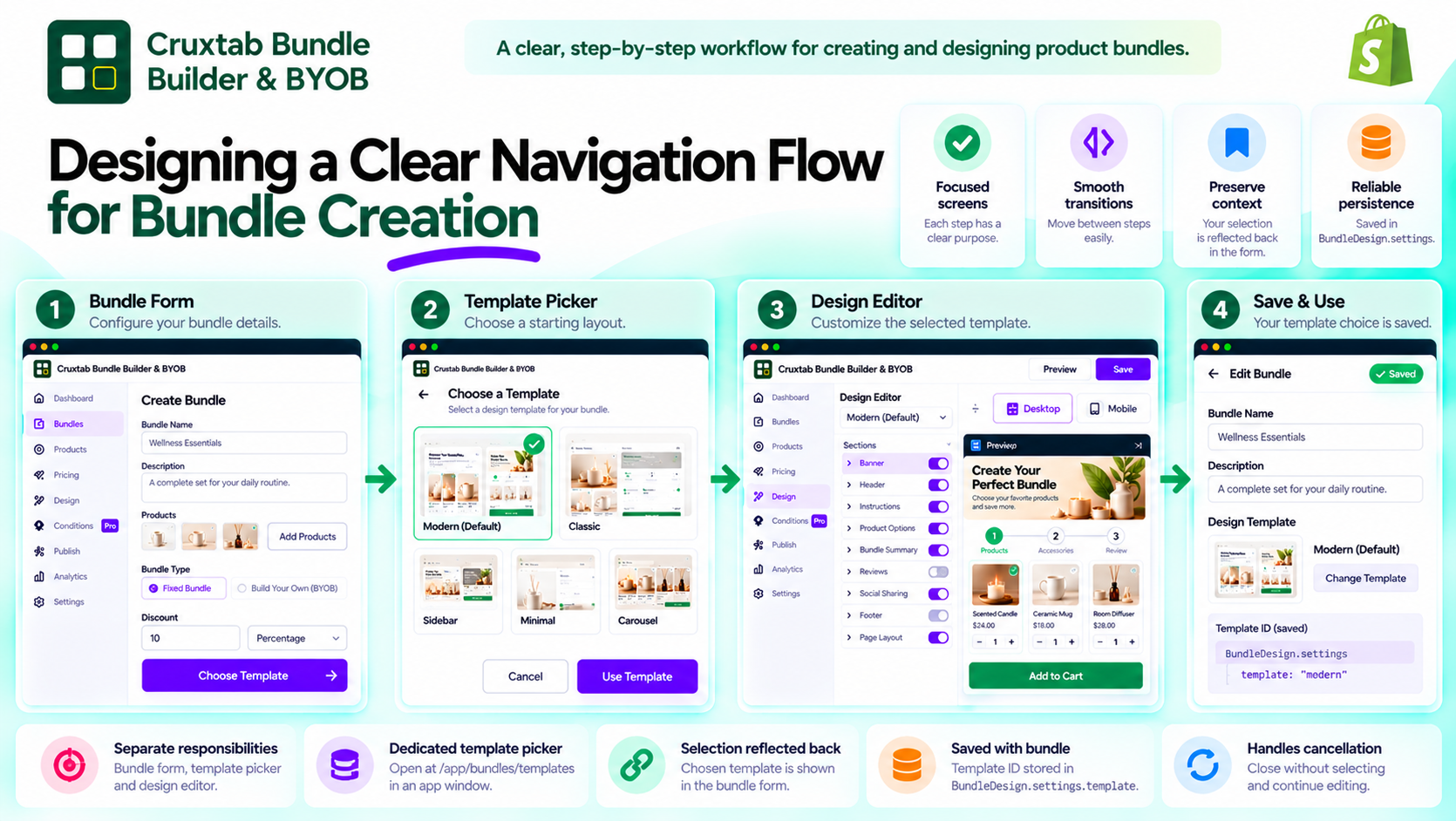
A good configuration experience depends on more than the controls available on each screen. It also depends on how users move between those screens.
In a Shopify bundle builder, merchants may need to configure bundle details, choose a template, customize the design, and save their work. If the transitions between these tasks are unclear, even a capable editor can feel complicated.
Make each screen serve a specific purpose
A focused workflow separates related but distinct tasks.
For example:
- The bundle form handles the bundle's main configuration.
- The template picker lets the merchant choose a starting layout.
- The design editor provides detailed visual customization.
Each screen has a clear responsibility, reducing the need to place every possible option into one crowded interface.
Use navigation that matches the task
Cruxtab Bundle Builder & BYOB opens its template picker at:
/app/bundles/templates
The picker is opened in an app window from the bundle form. This provides a dedicated place to select a template without mixing the selection interface with all the bundle's other settings.
The design editor is a separate part of the broader workflow, allowing merchants to customize the selected design.
Preserve the user's context
Whenever a user moves from a main form into a secondary selection window, the application should consider how the user returns to the original task.
Important questions include:
- Can the merchant recognize the selected template?
- Is the selection reflected in the relevant form state?
- What happens if the picker is closed without choosing a template?
- Can the merchant continue editing without losing unrelated changes?
Thinking through these cases makes navigation more predictable.
Distinguish selecting from saving
Choosing a template does not necessarily mean the entire bundle has been saved.
In this implementation, the selected template ID is saved into BundleDesign.settings.template when the bundle is saved.
Making that distinction clear prevents merchants from assuming that every selection immediately persists all their work.
Test the workflow end to end
Navigation should be tested as a complete journey, not only as isolated pages.
A useful test starts from the bundle form, opens the template picker, selects an option, returns to the editing workflow, saves the bundle, and verifies that the selection persists.
Additional tests should cover cancellation and reopening an existing bundle.
Conclusion
Clear navigation helps turn a collection of configuration screens into a coherent workflow.
Cruxtab Bundle Builder & BYOB separates template selection from detailed design customization, allowing merchants to choose from five templates before continuing with their bundle setup.
Explore the app: https://apps.shopify.com/cruxtab-bundle-builder
When designing multi-screen workflows, each transition should help users understand where they are, what they are changing, and what will happen next.
Comments
Join the discussionNo comments yet. Be the first to comment.