Deep Linking into the Shopify Theme Editor
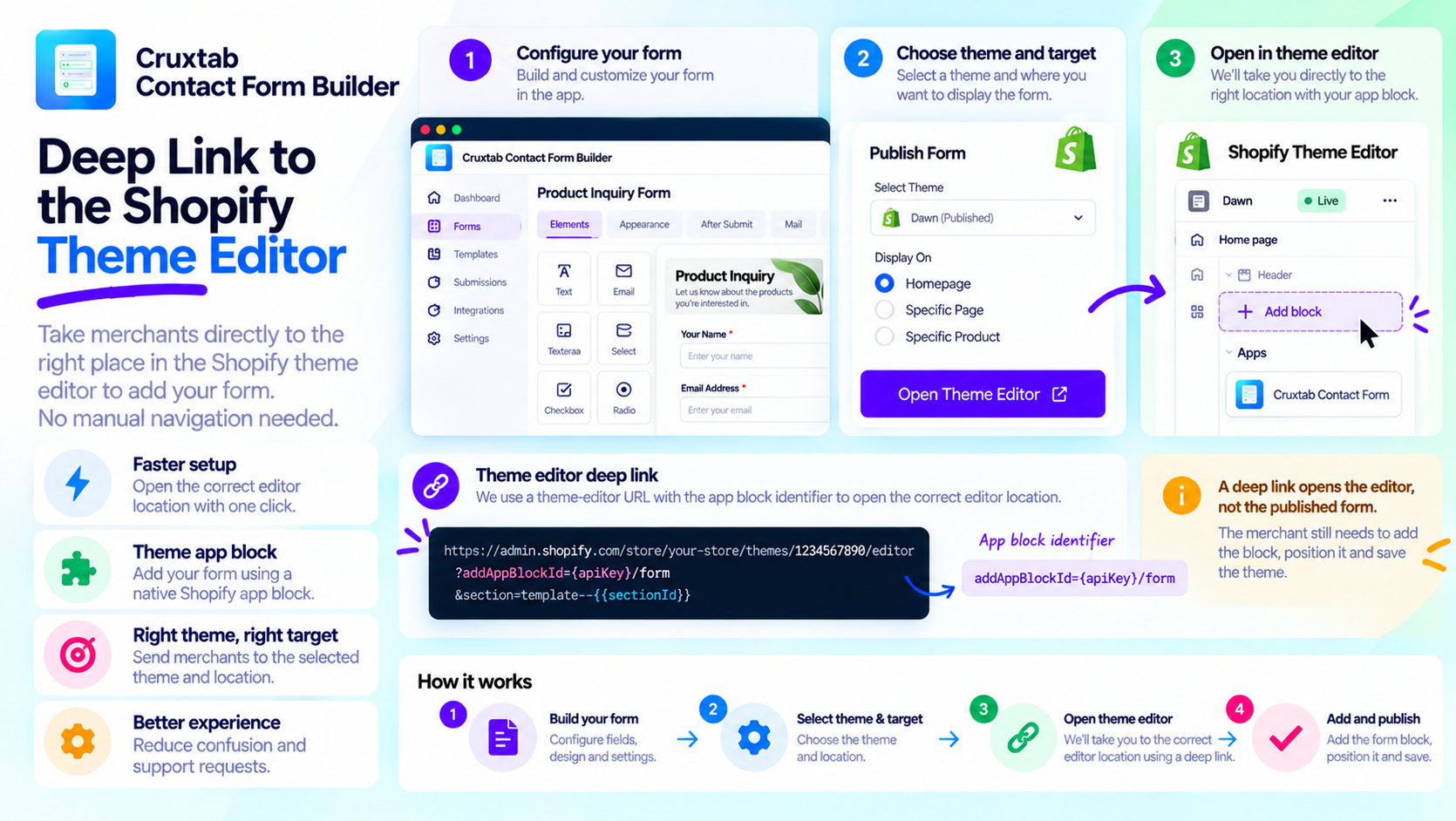
A merchant may finish configuring a form inside an embedded Shopify app and then need to open the theme editor to add that form to the storefront.
Making merchants navigate through several menus to find the correct theme and app block creates unnecessary friction.
Deep linking can simplify this transition by directing users to a relevant editor location.
What is a deep link?
A deep link is a URL designed to open a particular destination or workflow rather than a site's generic starting page.
In an embedded Shopify app, a publishing flow can use a theme-editor deep link to help the merchant reach the relevant theme and app block configuration.
The goal is to reduce navigation effort while leaving the merchant in control of the final storefront changes.
Connect the app to a theme app block
A theme app block provides a structured integration point between a Shopify app and a compatible theme.
Instead of asking merchants to copy snippets into theme files, the application can guide them through the theme editor to add the block.
Cruxtab Contact Form Builder uses a deep-link parameter in this form:
addAppBlockId={apiKey}/form
This illustrates the app-block identifier format used in its publishing workflow. The complete destination URL also needs the appropriate theme-editor context and target information.
Treat URL construction carefully
Deep-link parameters may contain identifiers and values that require encoding.
Developers should construct URLs using a URL-building API rather than concatenating arbitrary strings. This helps avoid malformed links when identifiers or query values contain special characters.
They should also ensure that the destination points to the intended Shopify theme-editor workflow.
A deep link is not the same as publication
Opening the theme editor does not necessarily mean the form is already visible on the storefront.
The merchant may still need to add the block, position it, and save the theme.
This distinction matters for status messages. An application should not report a form as successfully published solely because it opened a theme-editor URL.
The application should define what its saved publication state represents and how it is updated after the merchant completes the theme-editor steps.
Handle navigation failures gracefully
A robust publishing flow should account for missing themes, unavailable targets, and unexpected navigation failures.
The merchant should retain enough context to return to the app and continue configuring the form without having to repeat every step.
Conclusion
Deep links can make embedded-app workflows smoother by connecting a configuration screen to the relevant Shopify editor experience.
Cruxtab Contact Form Builder uses a theme-editor deep link as part of its form-publication workflow, after the merchant chooses a theme and target.
Explore the app: https://apps.shopify.com/cruxtab-form-builder
The key lesson is that deep linking should reduce navigation friction while preserving a clear distinction between opening an editor and completing a publication.
Comments
Join the discussionNo comments yet. Be the first to comment.