Building Repeatable Form Sections for Shopify Forms
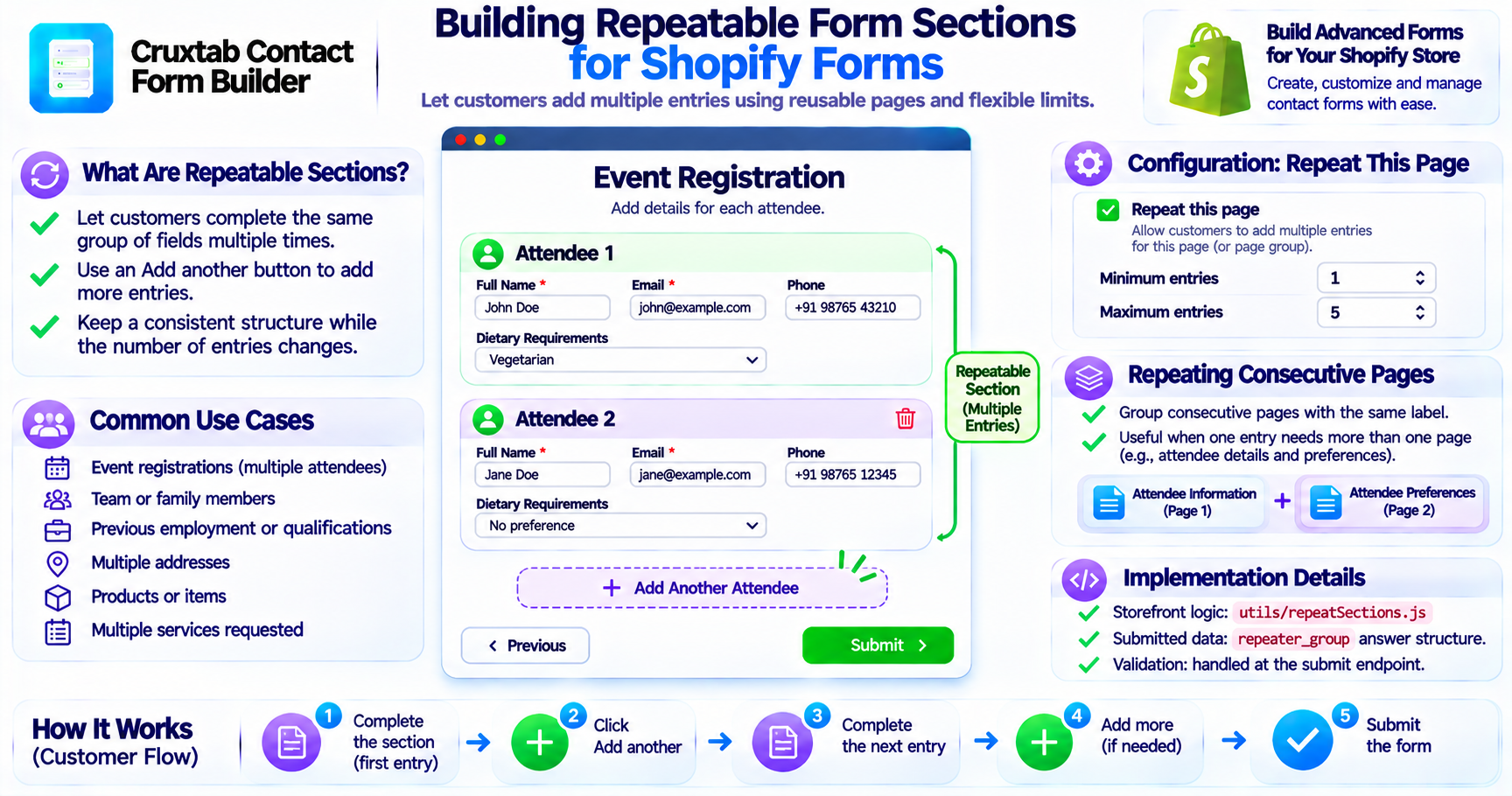
Some forms need to collect the same information multiple times.
For example, an event registration form may need information for multiple attendees. A booking form may need multiple participants. An application may need repeated entries for previous employment or qualifications.
Instead of creating a fixed number of fields, a repeatable section allows customers to add entries as needed.
Cruxtab Contact Form Builder supports repeatable sections through its Repeat Sections feature.
What are repeatable sections?
A repeatable section allows a customer to complete the same group of fields multiple times.
For example, an attendee registration form might contain:
- Attendee name
- Email address
- Phone number
- Dietary requirements
The customer can complete this section for the first attendee and then add another entry for the next attendee.
The form structure remains consistent while the number of entries changes.
The customer experience
A repeatable section can provide an Add another button.
The customer can use it to create another instance of the same section.
A simplified workflow looks like this:
Complete first section
        |
        v
     Add another
        |
        v
Complete second section
        |
        v
     Add another
        |
        v
Complete third section
        |
        v
      Submit
This makes it easier to collect structured information about multiple people or items without requiring merchants to create duplicate fields manually.
Configuring a repeatable page
The feature is triggered through the page setting:
Repeat this page
When enabled, the page can be filled multiple times.
The configuration supports minimum and maximum entry counts.
These limits define how many instances the customer must provide and how many they are allowed to add.
Repeating consecutive pages
The feature also supports a run of consecutive pages with the same label.
This is useful when a repeated entry requires more than one page.
For example, an attendee section might contain:
Attendee Information
- Name
Attendee Preferences
- Meal selection
- Accessibility requirements
When these consecutive pages share the same label, they can be treated as part of the same repeated section.
This allows the repeated entry to contain a multi-page structure rather than a single page.
How the implementation is organized
The feature uses:
utils/repeatSections.js
The storefront JavaScript handles the repeat-section interaction, while the submit endpoint validates the submitted data.
The implementation also uses a repeater_group answer structure to represent the repeated entries.
Why repeatable sections are useful
Repeatable sections help merchants build forms for:
- Multiple attendees
- Family members
- Team members
- Products or items
- Previous employment
- Multiple addresses
- Multiple services requested
The main benefit is that merchants can define one reusable section instead of creating a large fixed form.
Conclusion
Repeatable sections make Shopify forms more flexible by allowing customers to enter multiple instances of the same structured information.
Cruxtab Contact Form Builder supports repeating pages, consecutive pages grouped by label, minimum and maximum entry counts, and an Add another interaction.
Explore Cruxtab Contact Form Builder.
Comments
Join the discussionNo comments yet. Be the first to comment.