Building Plan-Based Storage Limits for SaaS Applications
Allowing customers to upload images creates a recurring infrastructure cost. Files consume storage, require validation, and may increase bandwidth usage when delivered to users.
For a subscription-based application, plan-based storage limits help define how much each customer can use.
But enforcing these limits correctly requires more than displaying a quota in the interface.
Two different limits
An upload system may enforce two separate constraints:
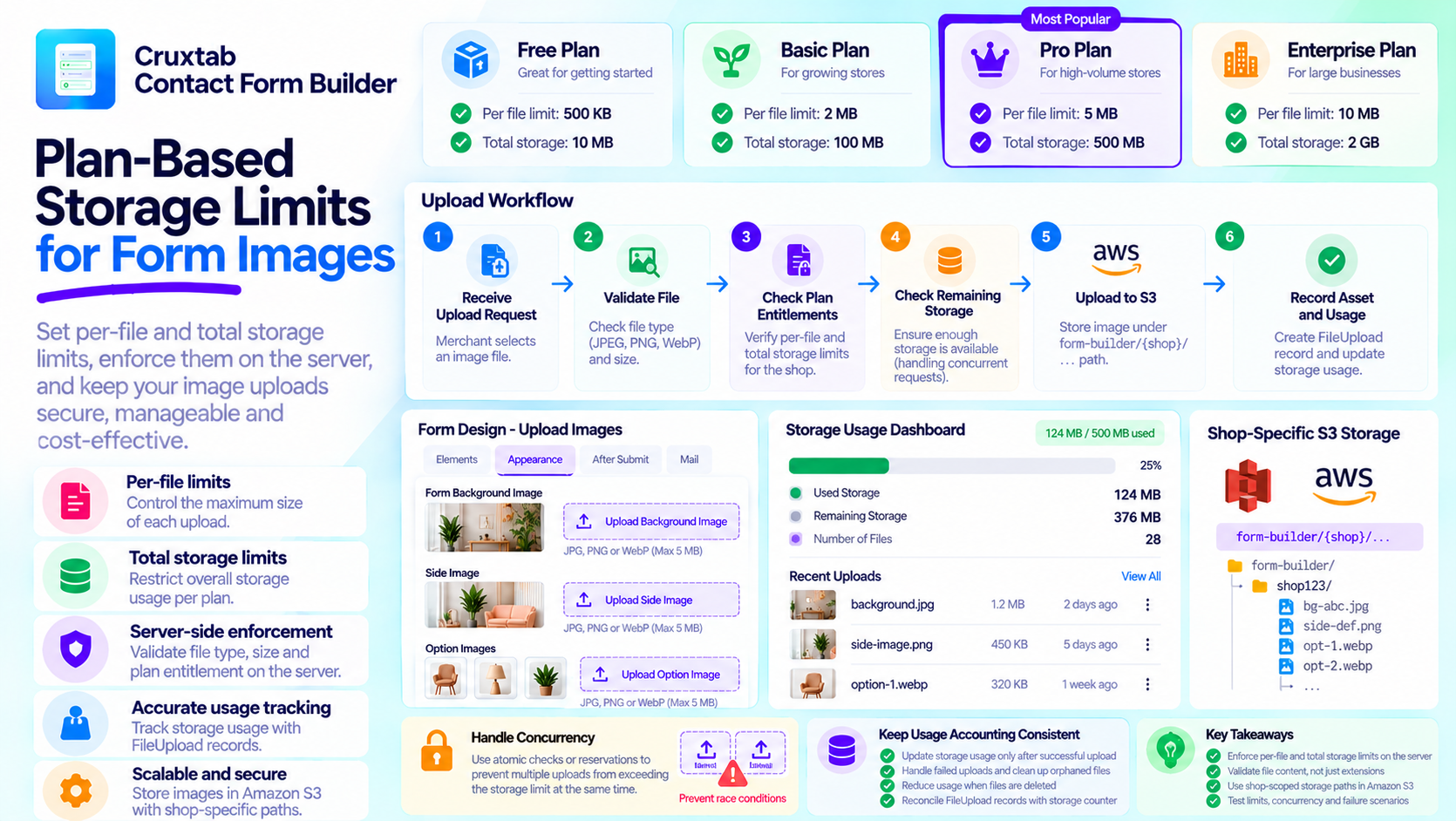
Per-file limit: The maximum size of an individual upload.
Total storage limit: The maximum storage usage allowed for the account or shop.
These constraints solve different problems. A file may be smaller than the per-file limit but still exceed the shop's remaining storage allowance.
Both checks should be enforced on the server.
Check limits before accepting the upload
A simplified workflow is:
Receive Upload Request
        |
        v
Validate File Type and Size
        |
        v
Check Plan Entitlements
        |
        v
Check Remaining Storage
        |
        v
Upload to S3
        |
        v
Record Asset and Usage
This is a conceptual workflow. The precise order of validation and storage operations depends on the upload implementation.
The important principle is that the application should reject disallowed uploads before committing unnecessary storage or processing resources.
Account for concurrency
Consider a shop with only 1 MB of storage remaining. Two upload requests arrive at almost the same time, each requesting 800 KB.
If both requests read the same remaining quota before either upload is recorded, both might be accepted, exceeding the limit.
This is a race condition.
Applications that require strict quota enforcement need a concurrency-safe reservation or accounting strategy. A simple check followed by an independent update may not be sufficient under concurrent requests.
Keep usage accounting consistent
Cruxtab Contact Form Builder uses FileUpload records and a legacy storage counter as part of its upload and storage-accounting workflow.
When multiple accounting mechanisms exist, developers should understand which one is authoritative and how discrepancies are detected or reconciled.
Deletion, failed uploads, and abandoned assets also affect usage. A reliable system should define when storage is counted and when it is released.
Test plan boundaries
Useful test scenarios include files exactly at the size limit, files just above it, shops at their storage limit, concurrent uploads, failed S3 operations, and deletion of previously uploaded files.
Tests should also cover changes in subscription entitlements and verify that the server enforces the correct plan restrictions.
Conclusion
Plan-based storage limits protect application resources while making subscription entitlements meaningful.
Cruxtab Contact Form Builder applies plan-based restrictions to individual file sizes and total storage usage for form design images.
The broader lesson is that quotas are a data-integrity problem as much as a billing feature. Enforce them on the server, account for concurrent requests, and keep usage records consistent.
Comments
Join the discussionNo comments yet. Be the first to comment.